
- articles
How to Use Terapeak: eBay Product Research Guide (2026)

Quick Answer: Terapeak is now called Product Research on eBay, so Terapeak Product Research and Product Research are the same tool. To use it, sign in to eBay Seller Hub, open the Research tab, and select Product Research. The tool is free for sellers with access to Seller Hub and provides up to three years of eBay sales data for product, pricing, demand, and competition research.
Key Takeaways
- Terapeak Product Research now appears in eBay as Product Research.
- On desktop, the current path is Seller Hub → Research → Product Research. Product Research is also available through the eBay mobile app for eligible sellers.
- Product Research offers preset research periods from 7 days to 3 years, plus a custom date range within the available history.
- The Sold and Active views show different market data. Sell-through rate is available only for searches covering items sold within the last 90 days.
- Sourcing Insights is a separate research tool included for qualifying business sellers with a Basic Store subscription or higher.
- A useful product decision should combine demand, price, competition, shipping, and the quality of the matching listings. One metric rarely tells the whole story.
If you are searching for how to use Terapeak for eBay, the first thing to understand is the name change. eBay now calls the core tool Product Research. Older tutorials, seller forums, and search results still use Terapeak, so both names refer to the same research workflow in many contexts.
That makes Terapeak useful well beyond simply finding “hot products.” Sellers can use the data to check whether an item has real sales history, compare realistic sold prices, spot seasonal demand, study competing listings, and make better listing decisions. If you are still deciding what to sell, Easync also has guides to best-selling items on eBay, what to sell on eBay, and broader product research tools.
Terapeak eBay: What Is It in 2026?
Terapeak began as an ecommerce analytics company. eBay acquired it in 2017 and said it would integrate Terapeak functionality into Seller Hub. The official eBay acquisition announcement described Terapeak as a service built around supply, demand, and pricing data.
Today, the main Terapeak feature is presented as Product Research. eBay describes it as a research tool that helps sellers understand what to sell, when to sell it, and at what price by using marketplace data from eBay transactions.
Legacy searches such as terapeak ebay, ebay terapeak, and ebay research terapeak usually point to the same eBay research tool.
You may also see the name spelled as terrapeak, tearpeak, tarapeak, terepeak, or tera peak. All of these refer to the same eBay research tool, not a separate service.
How to Find Best-Selling Items on eBay With Terapeak
One of the most practical uses of Terapeak is finding out whether a product that looks popular is actually selling on eBay. Instead of judging an item by active listings alone, use Product Research to compare completed sales, price levels, demand, competition, and longer-term trends.
| What to check | What it tells you | How to use it |
|---|---|---|
| Sold activity and total sold by listing | Whether buyers are actually purchasing the product | Compare close product matches and look for consistent sales rather than a few isolated transactions |
| Sell-through rate | How sales compare with available inventory for eligible searches | Use it as a demand signal, then compare it with competition and pricing |
| Average sold price | The typical price buyers have paid | Estimate a realistic selling-price range before sourcing or listing the item |
| Sold price range | How much prices vary between comparable sales | Investigate differences in condition, model, bundle size, or included accessories |
| Seller count | How many sellers have successfully sold the item | Gauge how crowded the market is and whether demand is spread across many sellers |
| Sales trend | Whether demand is stable, seasonal, rising, or fading | Review a longer date range before committing to inventory |
| Shipping data | What buyers commonly pay for delivery and how often free shipping is offered | Compare total delivered cost, not just the item price |
A product does not become a strong opportunity simply because one metric looks good. The most useful Terapeak product research combines evidence that buyers are purchasing the item with a realistic sold price, manageable competition, and costs that still leave room for profit.
This is also why Product Research is more useful than browsing a list of trending products by itself. A broad list can give you ideas, but Terapeak lets you validate whether those ideas match real eBay sales data before you source inventory.
Where Is Seller Hub on eBay?
Terapeak Product Research lives inside eBay Seller Hub, eBay’s central dashboard for managing a selling business. The Seller Hub help page describes Seller Hub as the central place to manage selling activity.
If you are looking for the eBay Seller Hub login, you do not create a separate Seller Hub account. Sign in with your normal eBay username and password. Sellers who are not already opted in may need to meet eBay’s Seller Hub eligibility requirements before they can use the desktop research tools.
The eBay Seller Hub Overview page summarizes current selling activity. Product Research itself is under the Research tab, not the Overview page.
For anyone asking where is Seller Hub on eBay or looking for seller hub on eBay, the current desktop path to Terapeak is:
Seller Hub → Research → Product Research
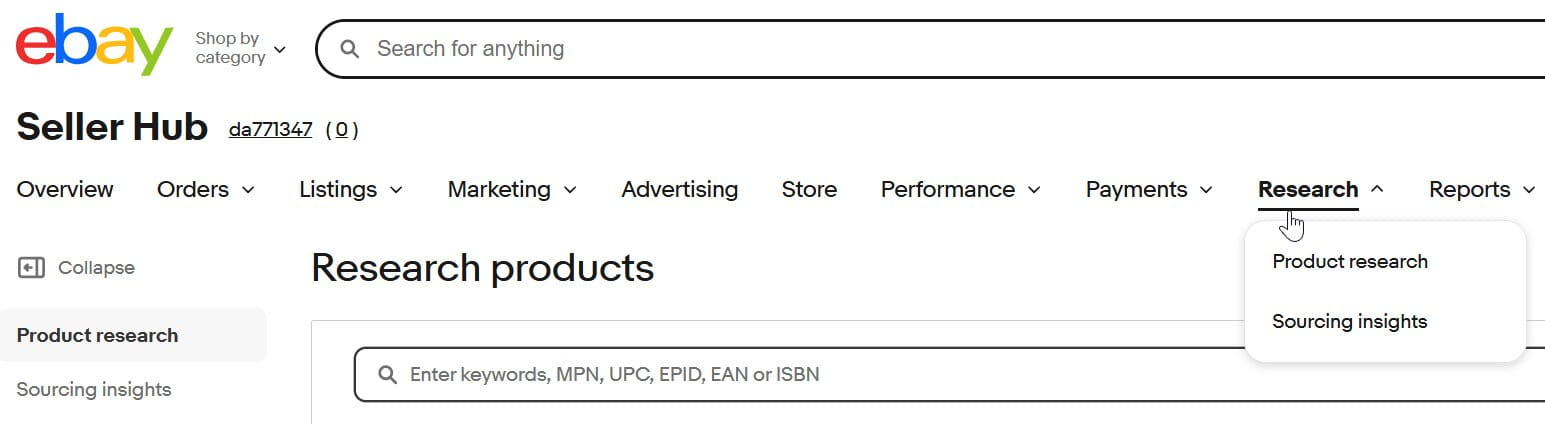
After the eBay Seller Hub sign in, Product Research appears under Research for sellers with access to Seller Hub. eBay also provides Product Research in its mobile apps. eBay’s Product Research update says mobile users should open the Selling tab and scroll to the Product Research section; mobile eligibility and available features differ from desktop.
If you are coming from My eBay Seller Hub searches, remember that My eBay and Seller Hub are related parts of the same account, but Seller Hub is the dedicated selling dashboard. You use the same eBay credentials for both.
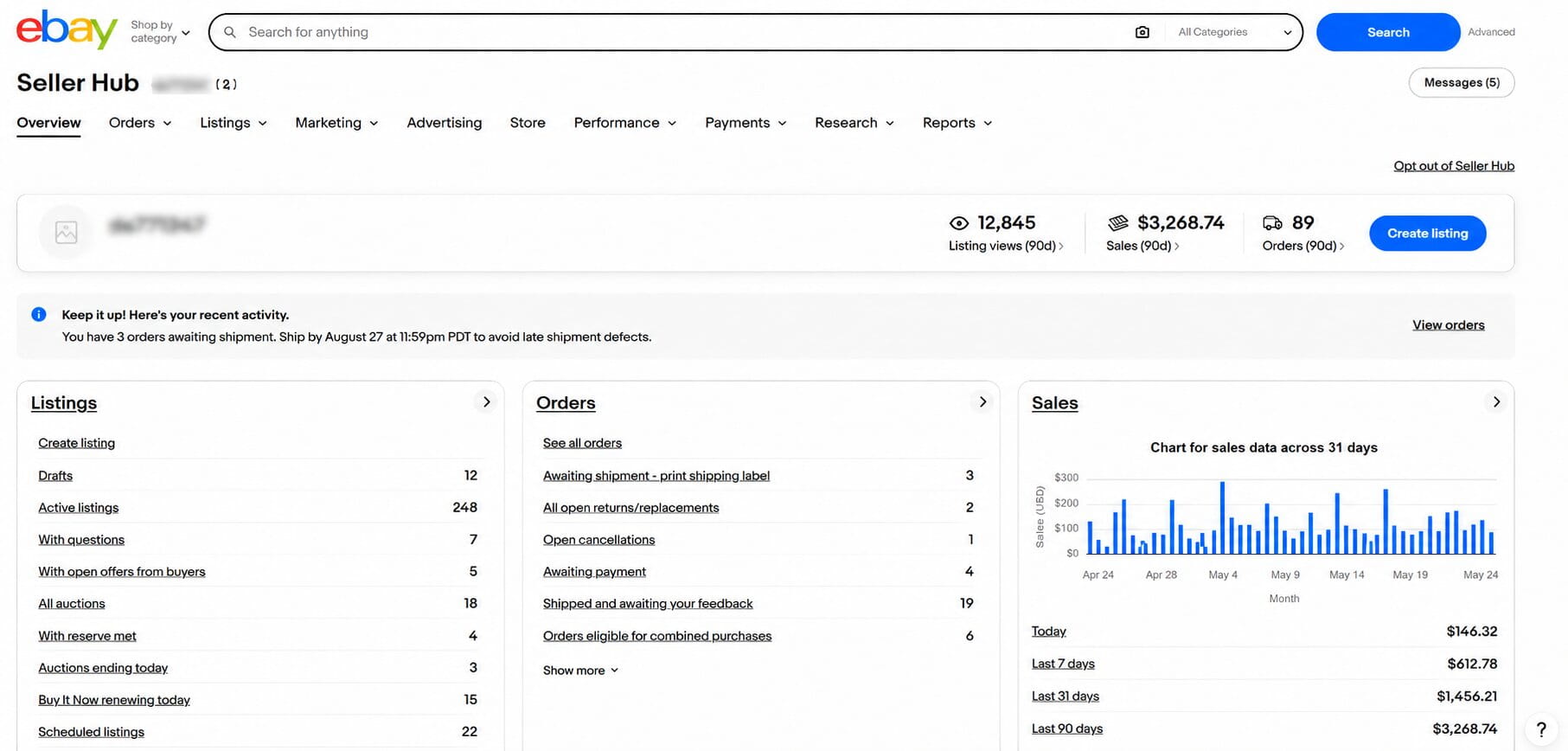
Newer sellers may also want to review how eBay selling limits work before building a large catalog.
Using Terapeak on eBay UK and Australia
Terapeak is not limited to eBay.com. Sellers on eBay UK and eBay Australia open it the same way: sign in to Seller Hub on the local site, go to Research, and choose Product Research. The tool works with the same kind of eBay sales history, with up to three years of data.
The local help pages describe access slightly differently. On eBay UK, Product Research sits in Seller Hub, and Sourcing Insights is included at no extra cost for business sellers with an eBay Shop subscription (eBay UK calls Stores “Shops”). eBay Australia’s help page describes Product Research as available to Pro sellers through the Seller Hub Research tab and the eBay app.
You can also research these markets from another eBay site. The Listing Site selector on the Product Research start screen switches the data to a different eBay marketplace, so a U.S. seller can check demand on eBay UK or eBay Australia before expanding, and a UK seller can compare prices on eBay.com. Keep in mind that the Store fees in the next section are U.S. rates; UK and Australian subscriptions are priced separately.
Terapeak Price: Is Product Research Free?
For most sellers, the Terapeak price is straightforward: Product Research itself is available to sellers with access to Seller Hub without requiring a paid Store subscription.
Sourcing Insights is different. eBay’s Product Research documentation says Sourcing Insights is included at no extra cost for qualifying business sellers with a Basic Store subscription or above. The Store subscription itself is paid.
As of August 2026, eBay’s Store fee page lists these standard U.S. subscription rates. For both renewal options, eBay charges the subscription fee monthly.
| Store | Yearly renewal rate, charged monthly | Monthly renewal |
|---|---|---|
| Starter | $4.95/month | $7.95/month |
| Basic | $21.95/month | $27.95/month |
| Premium | $59.95/month | $74.95/month |
| Anchor | $299.95/month | $349.95/month |
| Enterprise | $2,999.95/month | Not currently available |
You do not need to buy a Store subscription just to use Product Research. If you are comparing margins after research, Easync’s eBay fee calculator can help you estimate marketplace costs separately from the research data.
What Data Does Terapeak Product Research Show?
eBay’s Product Research documentation says the tool provides access to the last three years of eBay sales data for millions of items.
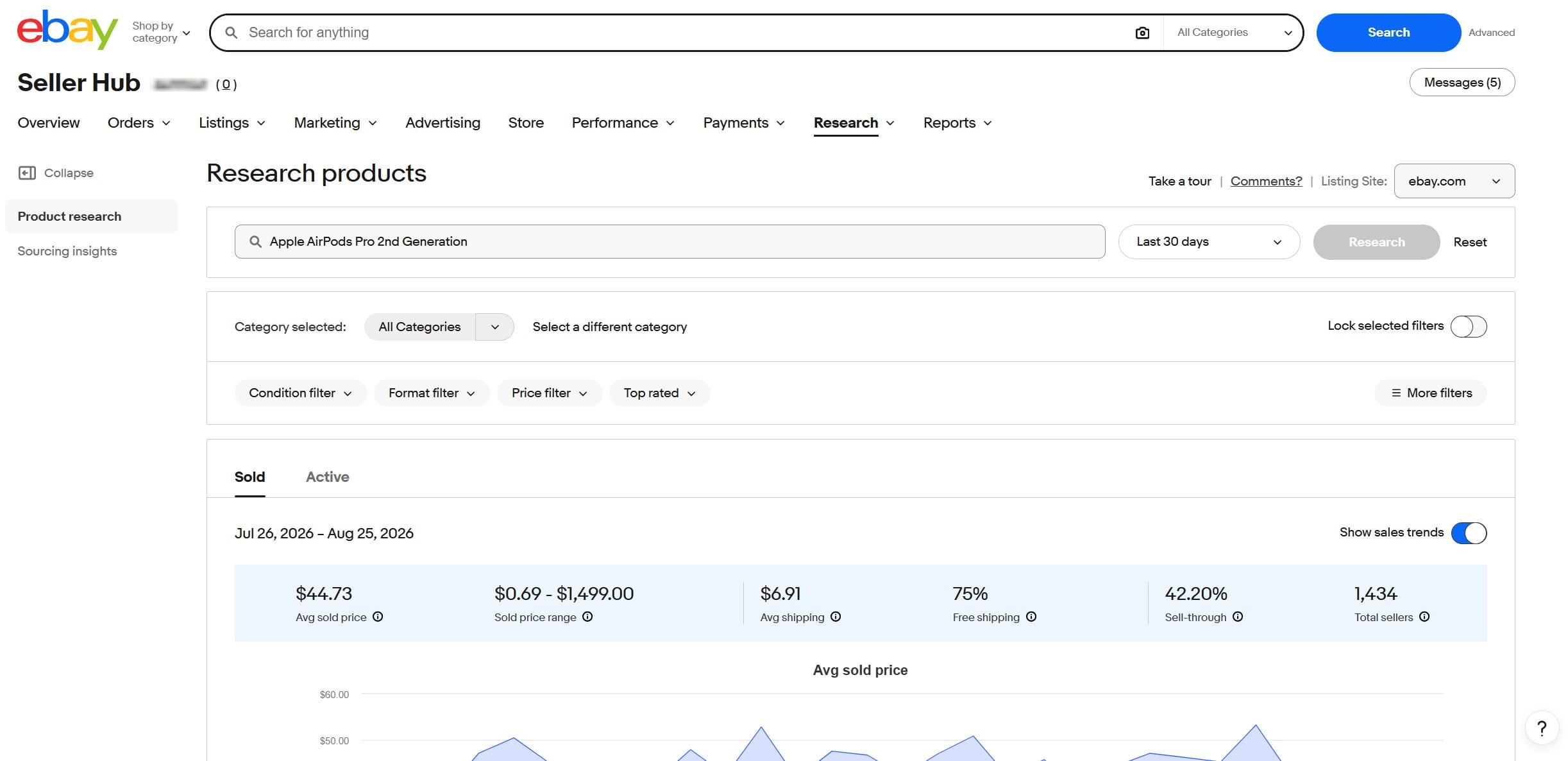
In the current desktop Sold view, the summary bar includes:
- average sold price;
- sold price range;
- average shipping;
- percentage of sales with free shipping;
- sell-through rate for searches covering items sold within the last 90 days;
- total sellers.
Below the summary, individual result rows can show the listing, average sold price, average shipping, total sold, item sales, bids, and the date last sold.
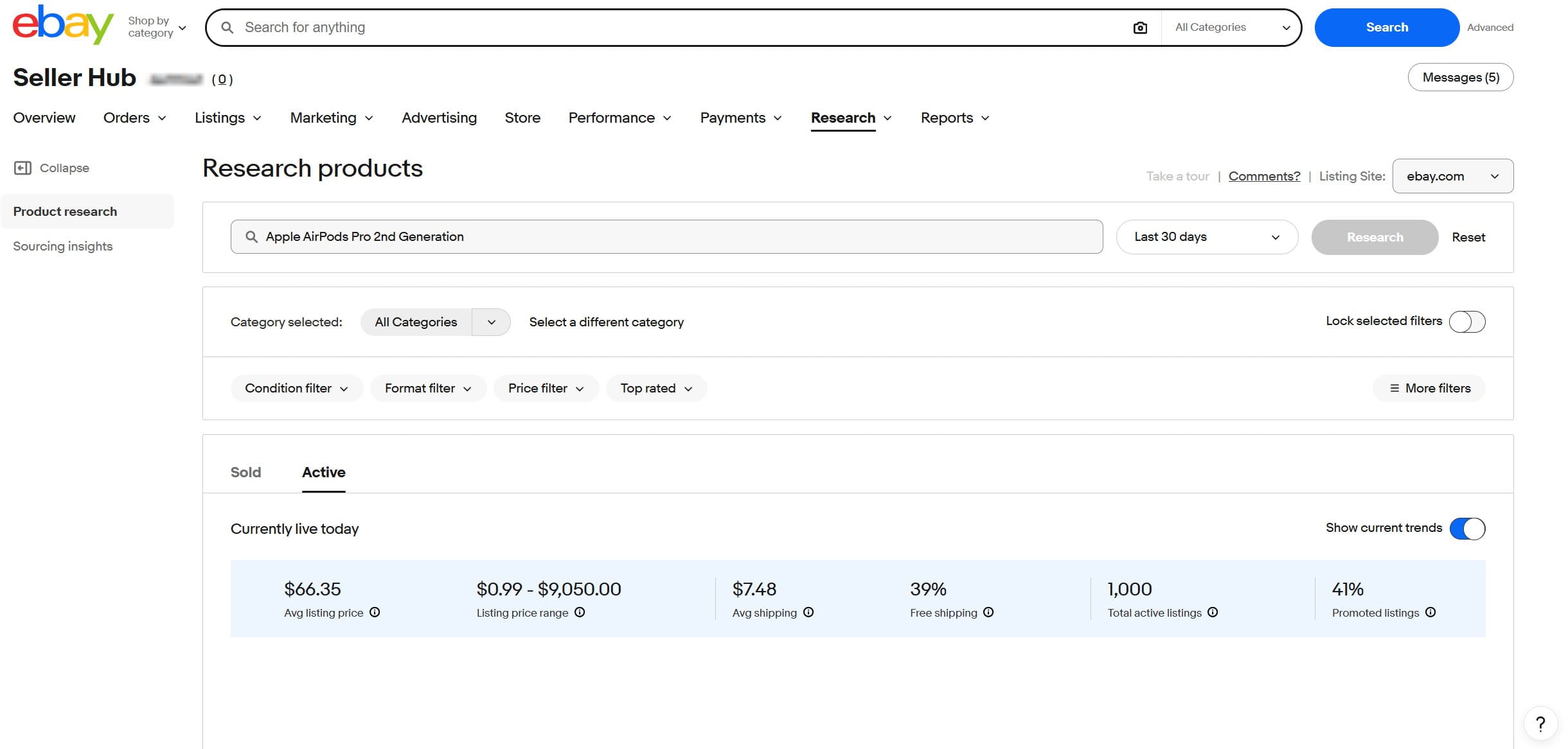
The Active view answers a different question: what is competing for buyers now? Its summary currently shows average listing price, listing price range, average shipping, free-shipping share, total active listings, and promoted listings.
The longer history is especially useful for seasonal products. A product can look strong during a 30-day period and weak across the rest of the year. Looking at a longer window helps separate a recurring seasonal pattern from a one-off spike.
Product Research also provides more complete sold-price information than ordinary eBay sold-item search. eBay says it can show actual sold prices, including accepted Best Offers. That matters in categories where the listed asking price may differ substantially from what buyers actually paid.
How to Use Terapeak on eBay: Step-by-Step
The best way to learn how to use Terapeak is to work through a product search and narrow the data until the results represent the item you might actually sell.
Step 1: Open Product Research in Seller Hub
Sign in to Seller Hub with your regular eBay account. Open Research, then select Product Research.
The Product Research start screen includes a search field, a date-range selector, a Research button, and a Listing Site selector for the eBay marketplace you want to analyze.
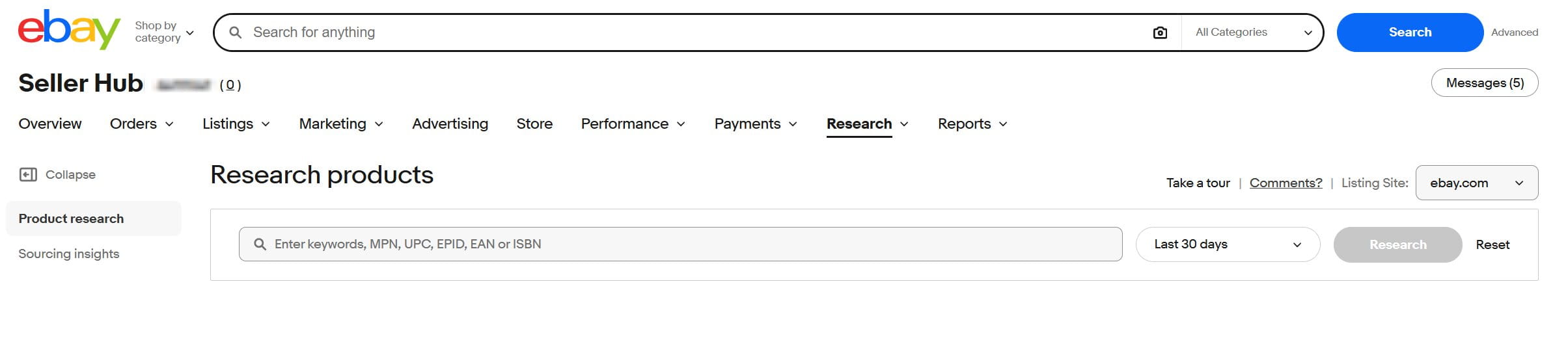
On mobile, use the latest version of the eBay app, open the Selling tab, and scroll to Product Research. eBay notes that some desktop features are not available in the mobile version.
If you are following an older guide on how to use Terapeak on eBay, do not look for a separate Terapeak website. The research function is now integrated into eBay.
Step 2: Enter a Product and Choose the Research Period
The search field accepts keywords, MPN, UPC, EPID, EAN, or ISBN. Use the most specific identifier or product description that matches the item you are evaluating.
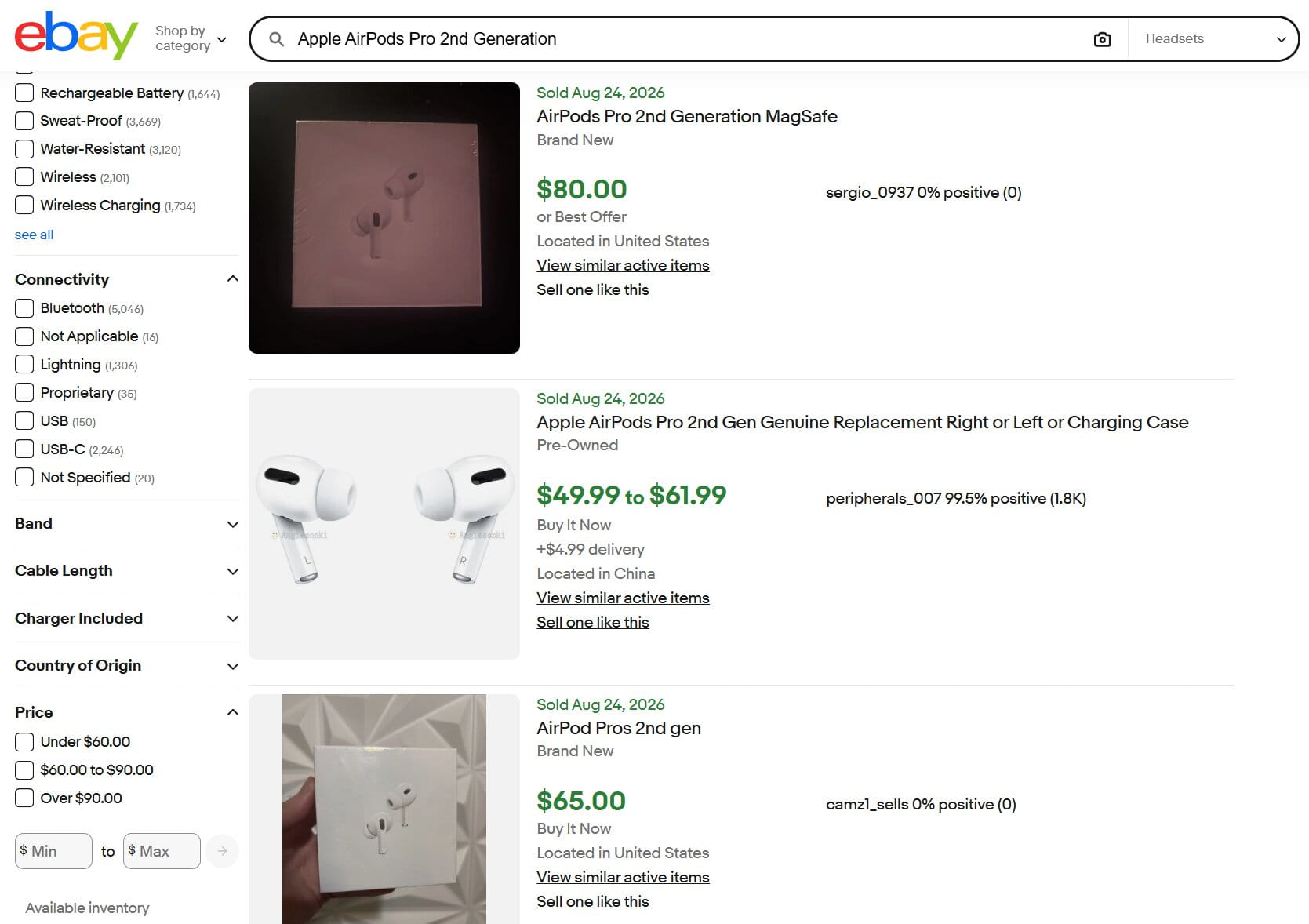
For example, a search for Apple AirPods Pro 2nd Generation can still pull in charging cases, individual replacement earbuds, protective cases, and related accessories. That is a useful reminder that a recognizable product name does not automatically create a clean dataset.
Product Research currently offers these preset periods:
- Last 7 days;
- Last 30 days;
- Last 90 days;
- Last 6 months;
- Last year;
- Last 2 years;
- Last 3 years;
- Custom.
The custom calendar also reaches back through the available three-year history. Sell-through rate is displayed only when the search covers items sold within the last 90 days; on longer ranges, that metric is not calculated.
Step 3: Use Filters to Remove Irrelevant Results
After a search, Product Research exposes the main research filters above the results. The current desktop interface includes:
- Category;
- Condition filter;
- Format filter;
- Price filter;
- Top rated;
- More filters.
Condition options depend on the category and results. In the tested consumer-electronics search, the menu included New, New other (see details), Certified – Refurbished, Used, and For parts or not working.
The Format filter can separate Auction, Best Offer accepted, and Fixed price results. Best Offer accepted is a research filter, not a third standalone eBay listing format.
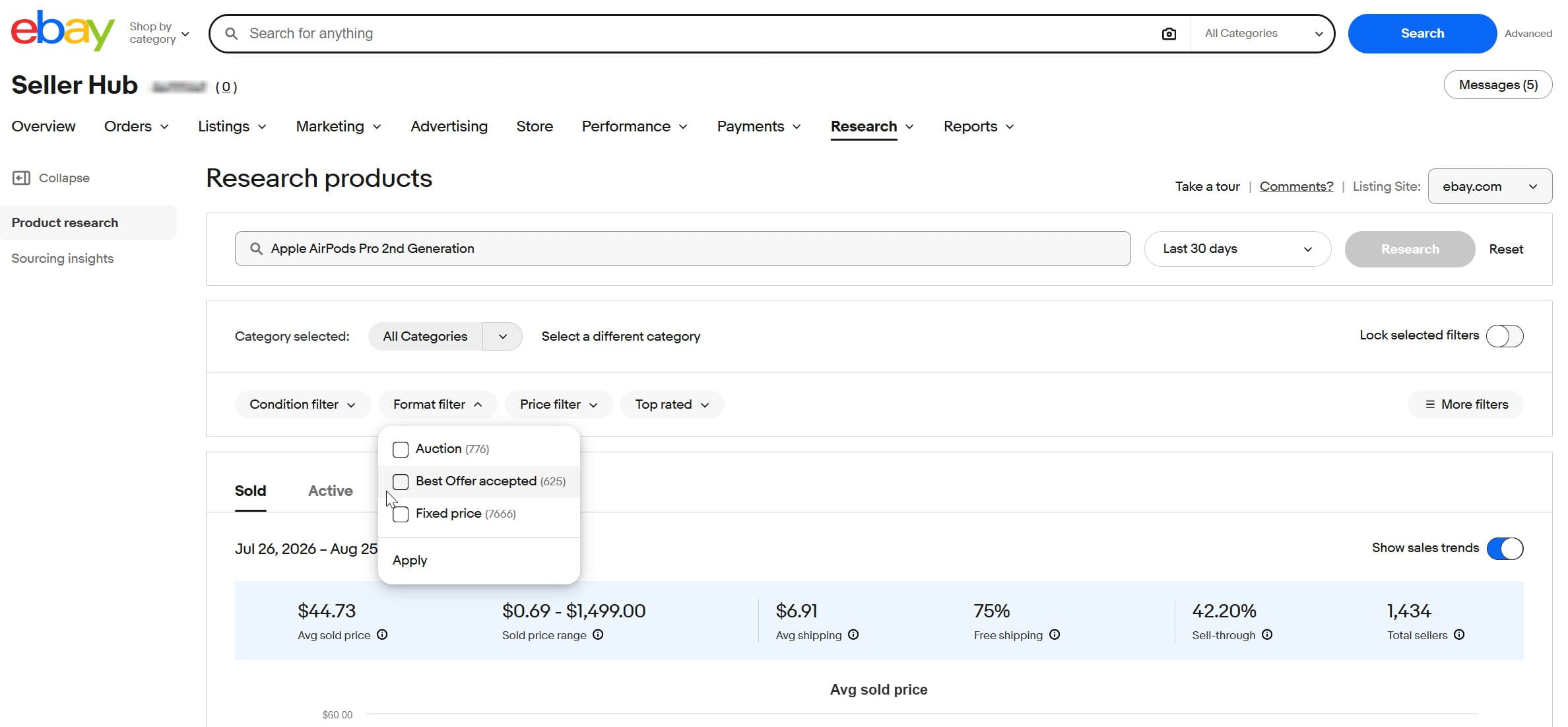
The Top rated control can show only top-rated listings or exclude them. Under More filters, location filters are available, and additional item-specific filters can appear when the retrieved listings contain relevant item-aspect values. The available controls can differ between Sold and Active views.
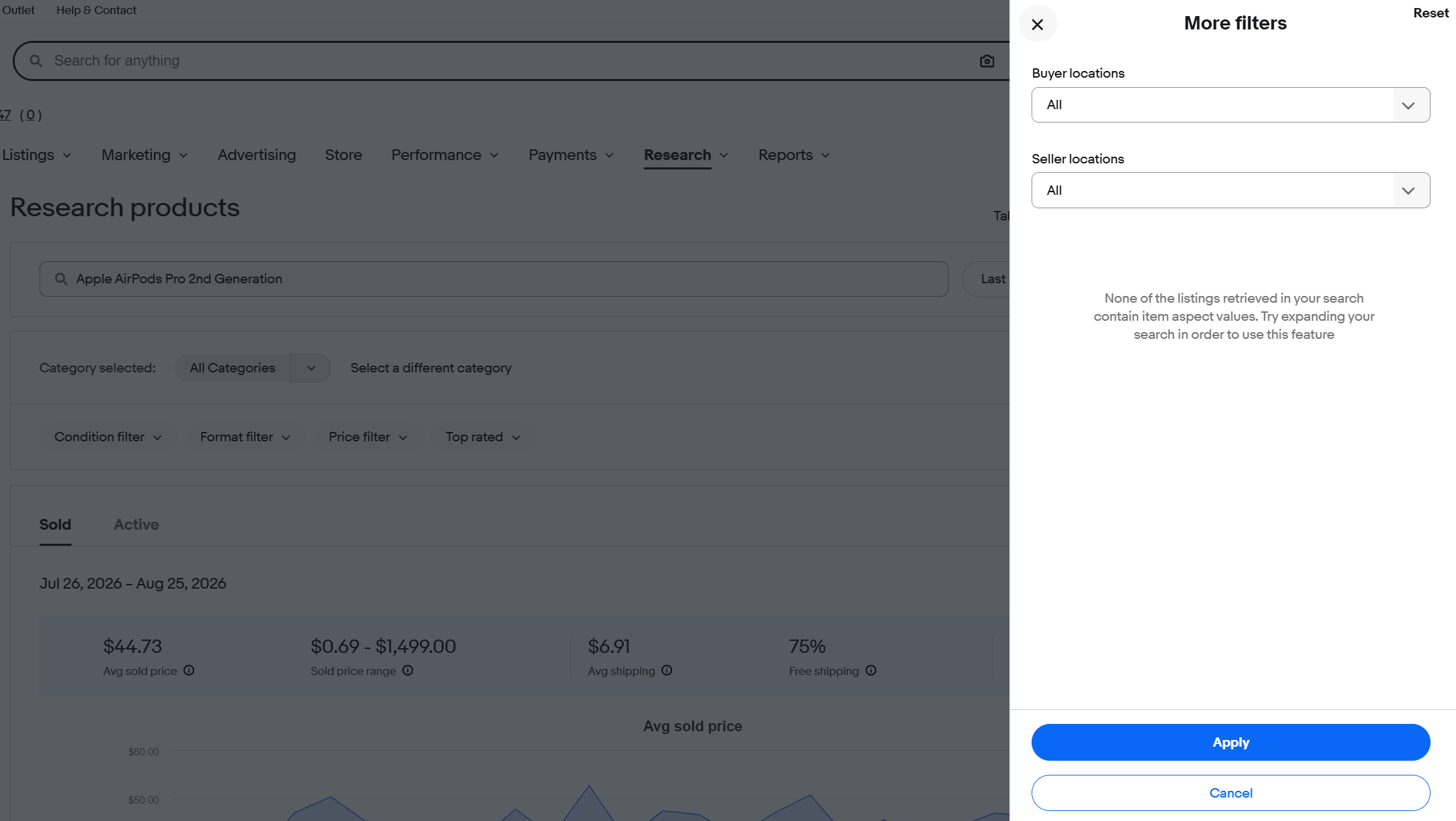
Condition is still one of the most important filters. Mixing new, used, refurbished, parts-only products, bundles, and single items can make an average sold price misleading.
Step 4: Compare Sold and Active Listings
Use Sold when you want evidence of completed market activity. The summary includes sold-price and shipping data, sell-through for eligible periods, and the number of sellers. Individual rows show how specific listings performed.
Switch to Active when you want to see the listings competing for buyers now. The current Active summary includes average listing price, listing price range, average shipping, free-shipping share, total active listings, and promoted listings.
The two views should be read together. Sold data shows what buyers accepted; Active data shows the offers your listing would have to compete against today.
Step 5: Compare Sold Price, Price Range, and Trends
Do not stop at average sold price. First compare the average with the sold-price range, then inspect the listings that sit at different points in that range.
Suppose the average sold price is $70. If most close matches sell between $65 and $75, the average is a useful reference. If the range stretches from $20 to $180, the dataset probably contains meaningful product differences that need to be understood before you set a price.
Next, review the sales trend. A steady pattern over several months supports a different inventory decision than a short burst around a holiday or product launch.
Step 6: Read Sell-Through Rate in Context
Sell-through rate is useful, but it should not be treated as a universal “good product” score. eBay specifically states that Product Research provides sell-through rate for searches of items sold 90 days ago or less.
There is no official eBay threshold that says every product above 40%, 60%, or 80% is automatically attractive. Category, price, condition, listing quality, seasonality, and the accuracy of your search all affect what the number means.
A vintage collectible with a small buyer pool should not be judged by the same benchmark as a replenishable everyday accessory. Use sell-through together with the sold-price range, seller count, sourcing cost, shipping, and the longer sales trend.
Step 7: Check Shipping and Competitive Position
Product Research includes average shipping costs and the share of sales or listings offering free shipping. These figures help you compare the total buyer cost rather than item price alone.
A listing at $31 plus $9 shipping is not necessarily more competitive than a similar item at $35 with free shipping. For bulky or fragile products, shipping can also be the difference between an attractive sold price and an unattractive margin.
Then look at the individual listings behind the numbers. Compare photos, item specifics, title wording, condition, shipping terms, returns, and selling format. The goal is not to copy another seller. It is to understand what distinguishes the listings that buyers are choosing.
How to Analyze the Main Terapeak Metrics
The metrics become more useful when each one answers a specific business question.
Average Sold Price and Sold Price Range
Average sold price gives you a reference point. The price range tells you whether that reference point is representative.
When the range is wide, investigate the listings behind the number. Differences in condition, generation, included accessories, quantity, and product variation often explain why similar-looking items sell at very different prices.
Sales Trends
Sales trends show how demand and pricing change over time. Use the three-year history when seasonality matters or when you want to see whether a recent increase is part of a recurring pattern.
For example, a product that peaks every November and December may be useful seasonal inventory but a poor candidate for aggressive restocking in spring.
Sell-Through Rate
Sell-through rate is most useful after you have narrowed the query carefully. A broad search can combine unrelated listings and create a number that looks precise while describing the wrong market.
Rather than asking only whether the percentage is “high,” ask whether enough comparable items sell at a price that still works after your real costs.
Seller Count and Competition
Seller count helps show how many sellers have participated in that market during the selected period. High demand can exist alongside heavy competition.
That is why a large sales total does not automatically mean an easy opportunity. Check how many sellers are competing, how concentrated the sales appear, and whether your listing can offer a comparable product, condition, delivery promise, or price.
Shipping Data
Average shipping and free-shipping data show what buyers are accustomed to seeing. Use them when building your price strategy, especially in categories where shipping is a meaningful share of the order value.
eBay Terapeak: Selling Formats and Best Offer
Product Research’s Format filter currently lets you narrow results to Auction, Best Offer accepted, or Fixed price. eBay’s core listing formats are auction-style and fixed price; Best Offer is an option that can be enabled on eligible listings rather than a separate core listing format.
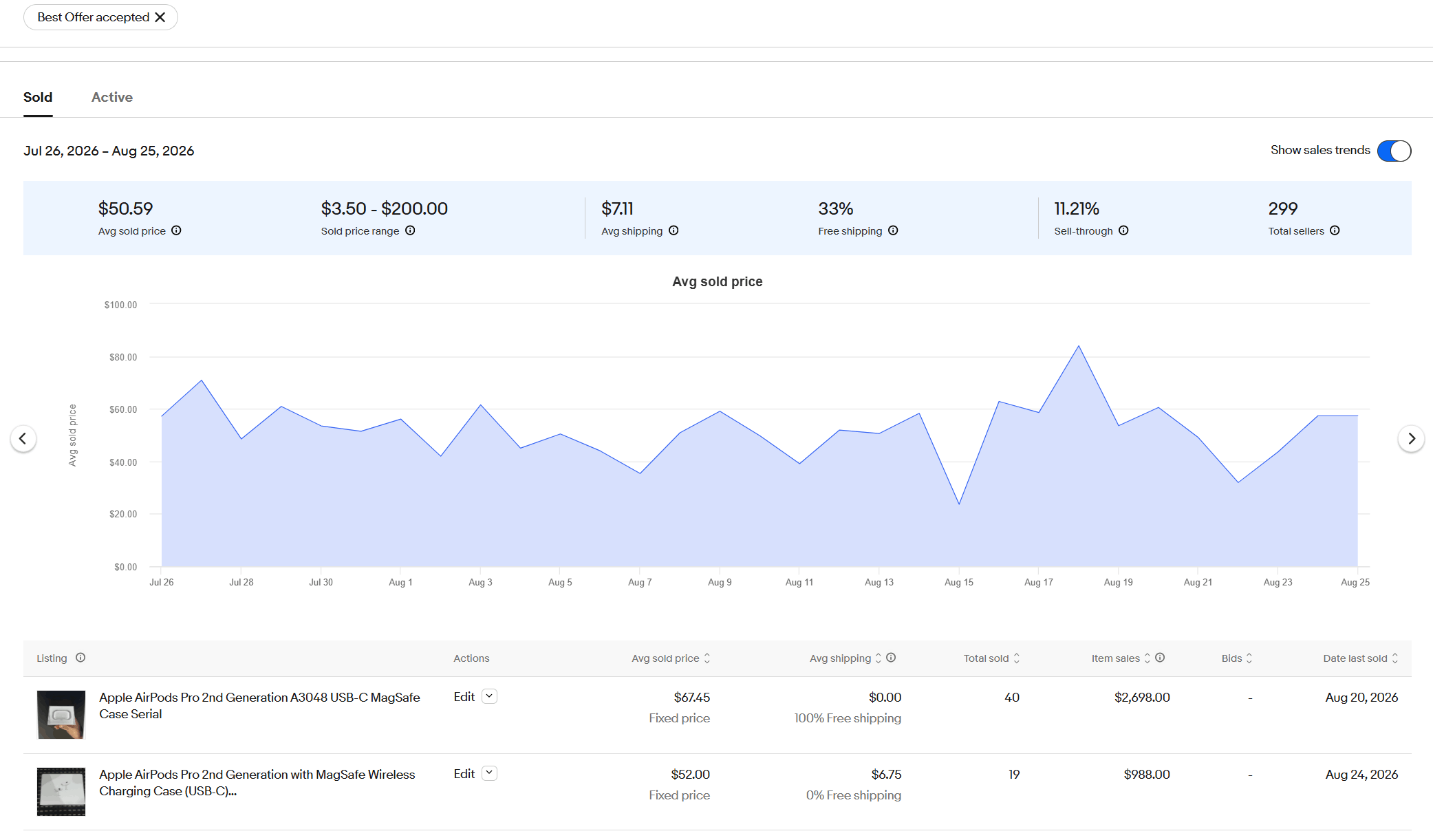
When Best Offer accepted is selected, Product Research can report the actual transaction price. A result may still be labeled Fixed price because that was the listing format even though the final sale was completed through an accepted offer.
Product Research vs. Regular eBay Sold Items Search
Product Research goes further than the normal Sold Items view. eBay’s Seller Center says Product Research can look back through the last three years, compared with the most recent 90 days in regular Sold Items search. It also provides actual selling prices, including prices from accepted Best Offers, plus aggregated market data.
| Feature | Product Research | Regular Sold Items search |
|---|---|---|
| Historical coverage | Up to 3 years | Most recent 90 days |
| Accepted Best Offer price | Actual accepted selling price can be included | The result may show the listing price or “or Best Offer” without exposing the accepted offer in the same way |
| Aggregated market metrics | Avg sold price, sold price range, shipping, sell-through for eligible periods, seller count, trends | No Product Research-style market summary |
| Active-market analysis | Separate Active view with listing-price and competition metrics | Normal marketplace results and filters |
| Best use | Product validation, pricing, trend and competition analysis | Fast review of individual recent sold listings |
Regular Sold Items search is still useful for quickly examining recent comparables. It shows individual listings, sold dates, visible prices, condition, shipping, seller information, and marketplace filters. Product Research is the better option when the decision depends on a longer history, market-level metrics, or the actual accepted Best Offer price.
How to Use Sourcing Insights
Sourcing Insights is designed for a different question: where might there be room to source more inventory?
eBay says Sourcing Insights is included at no extra cost for qualifying business sellers with a Basic Store subscription or above. It is available under the Research tab in Seller Hub.
The tool is intended to help sellers:
- analyze eBay categories and product performance;
- identify categories where demand is high relative to inventory;
- use real-world sales data when deciding what to source next;
- examine item-specific combinations and inventory gaps.
If an account does not have the qualifying Store subscription, eBay displays a subscription prompt instead of the Sourcing Insights dashboard.
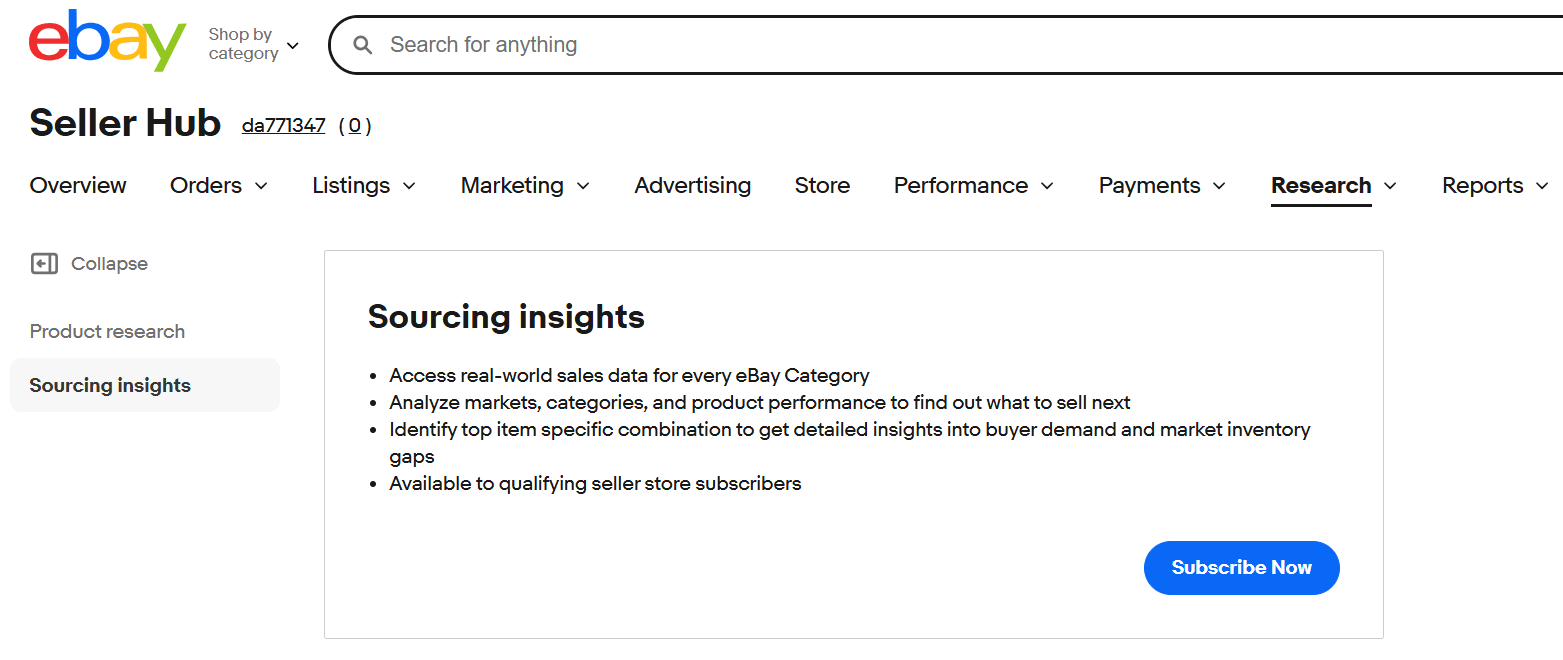
If you have access to Sourcing Insights, start there when you want broader sourcing ideas. Once a category looks promising, move to Product Research and test the exact items you may buy. Before committing to inventory, review comparable sold prices, the sales pattern over time, current competition, shipping costs, and the listings behind the numbers.
A high-opportunity or low-supply signal is a lead, not a guarantee of profit. There may be reasons supply is limited, including sourcing difficulty, expensive fulfillment, high return rates, or a very narrow buyer base.
If you need additional sourcing ideas before opening Product Research, Easync’s guides to trending products, high-ticket niches, and cheap wholesale products for resale can give you candidates to validate with eBay data.
How to Use Terapeak for eBay Keyword and Listing Research
Product Research is not a traditional keyword-volume platform, but it can still help with listing language because it lets you inspect products that actually sold.
Start with close product matches and note which accurate attributes appear repeatedly in successful listings. These may include model numbers, capacities, sizes, materials, compatibility details, or condition terms.
Compare that wording with the item you actually have. If a model or part number keeps appearing in sold listings and it accurately applies to your product, it is usually worth including. Leaving out a defining identifier can make the listing less precise.
Do not copy another seller’s title word for word. Use Product Research to identify useful product language, then write a title that accurately describes your own item. Easync also provides an eBay Title Builder within its seller tools ecosystem, but marketplace data should still guide which attributes matter for the product.
Common Terapeak Research Mistakes
Searching Too Broadly
A broad query often mixes products that should not be compared. Narrow by model, condition, category, location, or another defining attribute before trusting the averages.
Treating the Average Sold Price as the “Correct” Price
An average is a summary, not a pricing instruction. The listings behind the number may have different condition, accessories, quantities, or shipping terms.
Using One Short Time Window
A strong week or month can be caused by seasonality, a temporary shortage, or a short-lived trend. Use the longer history when the decision involves stocking inventory for more than a few weeks.
Judging a Product Only by Sell-Through Rate
Sell-through does not include your sourcing cost, eBay fees, return costs, or operational expenses. A product can sell quickly and still produce a weak margin.
Ignoring Active Competition
Sold data tells you what buyers accepted in the past. Current listings show what your offer would compete against today. Both views matter when you are deciding whether a product still has room for another seller.
Assuming Unsold Listings Mean the Product Is Bad
A listing can fail because of poor photos, an inaccurate title, weak item specifics, the wrong condition, high shipping, or unrealistic pricing. Unsold inventory is evidence to investigate, not an automatic rule to avoid the product.
Advantages and Limitations of Terapeak Product Research
The biggest advantage of Product Research is that the data comes from eBay’s own marketplace. You can research actual sold prices, historical trends, seller participation, and shipping behavior without relying only on third-party estimates.
It is also free for sellers with Seller Hub access, which makes it a strong first research tool before paying for additional analytics software.
The limitation is that Product Research shows marketplace activity, not your personal net profit. It does not know your supplier cost, storage expense, return rate, taxes, or every operational cost attached to the item.
Search quality is another limitation. Accurate source data can still lead to a poor conclusion if the query mixes products that are not truly comparable.
Finally, Product Research is focused on eBay. If you sell across several marketplaces, you may need marketplace-specific data or additional dropshipping software and research tools for the rest of your workflow.
Terapeak Alternatives
Product Research is the most direct source of eBay sold data, but it leaves gaps. It does not match items with suppliers, analyze a specific competitor’s store, show which sellers are dropshipping, compare marketplaces, or reach further back than three years. Terapeak alternatives exist to fill those gaps, and most sellers use them alongside Product Research rather than instead of it.
Each of the three tools below covers a different gap, so the right choice depends on what you sell and how you source it.
ZIK Analytics: For eBay Dropshippers
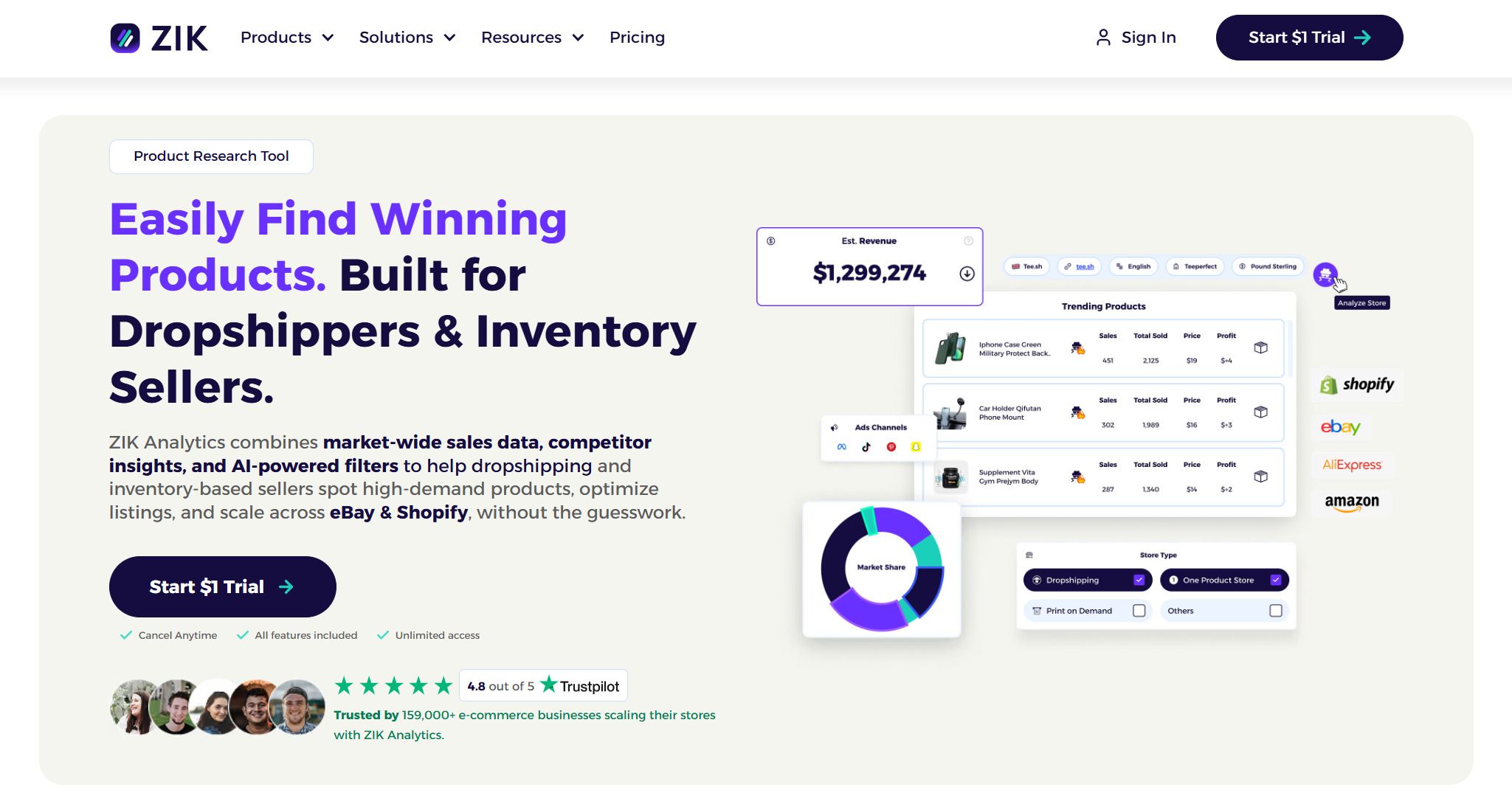
ZIK Analytics is built around eBay dropshipping and reselling workflows. Besides product research with sold data and sell-through, it adds competitor research (enter any eBay seller and see their best-selling items), category research, a Product Explorer with advanced filters, a title builder, and a Dropshipping Product Finder that matches eBay items with supplier listings on Amazon, Walmart, AliExpress, and other sources. ZIK is a third-party tool, so its figures come from its own data collection rather than eBay’s internal transaction records.
The case for using it next to Terapeak is easy to see in ZIK’s own Terapeak comparison video. ZIK, which sells a competing research tool, points out that Product Research does not show how big the seller behind a listing is, whether that seller is dropshipping, or whether an item carries VeRO risk, and that finding a supplier and creating the listing remain manual steps. For dropshippers who process many products a day, those gaps add up.
The eBay PRO plan costs $39.90/month, with the first month at $19.90, or $14/month billed annually. PRO+ costs $59.90/month, or $20/month billed annually, and adds bulk scanning, Turbo Scanner, Autopilot, and 100 Product Explorer searches a month instead of 20. Both plans start with a 7-day trial for $1.
Algopix: For Cross-Marketplace Checks

Algopix answers a question Terapeak cannot: where should this product be sold? It estimates demand, pricing, fees, and competition for a product across Amazon, eBay, Walmart, and other marketplaces, and it can analyze individual products or batches. That is useful for sellers who source a product once and then decide which channel to list it on.
The trade-off is that its numbers are estimates built from marketplace data rather than eBay’s own transaction history, and the product is clearly aimed at Amazon sellers first. For an eBay-only seller, it adds little to what Product Research already shows. Plans cost $29/month or $299/year (Beginner), $49/month or $349/year (Achiever), and $99/month or $999/year (Champion).
WorthPoint: For Collectibles and Vintage Items
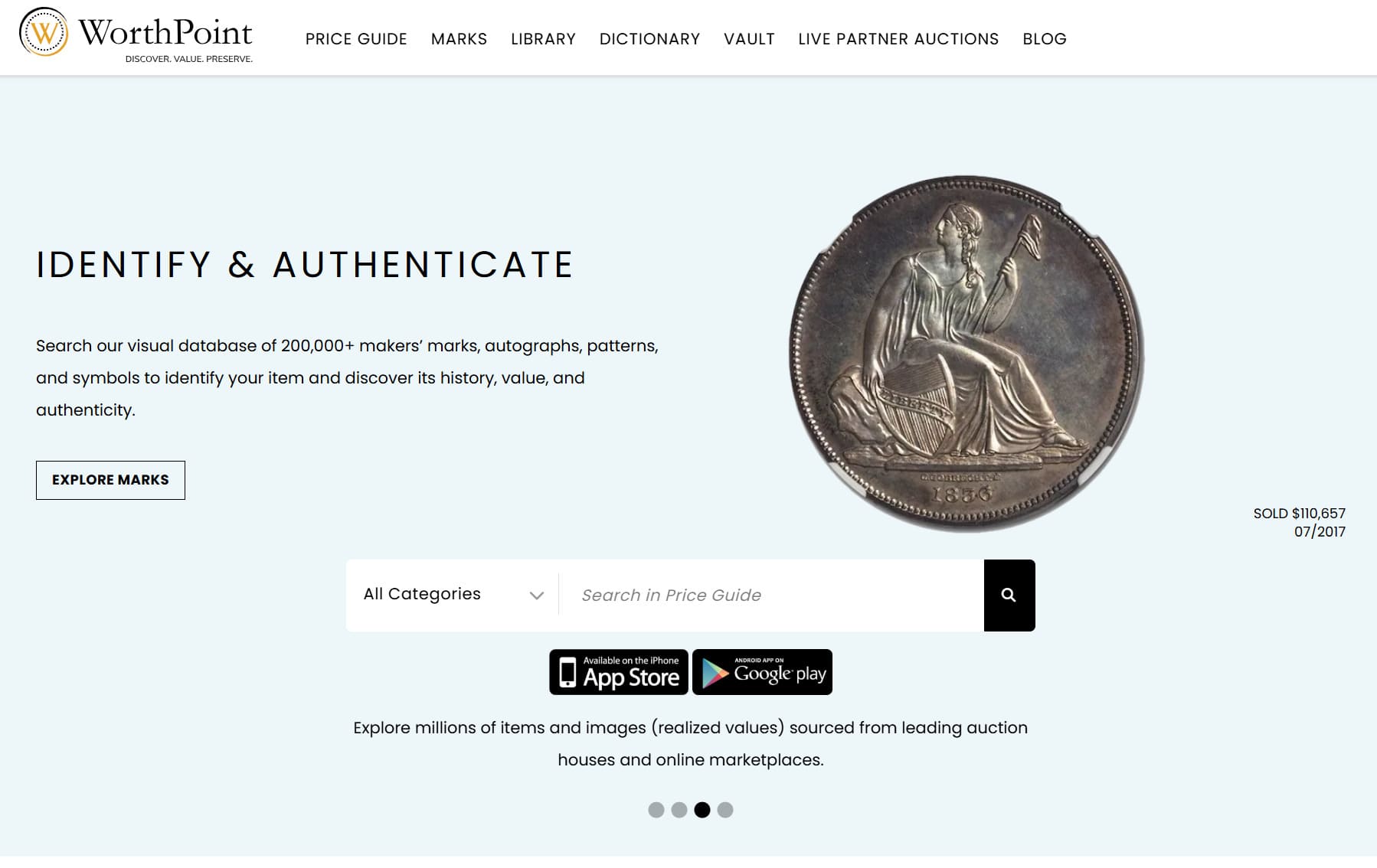
WorthPoint solves a different problem: pricing antiques, vintage items, and collectibles where comparable sales are rare and three years of eBay history may contain only a handful of matches. Its Price Guide holds more than 1 billion prices collected from auction houses and online marketplaces, eBay among them, going back nearly two decades.
Since October 2026, WorthPoint sells a single All Access plan at $29.99/month that bundles the Price Guide, Marks, and Library, with a 7-day free trial and a 15% discount for annual billing. It is unnecessary for new, replenishable products, but for a vintage toy or a signed print it can be the difference between guessing and pricing from real comparable sales.
Here is how the alternatives compare with Terapeak at a glance:
| Tool | Best for | What the data covers | Starting price |
|---|---|---|---|
| Terapeak (Product Research) | Validating eBay demand and sold prices | eBay’s own transactions, up to 3 years | Free with Seller Hub access |
| ZIK Analytics | eBay dropshipping, competitor and supplier research | Third-party eBay data plus supplier matching | $39.90/month, or $14/month billed annually |
| Algopix | Comparing one product across marketplaces | Estimates for Amazon, eBay, Walmart, and more | $29/month, or $299/year |
| WorthPoint | Antiques, vintage items, and collectibles | Auction house and marketplace prices, nearly two decades | $29.99/month |
From Product Research to an Actual eBay Listing
Research matters when it changes what you do with the listing. Once a product looks viable, use comparable sales to set the price and see whether buyers in that niche tend to expect free shipping. The sold listings can also show which selling format, item specifics, and title details are common among close matches.
For sellers running a compliant eBay dropshipping or resale workflow, Easync can handle operational tasks after product selection, including listing management, price and stock monitoring, order workflows, and tracking synchronization. You can see the current eBay features on the Easync eBay automation page or read the broader eBay dropshipping guide.
This is where research and automation should stay separate. Product Research helps you decide what the marketplace data supports. Automation helps you manage repetitive work once the product is in your catalog.
If you are comparing automation options, the Easync overview and its AutoDS review provide additional context on tools used for listing and store operations.
Terapeak vs Easync: Research vs Automation
Terapeak and Easync often come up in the same searches because both sit in an eBay seller’s workflow, but they answer different questions. Terapeak tells you whether an item sells on eBay, at what price, and against how much competition. Easync, an Amazon to eBay dropshipping tool, takes over once you have decided what to list: it creates the listings, keeps prices and stock in line with the source, and processes orders.
| Feature | Terapeak (Product Research) | Easync |
|---|---|---|
| Main question it answers | Will this item sell on eBay, and at what price? | How do I list and fulfill it without manual work? |
| Data source | eBay’s own completed transactions, up to 3 years | Live source prices and stock for the products you import |
| Finding products | Keyword, UPC, EPID, and category research; Sourcing Insights for Store subscribers | Hot Items & Finder for product ideas; import by product URL, ID, or CSV |
| Pricing | Shows sold and listing prices; does not change your listings | Reprices eBay listings from the source price using your margin, fee, and rounding rules |
| Stock | Not tracked | Sets eBay quantity to 0 when the source is out of stock, so you do not sell what you cannot ship |
| Orders and tracking | Not covered | Automatic ordering from Amazon and tracking upload to eBay |
| Risk checks | Market data only | VeRO database that blocks high-risk ASINs at import |
| Supported routes | Research across eBay marketplaces | Amazon to eBay, AliExpress to eBay, Amazon to Shopify |
| Cost | Free with Seller Hub access | Paid plans with a 7-day free trial |
Easync also includes Hot Items & Finder, product discovery features that surface candidate items to list. Treat their output the same way you would treat any sourcing idea: run the item through Product Research first, check sold prices, sell-through, seller count, and shipping, and only then publish. Used in that order, the two tools complement each other: Terapeak filters out weak products, and Easync keeps the strong ones running without daily manual checks.
One rule to know before automating: eBay’s drop shipping policy allows orders fulfilled directly from a wholesale supplier, but not buying the item from another retailer or marketplace that ships straight to your buyer. Sellers who source from Amazon therefore either buy and hold the stock themselves before shipping, or have the supplier ship directly to the buyer and accept the account risk that comes with it. The upside of the model is that you do not need upfront inventory or a warehouse; the downside is that out-of-stock cancellations and late deliveries hit your seller metrics quickly, which is why price and stock monitoring matters. You can compare plans on the Easync pricing page.
Frequently Asked Questions
Is Terapeak still available on eBay?
Yes. eBay still provides the core Terapeak research functionality, but the tool is now called Product Research. You can access it through the Research tab in Seller Hub.
Where do I find Terapeak on eBay?
Sign in to eBay Seller Hub, open Research, and choose Product Research. You use your normal eBay login; there is no separate Seller Hub username or password.
Can anyone use Terapeak?
Any seller with access to eBay Seller Hub can use Product Research for free. There is no separate Terapeak login: you sign in with your regular eBay account and open Research in Seller Hub. Sourcing Insights is the exception, since it requires a qualifying eBay Store subscription.
Can I use Terapeak on eBay UK or Australia?
Yes. Product Research is available in Seller Hub on eBay UK and eBay Australia, and the Listing Site selector lets you research other eBay marketplaces from your account. On eBay UK, Sourcing Insights comes with an eBay Shop subscription.
Is Terapeak Product Research free?
Yes. Product Research is available to sellers with access to Seller Hub without requiring a paid eBay Store subscription.
Is Sourcing Insights free?
There is no separate Sourcing Insights add-on fee for qualifying business sellers, but access requires a paid Basic Store subscription or higher.
How far back does eBay Product Research go?
Product Research provides up to three years of eBay sales data. The desktop interface offers preset ranges from 7 days to 3 years, plus a Custom option within the available history.
What is a good Terapeak sell-through rate?
eBay does not publish one percentage that works as a universal benchmark. Read sell-through together with sold prices, seller count, competition, shipping, and the type of product you are researching. The metric is displayed only for searches covering items sold within the previous 90 days.
Does Terapeak show active eBay listings?
Yes. Product Research has separate Sold and Active views. Active results include current listing-price and competition data such as average listing price, total active listings, and promoted listings.
Is Product Research better than eBay Sold Items search?
Product Research is the stronger option when you need more than a quick comparable-sale check. It adds longer history, accepted Best Offer prices, and market-level metrics, while regular Sold Items search is still handy for a fast look at recent sales.
Is there a Terapeak Chrome extension?
eBay does not offer a separate Terapeak extension; Product Research runs inside Seller Hub and the eBay app. Third-party extensions exist, such as eBay Research Helper, which adds extra metrics on top of Product Research and states that it is not affiliated with eBay. Research tools like ZIK Analytics also ship their own Chrome extensions. Check what access any extension requests before installing it.
What are the best Terapeak alternatives?
It depends on the gap you need to fill. ZIK Analytics suits eBay dropshippers who want competitor research and supplier matching, Algopix compares a product across several marketplaces, and WorthPoint covers antiques and collectibles with nearly two decades of price history. For eBay sold-price data itself, Product Research remains the most direct source.
Final Thoughts
Knowing how to use Terapeak for eBay in 2026 means knowing how to use Product Research inside Seller Hub.
Start with a precise search. Remove listings that do not match the item you are evaluating. Then compare sold prices, demand, competition, shipping, seller count, and the longer sales trend before making a sourcing or pricing decision.
Sourcing Insights can help you find broader category opportunities, while Product Research is better for validating specific products. Neither tool replaces a margin calculation or a review of your real operating costs.
The strongest use of Terapeak for eBay is not finding one “magic” metric. It is building a cleaner picture of the market before you spend money on inventory or publish a listing.