
- articles
- eBay Dropshipping
Best eBay Bulk Listing Tools & Software to Automate Listings in 2026
Quick answer: eBay’s own Bulk Listing Tool and Seller Hub Reports are free and cover basic batch work for sellers who list on eBay only. Resellers who also sell on Poshmark, Mercari or Etsy usually move to a crosslister like Crosslist or Vendoo. Sellers who stay on eBay only tend to pick 3Dsellers, CrazyLister or Auctiva, and dropshippers who source from Amazon, AliExpress or Walmart need a tool that tracks the supplier, such as AutoDS or Easync.
Listing one product on eBay is simple. Listing five hundred is a different reality entirely.
Anyone who has tried to grow an eBay store knows the bottleneck. You copy a title, paste a description, upload images, fill in item specifics, set a price, and repeat. Then you do it again, hundreds of times, until the work itself becomes the obstacle to growth.
Manual listing doesn’t just consume hours. It introduces typos, mispriced items, and inventory that drifts out of sync with your supplier. At scale, those small errors turn into cancelled orders, defect rates, and suppressed search visibility.
This is exactly the friction that eBay listing tools are built to remove. Some of them are free and already sit inside Seller Hub. Others are paid eBay listing software that crosslists to other marketplaces, edits thousands of listings at once, or pulls products straight from a supplier for a dropshipping store. Below we compare each eBay bulk listing tool worth your time in 2026, what it really costs to unlock bulk features, and which kind of seller it fits.
eBay Bulk Listing Software Compared
This eBay seller tools comparison uses regular monthly prices from each vendor’s pricing page as of October 2026. Watch the “Bulk features from” column: on several tools, CSV upload or bulk editing sits on a plan that costs more than the advertised starting price.
| Tool | Best for | How it lists in bulk | Bulk features from | Starting price (monthly) | Trial or guarantee |
|---|---|---|---|---|---|
| eBay Seller Hub | eBay-only sellers on a budget | Bulk Listing Tool, CSV via Seller Hub Reports, AI drafts from photos | Free | Free | Included with any seller account |
| 3Dsellers | High-volume eBay stores | Bulk editor, CSV import, scheduled publishing | $39.90 (CSV import) | $19 | 7 days, no card |
| CrazyLister | Branded listing design | Bulk publish and revise, CSV import | $25 (all plans) | $25 | 7 days, no card |
| Auctiva | Budget eBay-only sellers | Bulk live revision, CSV import | $19.95 (revision), $29.95 (CSV) | $12.95* | 30 days |
| Crosslist | Crosslisting to 11+ marketplaces | Bulk actions, CSV import and export | Bulk edits on all plans, CSV from $39.99 | $29.99 | Money back within 3 days or 20 listings |
| Vendoo | Resellers on several marketplaces | Importing, bulk actions on up to 240 listings | $29.99 | Free (5 listings a month), paid from $14.99 | 14 days |
| List Perfectly | Power users and teams | Bulk crossposting and bulk import | $49 | $29 | 50 free listings |
| Nembol | Multichannel sellers with their own stock | One catalog pushed to many channels, CSV light edit | $79 (CSV) | $39 | 14 days, no card |
| AutoDS | Dropshippers on several channels | Bulk product importer, supplier-based listing | $49.90 | $26.90 | 3 days for $0.99 |
| Easync | Amazon to eBay dropshipping | Paste product URLs or IDs, CSV upload | $49.99 (all plans) | $49.99 | 7 days, no card |
| Rithum (ChannelAdvisor) | Enterprise brands | Feed-based catalog management | Custom | Custom quote | Not published |
*Auctiva charges 1% on sales above the plan’s included volume ($1,000 on Base+), capped at $9.95 per transaction and $199.95 per month. Annual billing lowers the price on most tools.
Free eBay Bulk Listing Tools Built Into Seller Hub
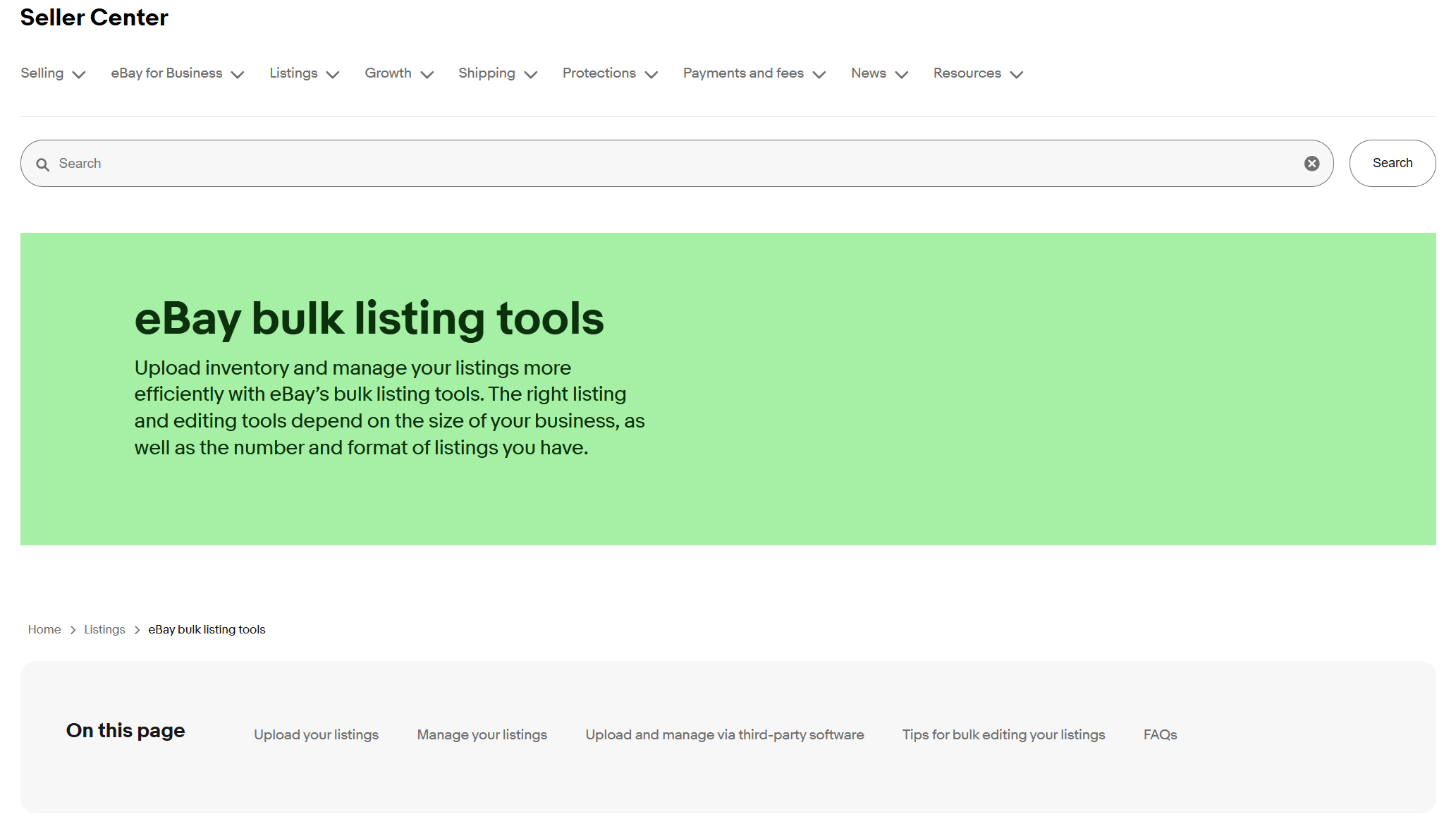
Before paying for anything, it helps to know what eBay already gives you. The eBay bulk listing tools page in Seller Center groups them by business size, from a browser-based editor for small sellers to feed-based platforms for large merchants.
Bulk Listing Tool
This is eBay’s built-in editor for creating, relisting and revising many listings at once. It works like a spreadsheet inside your browser: you fill in one row, duplicate it, change what differs, and publish the batch. According to eBay, you can keep track of and edit up to 2,000 listings in a table view with photo thumbnails.
It shines at eBay mass listing of similar items. Ten sizes of the same jacket or forty graded cards from one set go fast. Unique thrift finds still need their own photos, measurements and condition notes, and no bulk listing tool writes those for you.
Seller Hub Reports and CSV Templates
Seller Hub Reports is the free eBay bulk upload tool for spreadsheets that comes with every seller account. eBay retired File Exchange on June 15, 2021 and moved its core functions here, so if you’re searching for eBay File Exchange, this is where it lives now. You download a category template from the Reports tab, fill in one row per listing and upload the file back. eBay’s Seller Center describes Reports as a way to upload and download listing data in CSV and XLS format.
As an eBay CSV listing tool it’s reliable but unforgiving, and the most common upload errors are covered right after this section. Merchants who outgrow spreadsheets can use eBay’s Merchant Integration Platform or the Sell Feed API, both listed on the same Seller Center page. Turbo Lister, eBay’s old desktop program, is no longer supported.
Common eBay Bulk Upload Errors and How to Fix Them
Spreadsheet uploads fail in two different ways, as an eBay Community volunteer explains in a thread on bulk upload errors. Some problems break the file itself, and eBay rejects it before creating anything. Others let the file through, after which eBay produces a results report naming the rows it couldn’t post.
These are the issues that come up most often:
- Line breaks inside a cell, usually in the description column, break the file structure. Keep each description on one line and use HTML for formatting instead of pressing Enter.
- Start from a fresh category template whenever you can. Renamed or extra headings, missing columns, or an Action column that isn’t first will get the whole file rejected.
- If a business policy name doesn’t exactly match the one saved in your account, every listing that uses it fails.
- A title longer than eBay allows, or a description pasted into the title column by mistake, fails only that row, and the results report tells you which one.
- Broken or private image links can also sink a row, so open a couple of them in a private browser window before uploading.
Errors often surface one at a time, so you may fix the first, re-upload and only then see the next. Testing a single row before you upload the full catalog saves much of that back and forth. The XLSX version of the template also helps, since it includes dropdowns for fields that accept only fixed values.
Magical Bulk Listing (AI Drafts From Photos)
eBay’s AI option skips the spreadsheet. With Magical Bulk Listing, you upload batches of product photos and eBay generates draft listings with suggested categories, titles and item specifics. In its seller announcement, eBay says the tool can process hundreds of photos per batch. You’ll find it under “Multiple listings from photos” when you create listings in Seller Hub on desktop.
Treat every result as a first draft. The AI guesses from the image, and niche or unusual items often come back with gaps you have to fill by hand.
Editing Listings in Bulk
Creating listings and changing them later are different jobs, and Seller Hub’s bulk editor handles the second one better than many sellers realize. Select several active listings, click Edit, and you can change prices, descriptions, shipping and Promoted Listings settings for the whole selection.
Reseller and YouTuber Cayley Elaine showed how far this goes in a walkthrough of the eBay bulk editor in spring 2025. When eBay renamed its pre-owned conditions, she used text replace to swap “great” for “excellent” across every description instead of opening listings one by one. She schedules finished drafts ten at a time by shift-clicking a range and bulk-editing the start date, and she drops prices by a percentage with a floor so nothing falls below a set amount. She says in the video that she checked these tricks on her own listings, so they’re worth trying before you pay for a separate eBay bulk editing tool.
How to Bulk List on eBay, Step by Step
If you want to bulk list on eBay without third-party software, this is the shortest path:
- Group your items by category. Required item specifics differ by category, so mixed batches cause more errors.
- Take and edit all photos in one session, then host them or upload them as you go.
- In Seller Hub, open Listings, choose Create listing and pick “Multiple listings” for the Bulk Listing Tool, or “Multiple listings from photos” for AI drafts.
- Fill in one complete row, duplicate it, and change only what differs between items. For very large catalogs, download a template from Seller Hub Reports and bulk create eBay listings from the spreadsheet instead.
- Review the batch, fix flagged fields, and publish now or schedule the start time.
Where Native Tools Stop
Free tools stop at the edge of eBay. Seller Hub has no idea what happens on Poshmark or Mercari, so it can’t delist an item that just sold there. It doesn’t watch a supplier’s price or stock, and it won’t place an order anywhere when an eBay sale comes in. Templates are basic, and AI drafts still need a human pass.
For a seller with a few hundred listings on eBay only, that may be enough. Everyone else eventually hits one of these limits, and that’s the point where paid eBay listing software starts paying for itself. If you run a dropshipping store, this short video covers what back-end automation should handle, from importing products to uploading tracking:
The Best Third-Party eBay Listing Software
Most comparisons rank every eBay bulk lister on one scale, which makes little sense when a vintage reseller and an Amazon-to-eBay dropshipper need completely different things. The tools below are grouped by the kind of seller they serve.
eBay-Only Listers
These tools assume your business lives on eBay, whether you flip secondhand finds or manage a wholesale catalog with frequent restocks. They go deeper on eBay-specific features than any crosslister, and they cost less than you might expect.
3Dsellers
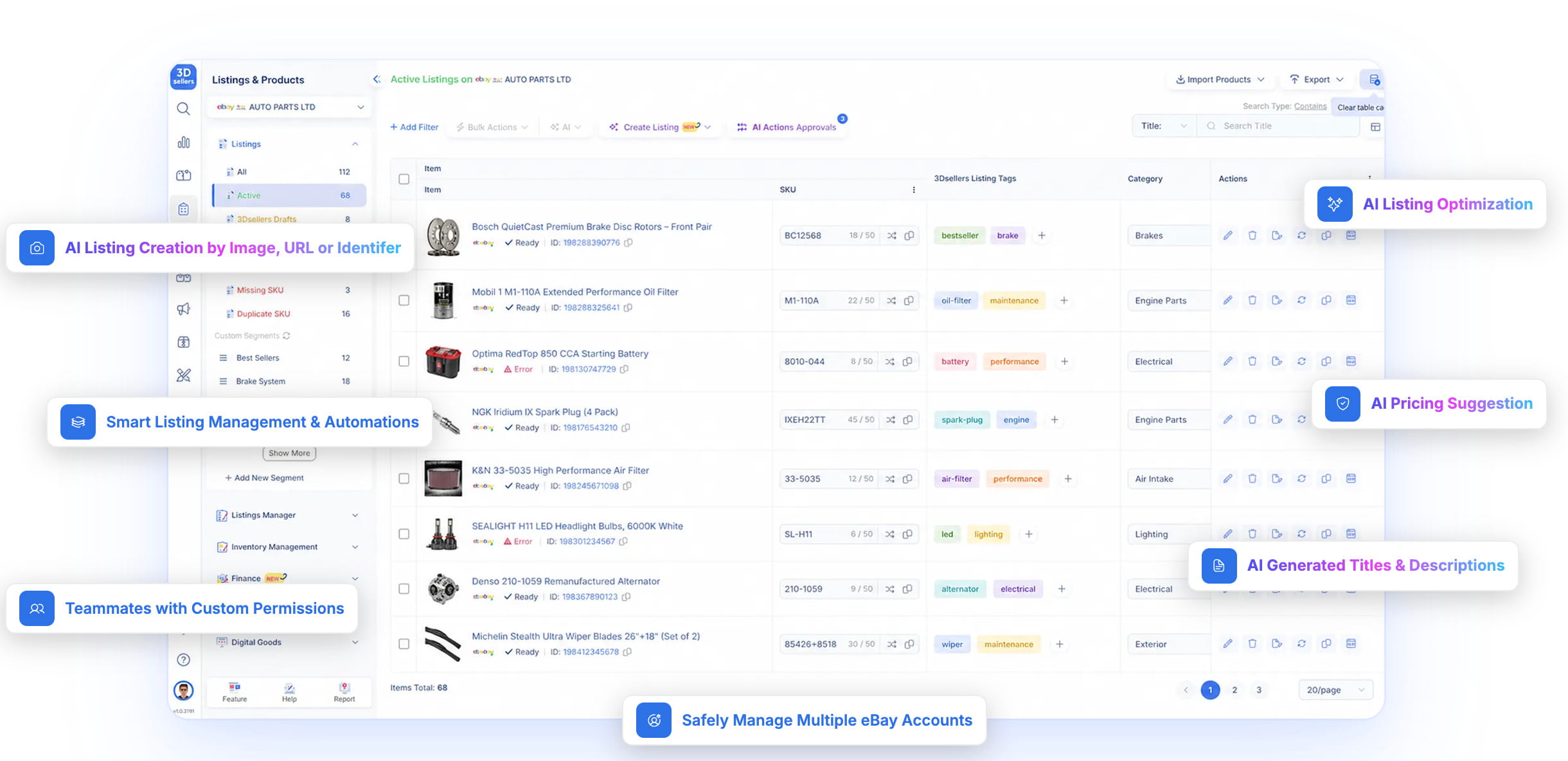
3Dsellers is an eBay selling manager that carries eBay’s Silver Solution Provider badge for 2026. Every plan includes the listings manager, the listing designer, an image editor and eBay Motors support.
Essential costs $19 a month for 100 active listings and one eBay account. Growth ($39.90) adds CSV import and scheduled imports, and Professional ($79) starts at 2,000 listings with no account limit. Its AI bulk actions, which rewrite titles and descriptions across many listings, are an add-on from $9 a month on Growth and above. Any plan can be tried for 7 days without a card.
Pros
- Every plan sells across all eBay regions, handy if you run eBay US and eBay UK listings side by side.
- CSV imports on Growth handle files of up to 50,000 rows.
Cons
- Inventory, orders and offers managers are missing from the $19 plan.
- Image hosting on Essential is limited to 1 GB.
CrazyLister
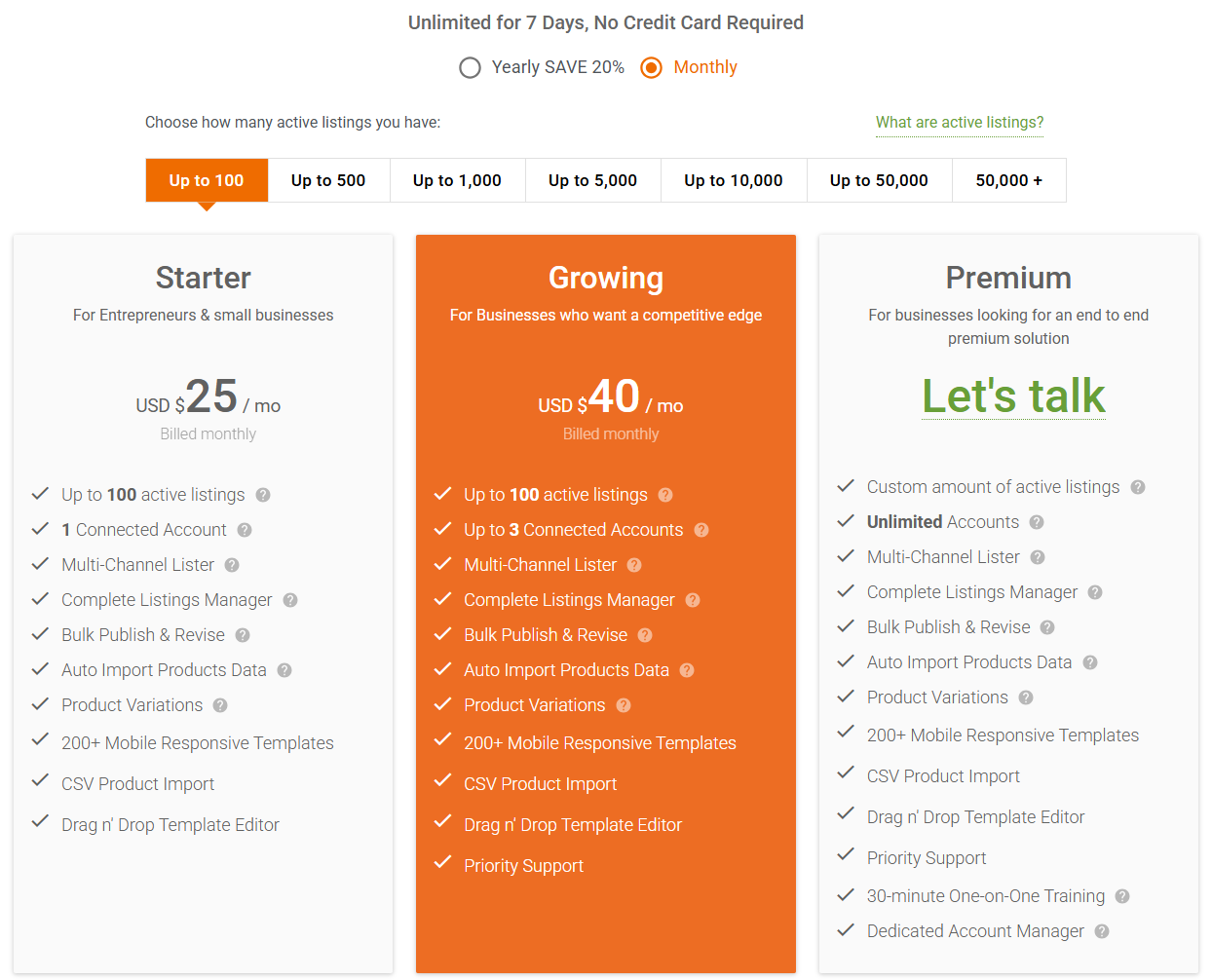
CrazyLister built its name on design, with more than 200 mobile-responsive templates and a drag-and-drop editor that non-designers can actually use. When we checked the current plans, the bigger surprise was how much bulk work the cheapest tier includes.
Starter costs $25 a month for up to 100 active listings. At up to 1,000 listings, Starter costs $60 and Growing (three connected accounts and priority support) costs $80. Annual billing saves 20%.
Pros
- Bulk publish and revise, CSV import and automatic product data import all come with the cheapest plan. Most tools here keep CSV for higher tiers.
- The drag-and-drop template editor needs no design skills.
Cons
- The price climbs quickly as your active listings grow.
- Starter connects a single account.
- Inventory sync is a separate $25 monthly add-on.
Auctiva
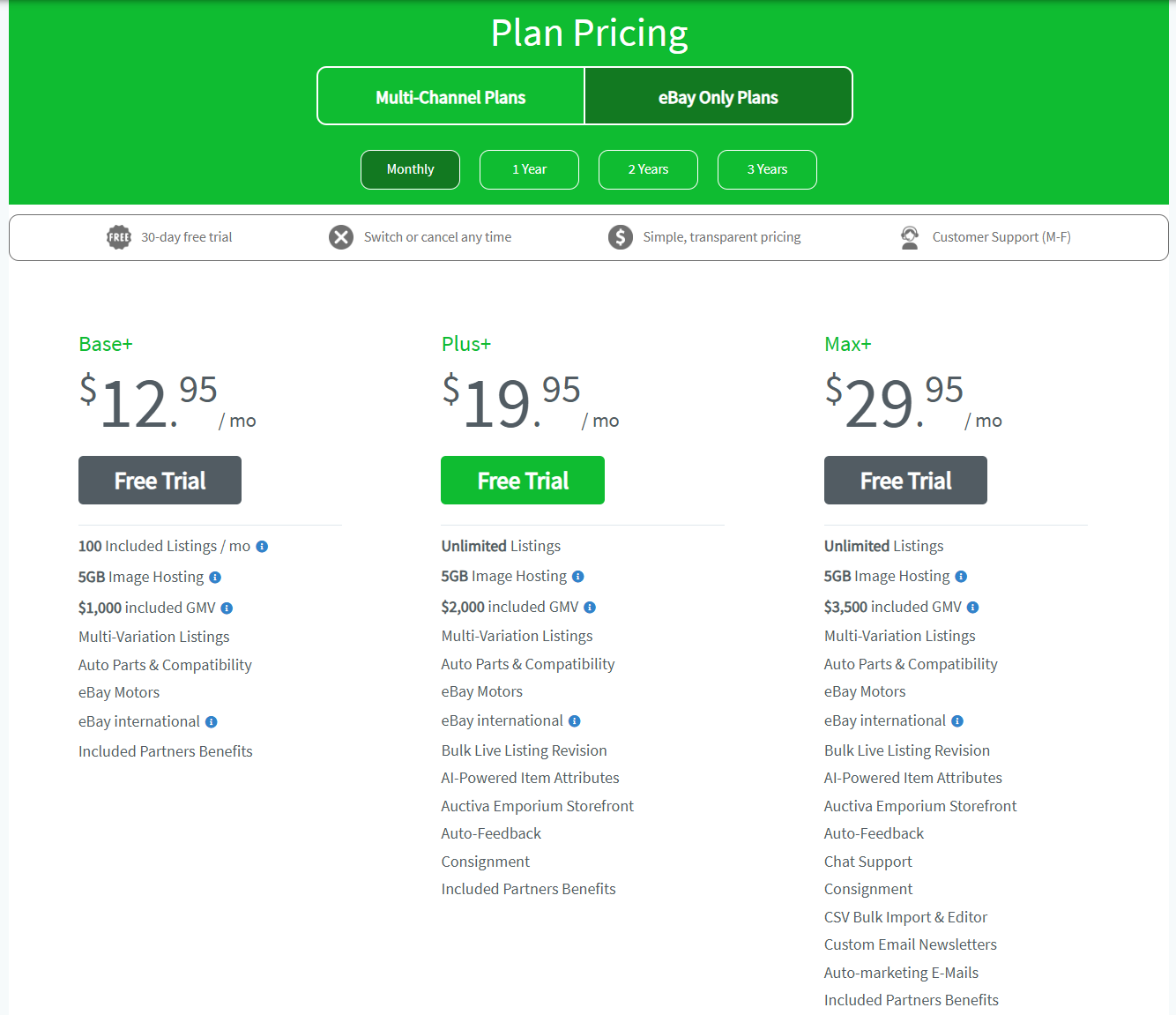
Auctiva sells separate eBay-only plans, and they start low. Base+ costs $12.95 a month with 100 listings per month and image hosting. Plus+ ($19.95) removes the listing cap and adds bulk live listing revision and AI-powered item attributes, while CSV bulk import and the spreadsheet editor need Max+ at $29.95.
Multi-year terms bring Base+ down to $8.95 a month, and separate multichannel plans are also available.
Pros
- The lowest starting price among the paid tools in this list.
- A 30-day free trial, the longest time-limited trial here.
- eBay international selling on every plan.
Cons
- Each plan includes a set sales volume, and Auctiva takes 1% on anything above it (capped at $9.95 per transaction and $199.95 a month), so a store selling $5,000 a month on Base+ pays about $52.95.
Crosslisting Tools
Crosslisting means creating a listing once, publishing it to eBay and other marketplaces, and removing it everywhere when it sells. For resellers of secondhand goods it’s often the biggest time saver, because one item can sell on whichever platform finds the buyer first.
Crosslist
Crosslist publishes listings from one universal form to 11+ marketplaces, including eBay, Poshmark, Mercari, Depop, Etsy and Facebook Marketplace.
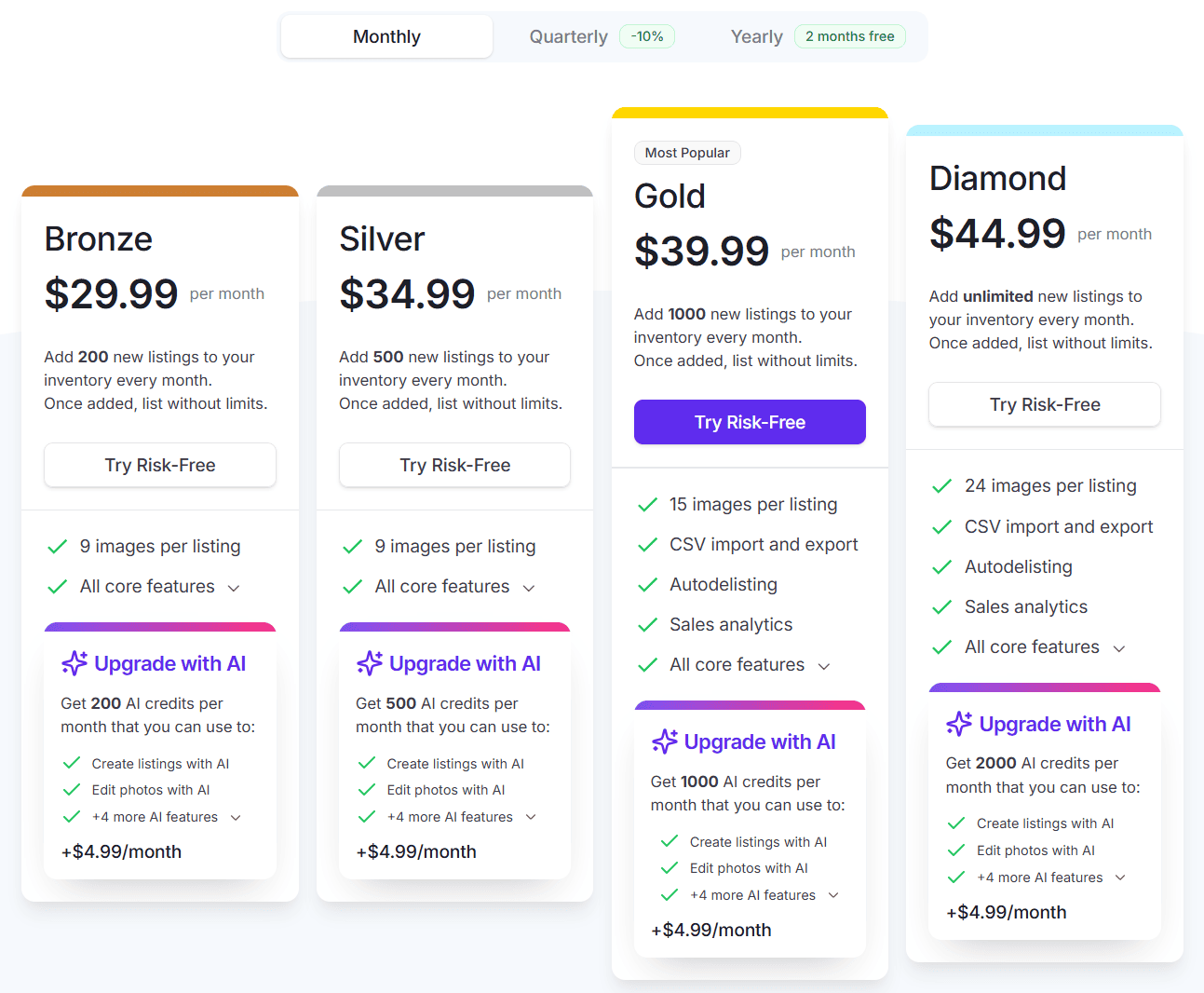
Bronze costs $29.99 a month and lets you add 200 new listings monthly. New users can get their money back within 3 days or before creating 20 listings, whichever comes first. One reseller wrote on Trustpilot in February 2026 that they moved 100 items from Vinted to eBay in one afternoon and made five eBay sales that evening.
Pros
- Bulk edits for prices, titles and descriptions are included on every plan.
- Listings post to several marketplaces in the background while you keep working.
Cons
- It’s available only to sellers in the US, the UK, Canada and Australia.
- CSV import and export, autodelisting and sales analytics start on Gold at $39.99, and AI features such as listing creation from a photo are a $4.99 add-on.
Vendoo
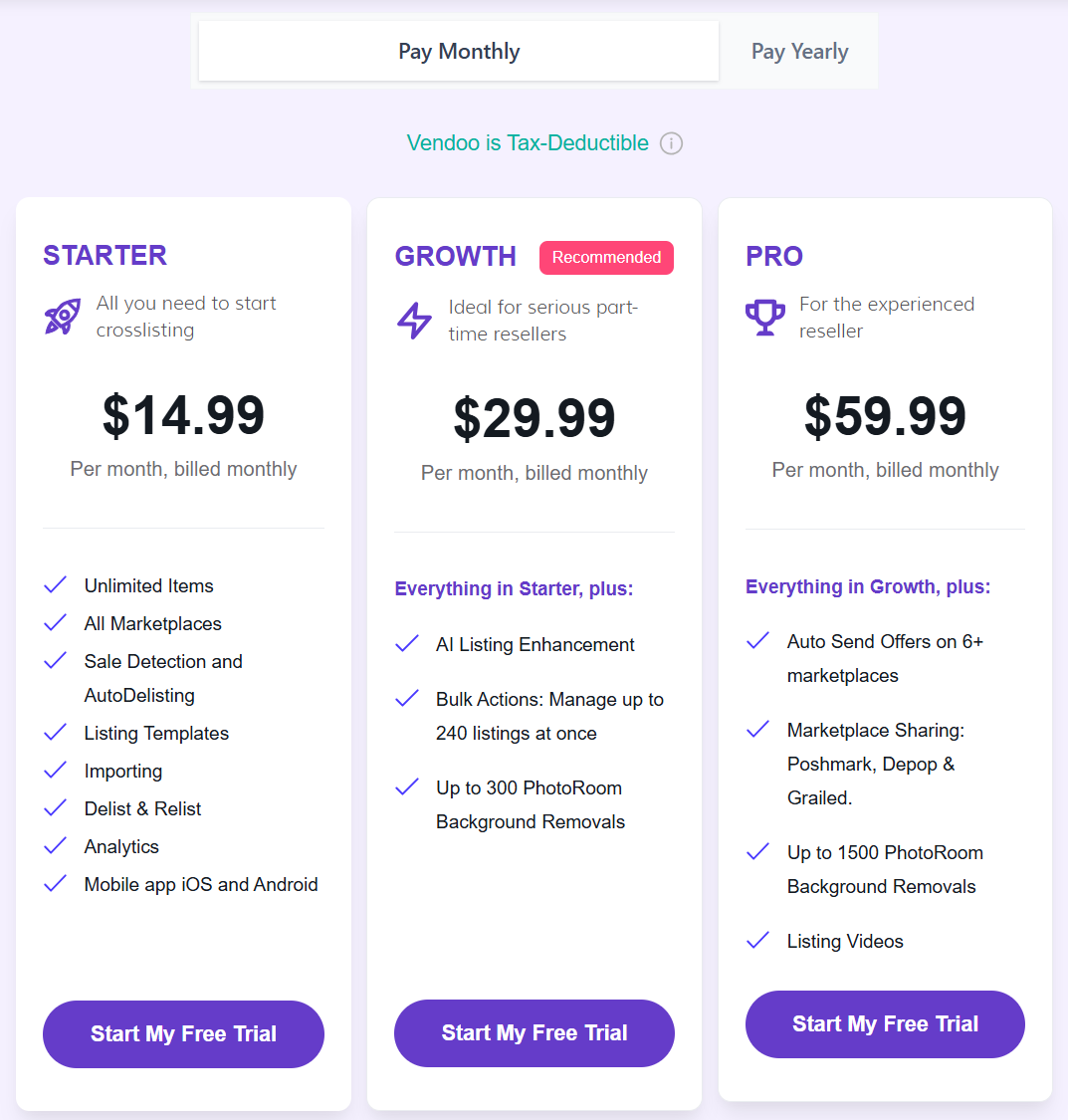
Vendoo is built around inventory and analytics as much as crosslisting. Starter costs $14.99 a month and includes unlimited items, all marketplaces, importing and listing templates.
Yearly billing gives you up to two months free, and there’s a free plan with 5 new listings a month. Paid plans start with a 14-day trial.
Pros
- Mobile apps for iOS and Android come with every plan.
- Sale detection and autodelisting come with the cheapest paid plan.
Cons
- Bulk actions on up to 240 listings at once and AI listing enhancement start on Growth at $29.99, and the trial requires a card.
- Sellers who list on eBay only will leave its crosslisting strengths unused.
List Perfectly
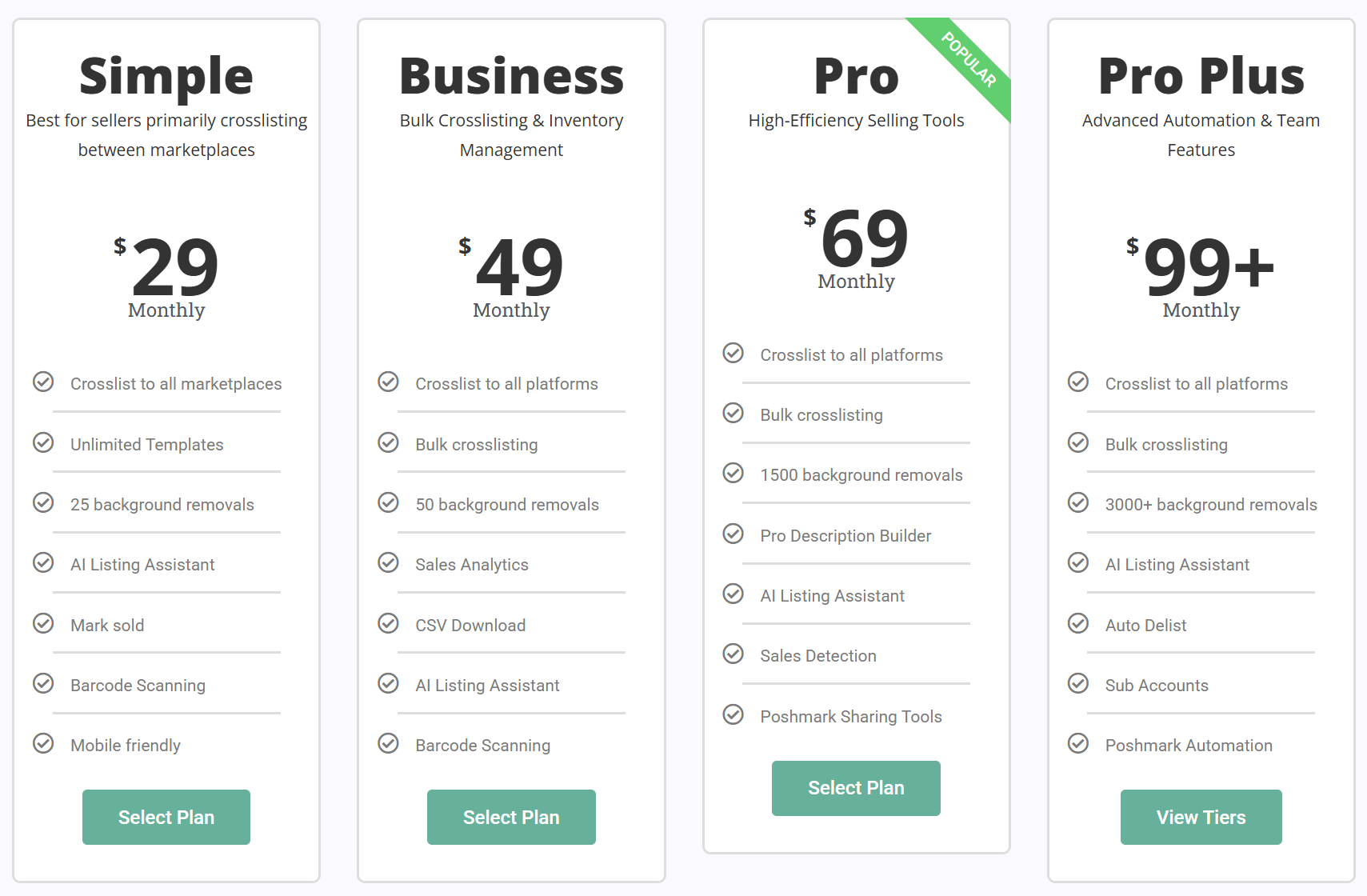
Plans at List Perfectly scale from solo resellers to teams. The Simple plan costs $29 a month. Pro ($69) brings smarter listing, automation and pricing tools, and Pro Plus runs from $99 to $249 depending on how many sub-accounts your assistants need. New members get 50 free listings and a 5-day money-back guarantee.
Pros
- No add-on fees on any plan.
Cons
- Bulk crossposting and bulk import start on Business at $49.
Nembol
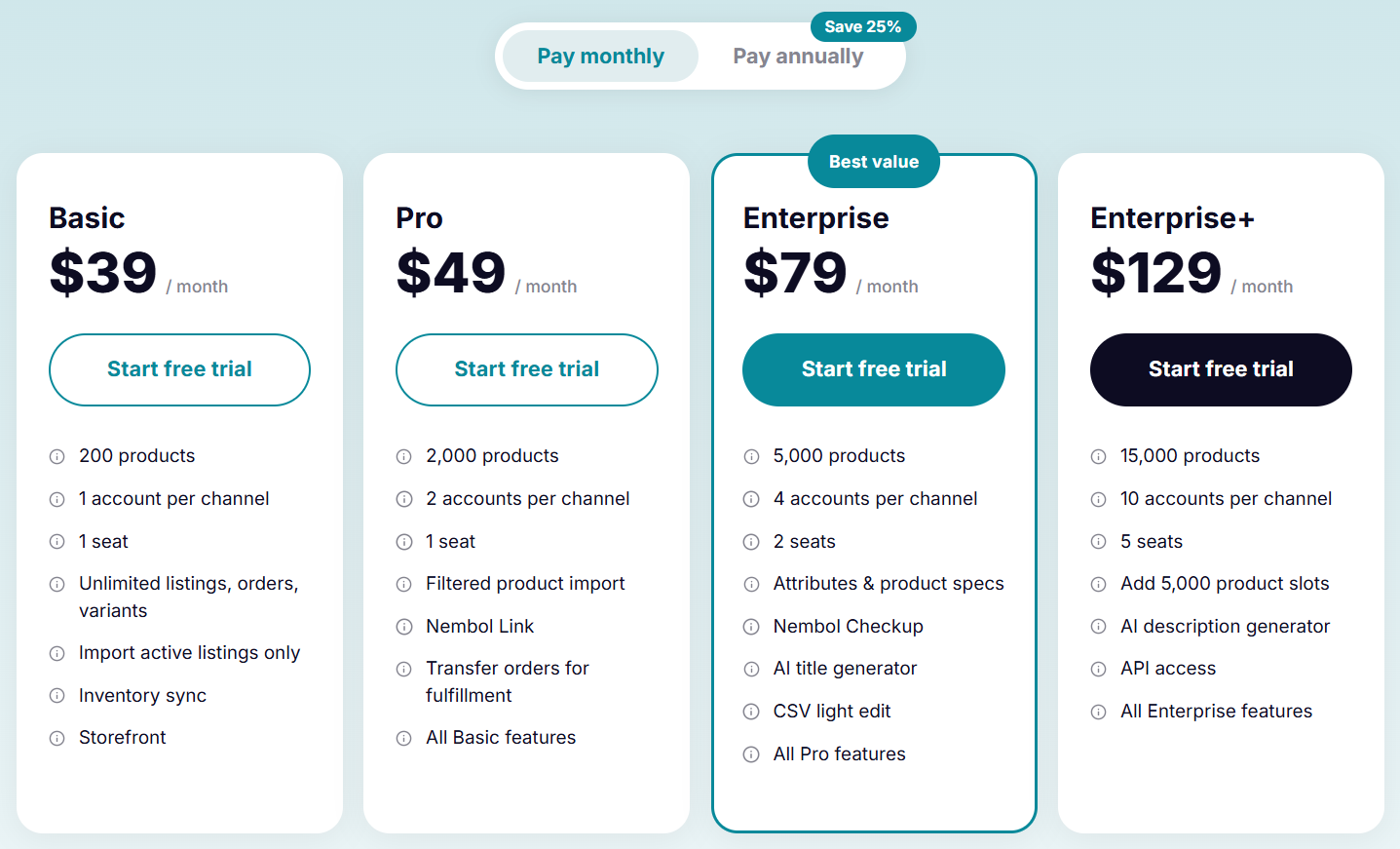
Nembol suits sellers who own their stock and want one catalog published to eBay, Amazon, Shopify, Etsy and other channels. Basic costs $39 a month for 200 products with unlimited listings, orders and variants. Pro ($49) raises the cap to 2,000 products and adds order transfer for fulfillment. Annual billing saves 25%.
Pros
- Inventory stays in sync across your own sales channels.
- The 14-day trial doesn’t ask for a card.
Cons
- It doesn’t monitor outside suppliers, and CSV light edit waits until Enterprise at $79.
Dropshipping Automation Tools
Dropshippers have the hardest listing problem, because the product data, the price and the stock all belong to someone else. These tools automate your eBay product listings from a supplier’s catalog. They also keep each listing updated after it goes live, which is what most sellers mean by automated eBay listing software. Arbitrage sellers buy low from retail and marketplace sources for the same reason, and the same tools serve them.
Most dropshipping automation platforms work the same way at the core. They import products in bulk and adjust prices when the supplier changes them, and they react when an item goes out of stock. Where they differ is in supported suppliers and channels, and in how much eBay listing automation the cheapest plan includes. Some sellers simply call this kind of software an eBay auto lister.
Before choosing one, read eBay’s rules. The eBay drop shipping policy allows fulfilling orders directly from a wholesale supplier, but it doesn’t allow listing an item and then buying it from another retailer or marketplace that ships straight to your buyer. Breaking that rule can lead to removed listings, selling restrictions or a suspended account.
That leaves two practical routes for Amazon-to-eBay sellers. One is to buy products in advance, hold the stock and ship it yourself, which fits the policy but ties up cash and space. The other is to let the retailer ship directly to the buyer after each sale. You avoid paying for inventory or renting a warehouse, but you carry the policy risk above. Some sellers choose the second model knowing this. Automation doesn’t change the policy, but it does take care of the everyday problems that get dropshipping accounts into trouble, like selling an item that’s already out of stock or missing a tracking upload. Our guide on how to start eBay dropshipping covers both routes in more detail.
AutoDS
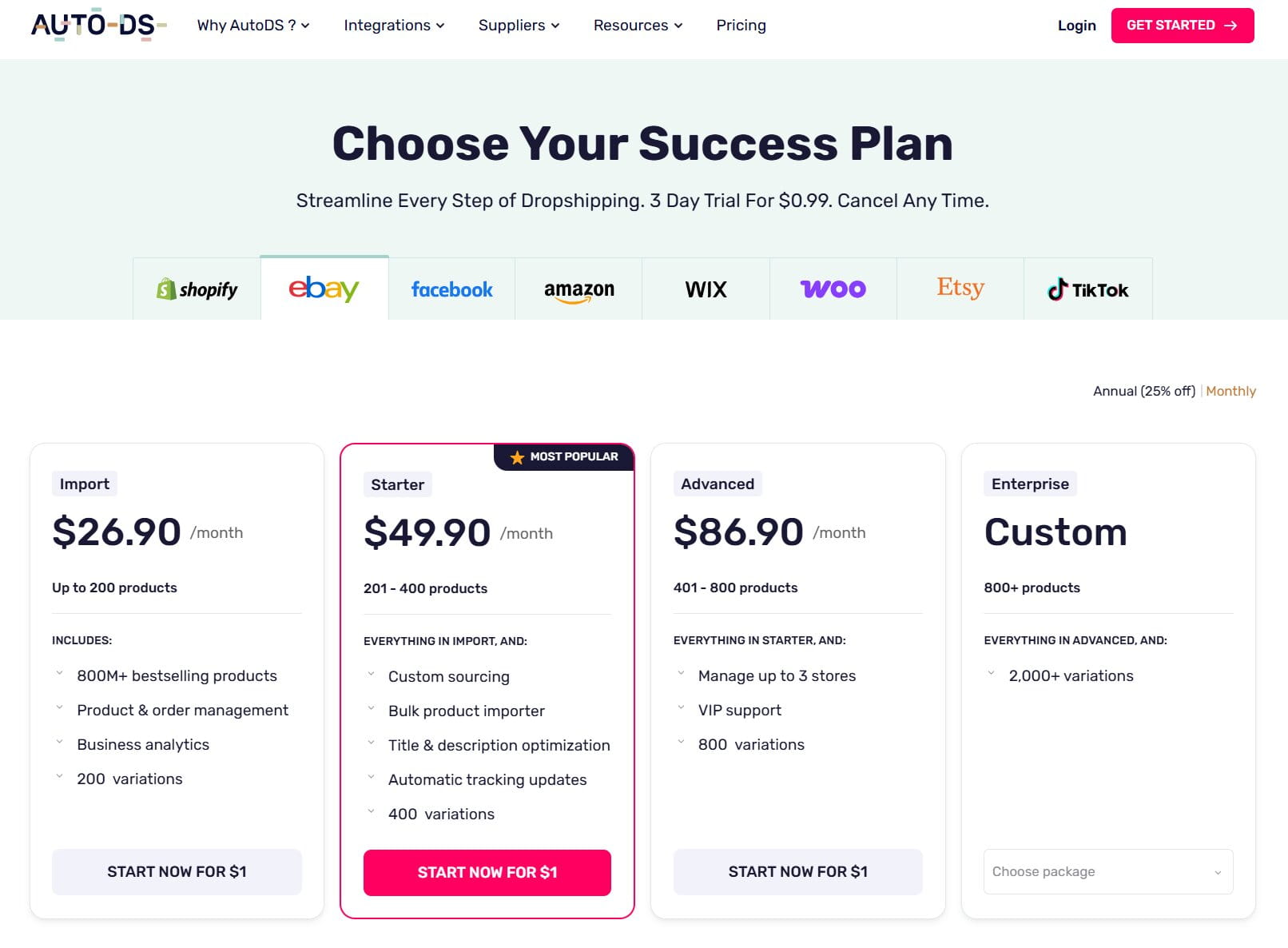
AutoDS is a dropshipping automation platform. On the eBay tab of its pricing page, Import costs $26.90 a month for up to 200 products, Starter $49.90 for 201 to 400, and Advanced $86.90 for up to 800 products across up to three stores. Annual billing takes 25% off, and the trial costs $0.99 for three days.
If you’ve used DSM Tool, it’s now part of AutoDS: its website redirects to AutoDS’s pricing page.
Pros
- Separate plans cover many channels besides eBay, including Shopify, Amazon and TikTok Shop.
- A large product database is included from the first plan.
Cons
- The bulk product importer, title and description optimization and automatic tracking updates start on Starter.
- Each plan also caps variations, 200 on Import.
Easync
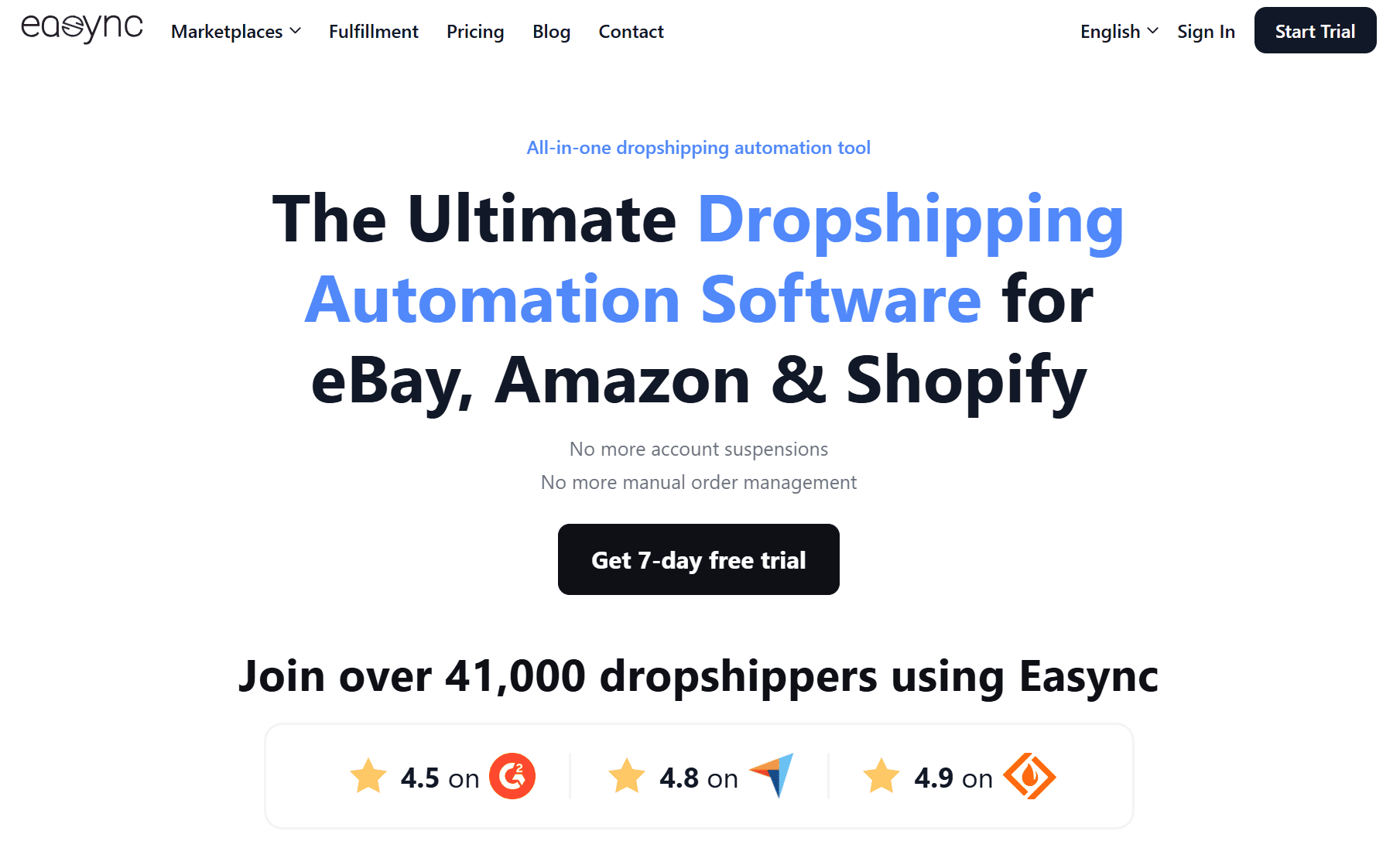
Easync is an Amazon to eBay dropshipping tool that also handles AliExpress to eBay and Amazon to Shopify, with Walmart available as a supplier source. It works as an Amazon to eBay lister first: you paste a list of product URLs or IDs into the Add Products window, or upload a CSV, then choose the supplier and region and publish the whole batch. Variations can be detected automatically, and a Best Price option lets you choose between the lowest supplier offer for quick sales and a higher, more stable offer that protects your margin. Batches can go live at once, wait as drafts or be scheduled for a later date, and the Easync Product ID Grab extension for Chrome collects product IDs while you browse.
After publishing, Easync rechecks supplier prices and stock every 30 minutes and updates the matching eBay listings. When an item goes out of stock at the source, the listing can stay in your store until it’s back, or you can turn on automatic deletion. Orders from Amazon can be placed automatically, and with Instant Tracking Easync sends tracking to eBay seconds after Amazon provides it. VeRO and blacklist protection helps keep restricted brands out of your store, and Fulfillment by Easync is there if you’d rather have orders placed through Easync’s own accounts.
That matters for account health. eBay rates every seller against its seller performance standards, which track transaction defects such as orders the seller cancels, late shipments and tracking uploaded on time, and a seller who falls below the minimum can face selling limits. Keeping stock in sync, placing orders automatically and uploading tracking within seconds all work in your favor on those metrics, so day-to-day mistakes are far less likely to put the account at risk. They don’t change eBay’s rule on retail sourcing, though.
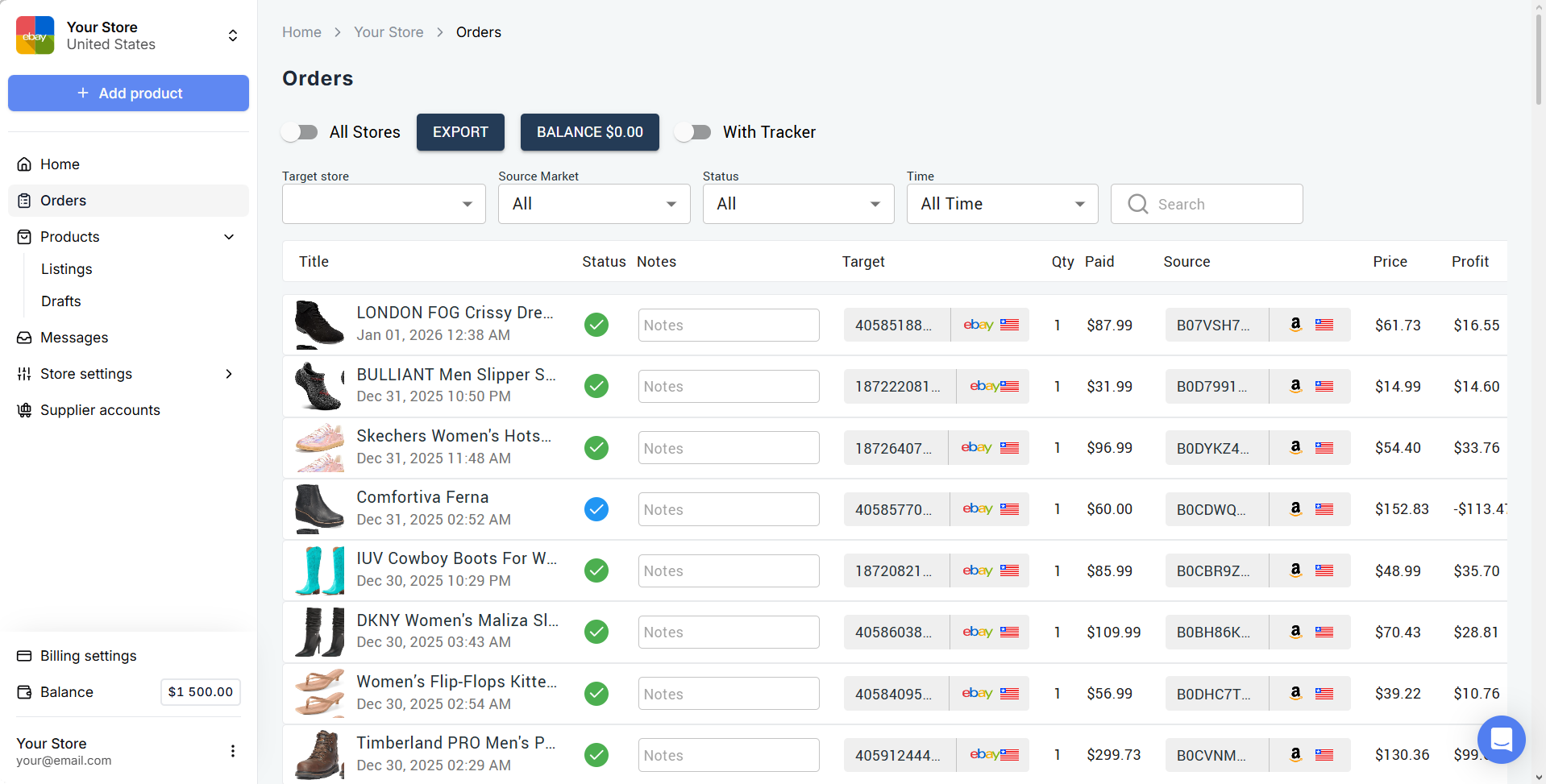
Basic costs $49.99 a month and covers up to 2,000 listings on repricing, and every plan includes unlimited drafts. Current tiers are on the Easync.io pricing page, and there’s a 7-day free trial.
Pros
- Bulk listing is included on every plan rather than locked behind a higher tier.
- It covers the whole order cycle, from the first listing to the tracking upload.
Cons
- eBay’s drop shipping policy still applies to retail-sourced orders, and no tool can change that.
- It’s built for dropshipping, so sellers who own their stock won’t use most of it.
Enterprise Platforms
Rithum (ChannelAdvisor)
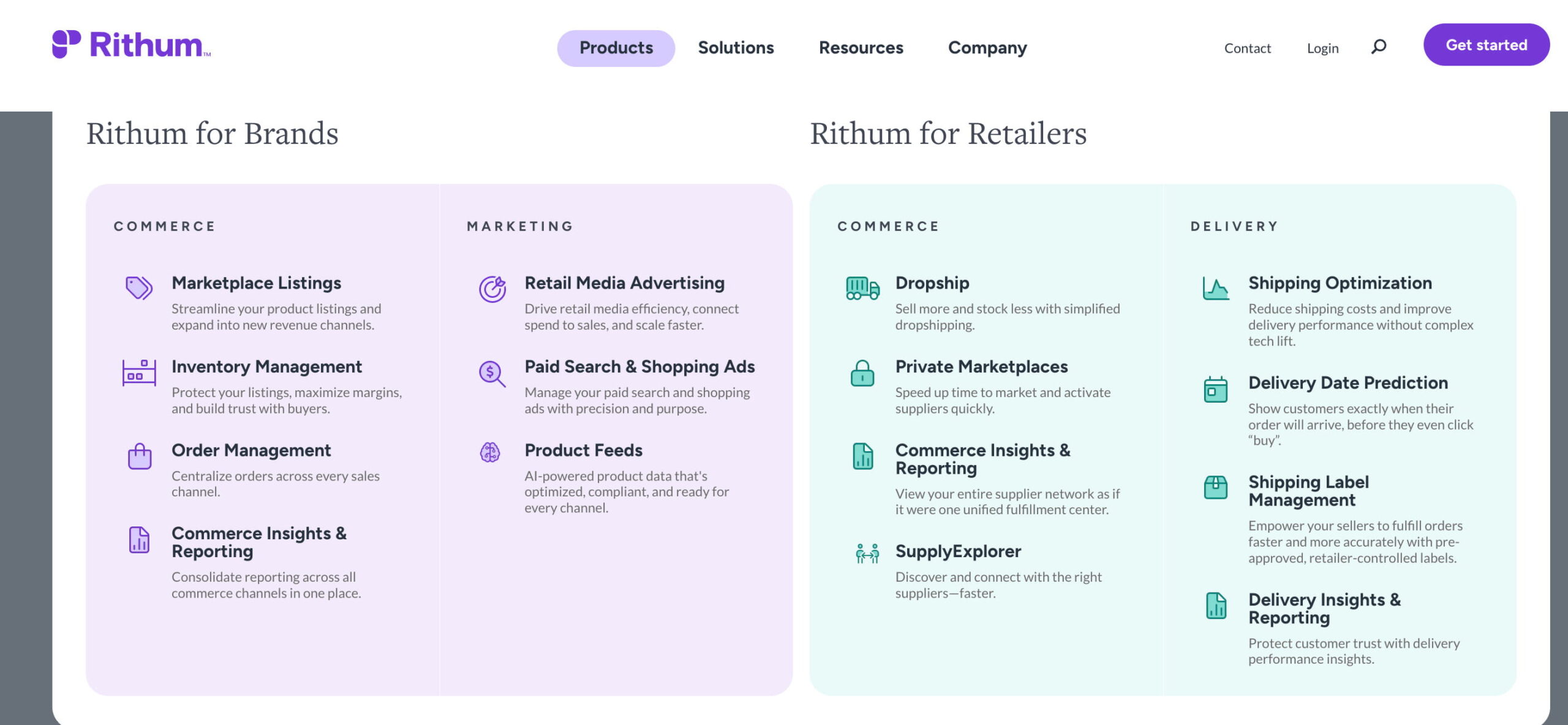
ChannelAdvisor is now part of Rithum, an enterprise commerce platform that covers catalog management, feed-based listing, order routing and inventory control.
Pros
- Built for very large catalogs spread across many marketplaces and retail partners.
Cons
- Pricing isn’t public, and every plan is quoted individually.
- Far beyond what most independent eBay sellers need.
If You’re Replacing InkFrog
InkFrog, the Wix-owned listing and template tool many eBay sellers relied on for years, shut down on June 1, 2026. Users had until May 31 to export their listing data as CSV. Live listings stayed on eBay, but anything InkFrog hosted, such as template code and images, stopped loading.
If you’re still looking for an InkFrog alternative, match it to what you used InkFrog for. Sellers who mainly needed templates and bulk revisions will feel at home in 3Dsellers, CrazyLister or Auctiva. Those who prefer desktop software can look at WonderLister or SixBit. Whatever you pick, host your images somewhere you control, so another shutdown can’t break your listings.
How to Choose an eBay Listing Tool
Start with where your products come from, because that decides more than any feature list. If you own the stock and sell on eBay only, Seller Hub plus a lister like 3Dsellers, CrazyLister or Auctiva covers almost everything. Selling the same items on Poshmark, Mercari or Depop changes the math, because a crosslister earns its fee the first time it prevents a double sale. When someone else holds the stock, you need eBay seller software that watches the supplier, which narrows the field to dropshipping automation tools like AutoDS and Easync.
Creating listings and managing them are worth judging separately. Some eBay listing tools are fast at publishing new batches but weak at editing what’s already live. eBay bulk listing management, such as changing prices on 800 listings or rescheduling a seasonal batch, is where much of the ongoing work sits once the store is up. Check whether bulk edits and CSV are included on the plan you can afford, because several eBay listing programs advertise a starting price that doesn’t include them.
Item specifics deserve a look too. Buyers filter eBay search results by them, so a tool that fills them completely across a whole catalog helps listings get found once they’re live.
AI listing from photos is useful for one-of-a-kind items and adds little for dropshipping, where product data already exists at the supplier. If you only want to automate eBay listings for products you already own, an eBay-only lister is usually enough. And if you’d rather not run software at all, compare eBay listing services, where a team creates listings for you.
Plan limits are the last thing to check, starting with how listings are counted. Some tools count active listings, some count new listings per month, and some count every product variation, so a dropshipping automation plan that treats each size and color separately fills up much faster than the headline number suggests. Account limits and country availability are worth a quick check too.
Frequently Asked Questions (FAQ)
Is there a free eBay bulk listing tool?
Yes. eBay’s Bulk Listing Tool, Seller Hub Reports and Magical Bulk Listing are free for any seller using Seller Hub, and together they cover bulk creation, spreadsheet uploads and AI drafts from photos. Free eBay listing software outside eBay comes with small allowances: Vendoo’s free plan includes 5 new listings a month, and List Perfectly gives new members 50 free listings.
How many listings can you bulk upload on eBay at once?
eBay’s Bulk Listing Tool lets you work with up to 2,000 listings at a time. For bigger catalogs, sellers split the work across spreadsheet uploads in Seller Hub Reports or move to eBay’s Merchant Integration Platform or a third-party tool built for that volume.
What is the best eBay listing software?
It depends on how you sell. Crosslist and Vendoo suit resellers working across several marketplaces. 3Dsellers, CrazyLister and Auctiva suit sellers who list on eBay only, with Auctiva as the cheapest paid entry, and AutoDS or Easync fit dropshippers who need supplier price and stock tracking.
Where can I find a template for eBay bulk listings?
Open the Reports tab in Seller Hub and download the listing template for your category. Fill in one row per item and upload the finished file through the same tab.
What is eBay’s magical listing tool?
It’s eBay’s AI feature that creates listings from product photos. The single-item version works in the eBay app, while Magical Bulk Listing in Seller Hub turns a batch of photos into draft listings with suggested categories, titles and item specifics for you to review before publishing.
Does eBay allow third-party listing software?
Yes. eBay keeps a list of third-party providers in its Seller Center, and tools such as Vendoo state that they connect through eBay’s API. Software doesn’t change the rules, though: every listing a tool creates still has to follow eBay policies, including the drop shipping policy.
Final Thoughts
The best eBay listing tools for you depend on how you source and where you sell. Start with eBay’s free tools and pay for software only once they stop covering what you need. Before you subscribe, check which plan actually unlocks bulk features, because that number is often higher than the price on the homepage.
Ready to automate your dropshipping?
Join 41,000+ dropshippers using Easync.
Start Your Free 7-Day Trial G24.6/5
 Capterra4.8/5SourceForge4.8/5