
- articles
- eBay Dropshipping
eBay Sold Listings: How to See Sold Items and Use Them to Find What to Sell
To see sold listings on eBay, search for the item, open the filters and tick Sold items. On a computer the checkbox sits in the left sidebar (or in Advanced Search). In the app it’s under Filter. eBay then shows only listings that actually sold, with the sold price in green and the date it sold. Public sold results go back about 90 days. For older data you need Product Research (Terapeak) in Seller Hub, which covers 3 years.
I check sold listings before I list anything. Active listings tell you what people are asking. Sold listings tell you what buyers paid, how often, and in which format. Most guides stop at the checkbox. This one also covers how to read the results, how to work out sell-through rate, and how I turn a sold search into a yes or no on a product I’d dropship.
Quick answer
- Type the product into eBay search and press Enter.
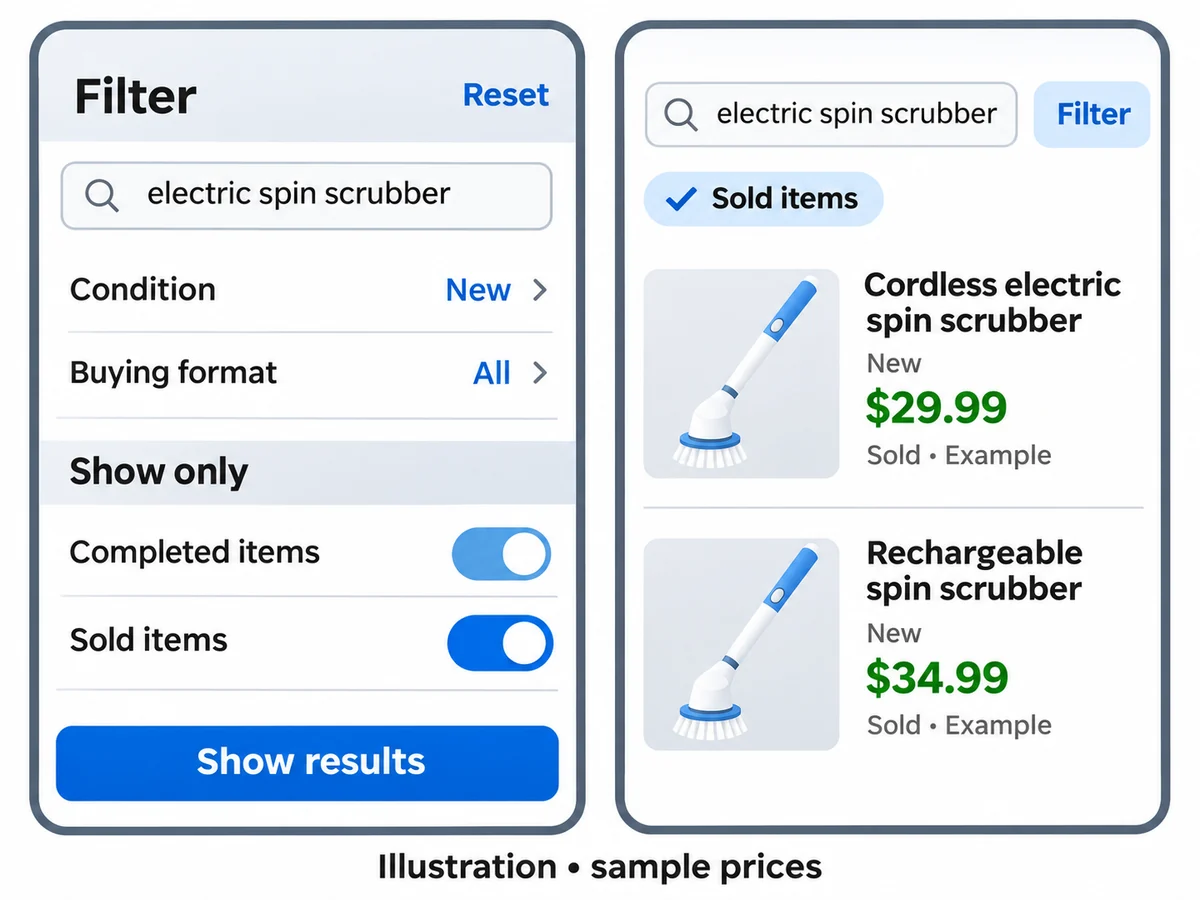
- Desktop: scroll the left filters to Show only and tick Sold items. App: tap Filter, turn on Sold items, then Show results.
- Sort by Ended recently to see the newest sales first.
Shortcut: add &LH_Sold=1&LH_Complete=1 to the end of any eBay search URL and you get the same sold view.
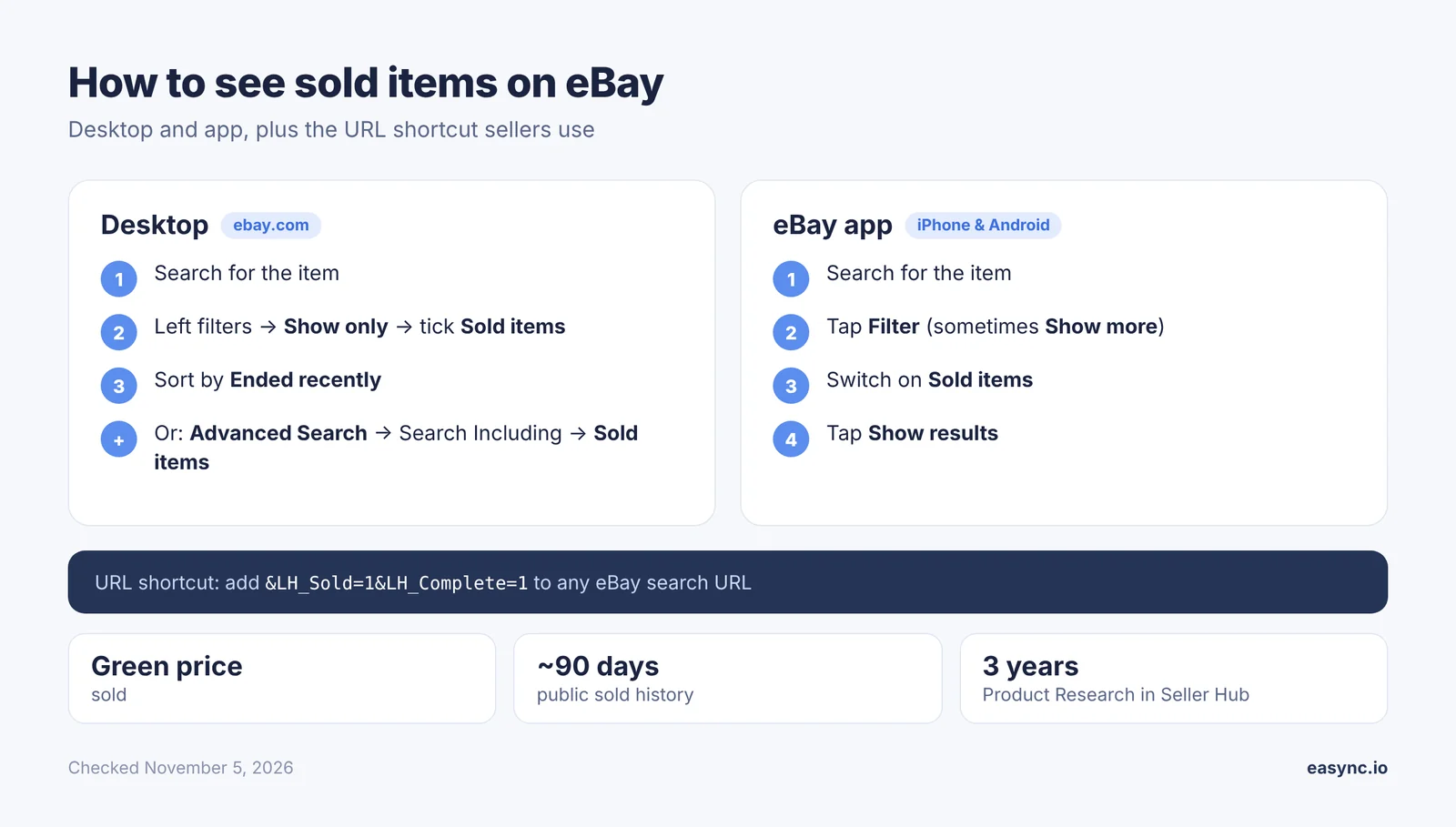
How to see sold items on eBay on a computer
There are two ways in. I use the sidebar filter for quick checks and Advanced Search when I want to narrow things down before the results load.
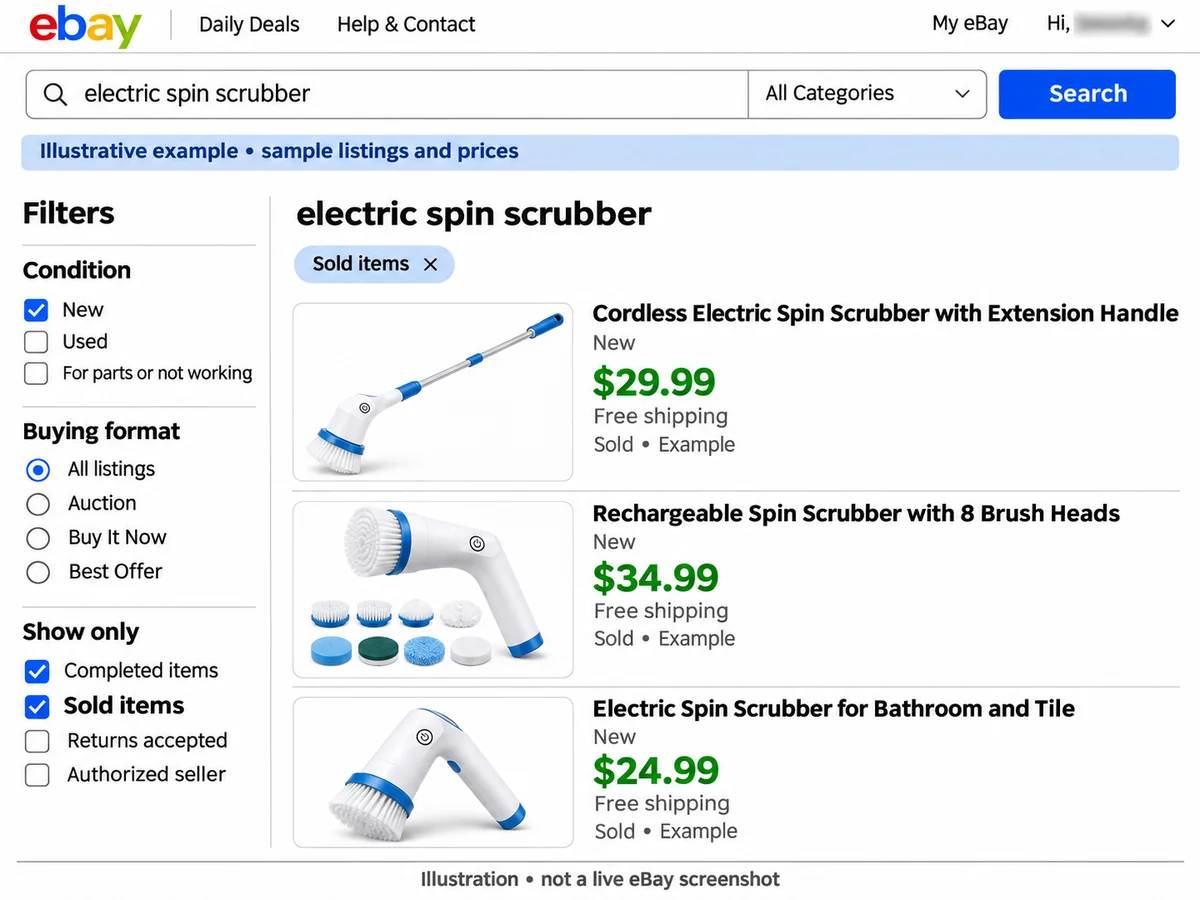
Option 1: the Sold items filter
- Search for the product the way a buyer would, for example electric spin scrubber.
- In the left sidebar, scroll down to Show only.
- Tick Sold items.
- Change the sort to Ended recently so the newest sales sit on top.
If eBay asks you to sign in first, do it. When I tried the sold filter signed out on November 5, 2026, eBay sent me to the sign-in page before it showed any results.
Option 2: Advanced Search
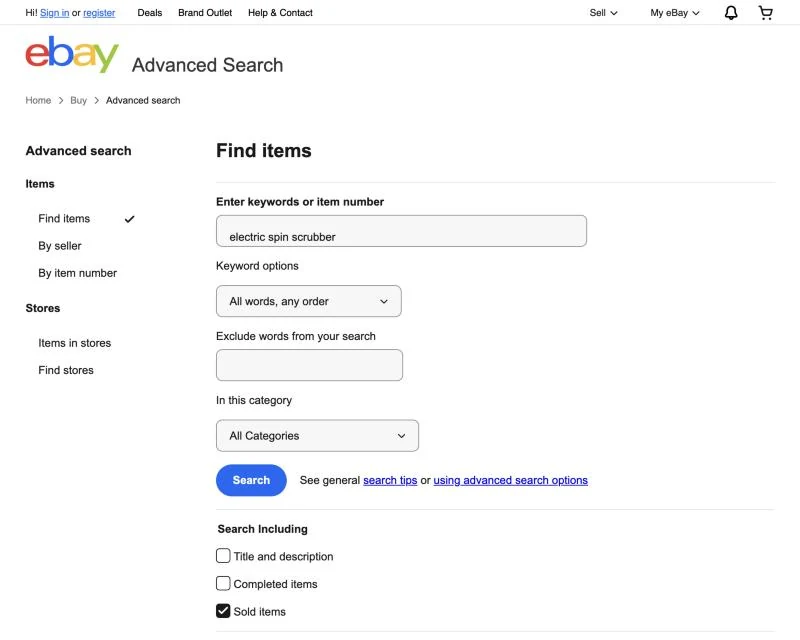
- Open eBay Advanced Search (the Advanced link next to the search button).
- Enter your keywords and, if you want, pick the category.
- Under Search Including, tick Sold items.
- Set the rest before you search: condition (New), buying format (Buy It Now if that’s how you’ll sell), and item location (US only if you ship domestically).
- Click Search.
Sold items vs Completed items
| Filter | What you see | When I use it |
|---|---|---|
| Sold items | Only listings that ended with a sale | Checking real prices and demand |
| Completed items | Every listing that ended, sold or not | Seeing how many listings failed to sell at a given price |
Completed items on its own is useful for one thing: spotting a price ceiling. If ten listings at $49.99 ended unsold and the ones at $36 sold, you know where buyers stop.
The URL shortcut
Every eBay search URL accepts two parameters: LH_Sold=1 (sold only) and LH_Complete=1 (ended listings). Paste them after any search, for example:
https://www.ebay.com/sch/i.html?_nkw=electric+spin+scrubber&LH_Sold=1&LH_Complete=1
I keep a bookmark like this for each product I watch and swap the keyword.
How to see sold items in the eBay app
The steps are the same on iPhone and Android:
- Open the eBay app and search for the item.
- Tap Filter at the top of the results.
- Find Sold items (on some versions you tap Show more first) and switch it on.
- Tap Show results.
If you don’t see the Sold items switch, update the app. The filter layout changes between versions, but the switch has been under Filter for years.
Your own sold items
This is a different place. Your own sales live in My eBay > Selling > Sold or in Seller Hub > Orders. eBay keeps them there for the last 90 days. In Seller Hub you can search orders by buyer, status or date range.
How to read sold listings (and what most people get wrong)
A sold search shows more than prices. Here is what each part means.
| What you see | What it means | How I use it |
|---|---|---|
| Price in green | The item sold at this price | Real market price |
| Green price crossed out, “Best offer accepted” | It sold for less than the listed price. eBay doesn’t show the real amount in search | Treat the crossed price as a ceiling, not a sale price |
| Black or red price (Completed items only) | The listing ended without a sale | Shows where buyers stopped paying |
| “Sold” date on the card | The day it sold | Count sales per week to spot trends |
| “x bids” | Auction result | Auctions swing a lot; I look at Buy It Now sales for steady pricing |
| Shipping line | What the buyer paid for delivery | Add it to the price. A $19.99 + $8 shipping sale is a $27.99 sale |
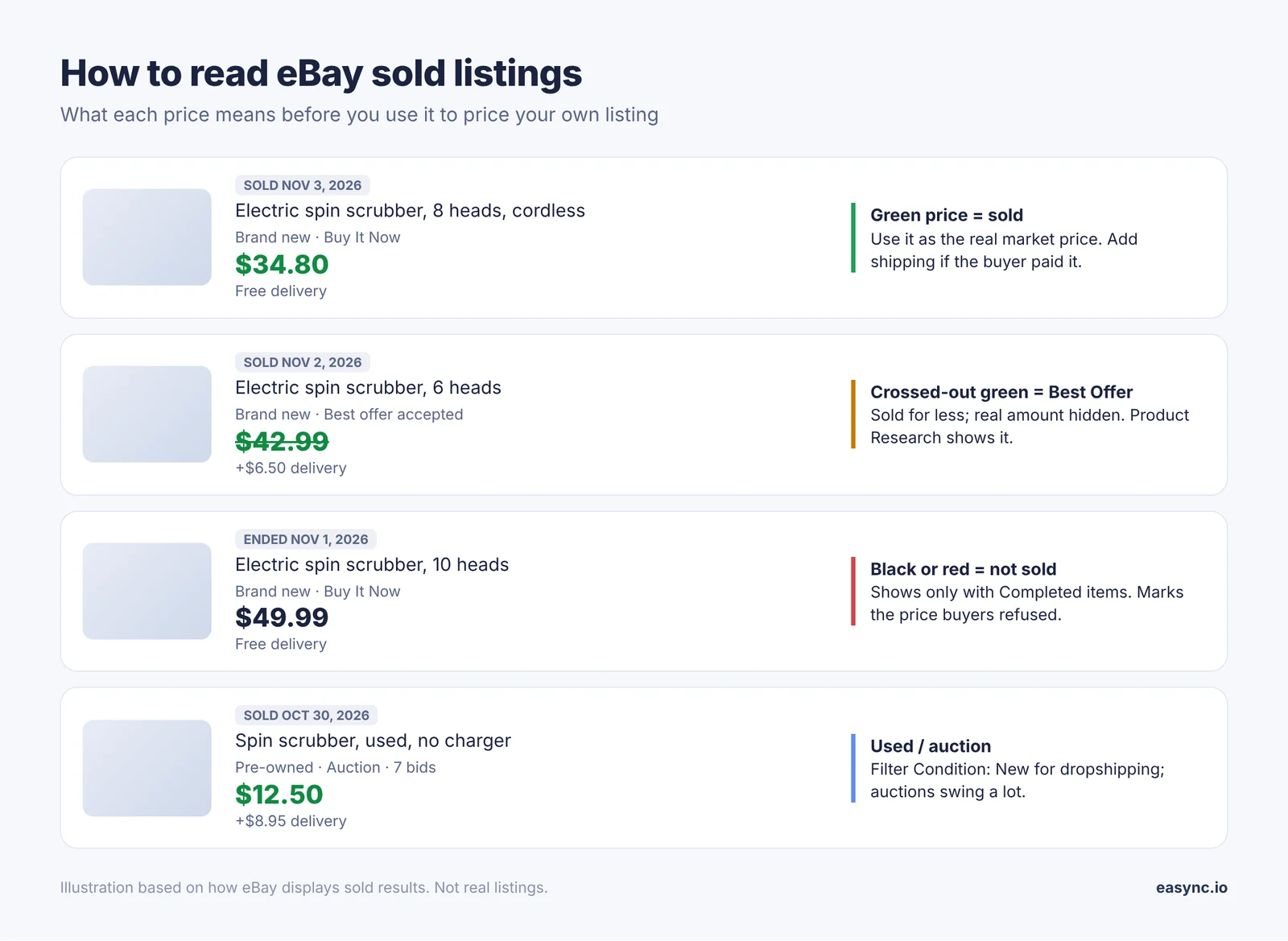
Two mistakes I see all the time:
- Pricing off the crossed-out Best Offer prices. Those sellers took less, maybe a lot less. To see the real accepted amount, use Product Research in Seller Hub (next section). It records the price the item actually sold for, Best Offers included.
- Mixing used and new. For dropshipping you sell new items, so filter Condition: New. Used sales drag the average down.
Sell-through rate: is there real demand?
Sold count alone can fool you. Fifty sales look great until you see 400 live listings fighting for them. Sell-through rate (STR) puts the two numbers together:
STR = sold listings ÷ (sold listings + active listings) × 100
Run the same search twice: once with Sold items (last 90 days), once without (what’s live now). Then:
| STR | What it tells me |
|---|---|
| Under 20% | Too many sellers for the demand. I skip it unless I can win on price |
| 20–50% | Normal. Worth it if the margin holds and listings aren’t all from top-rated sellers with free returns |
| Over 50% | Demand is ahead of supply. These are the items I test first |
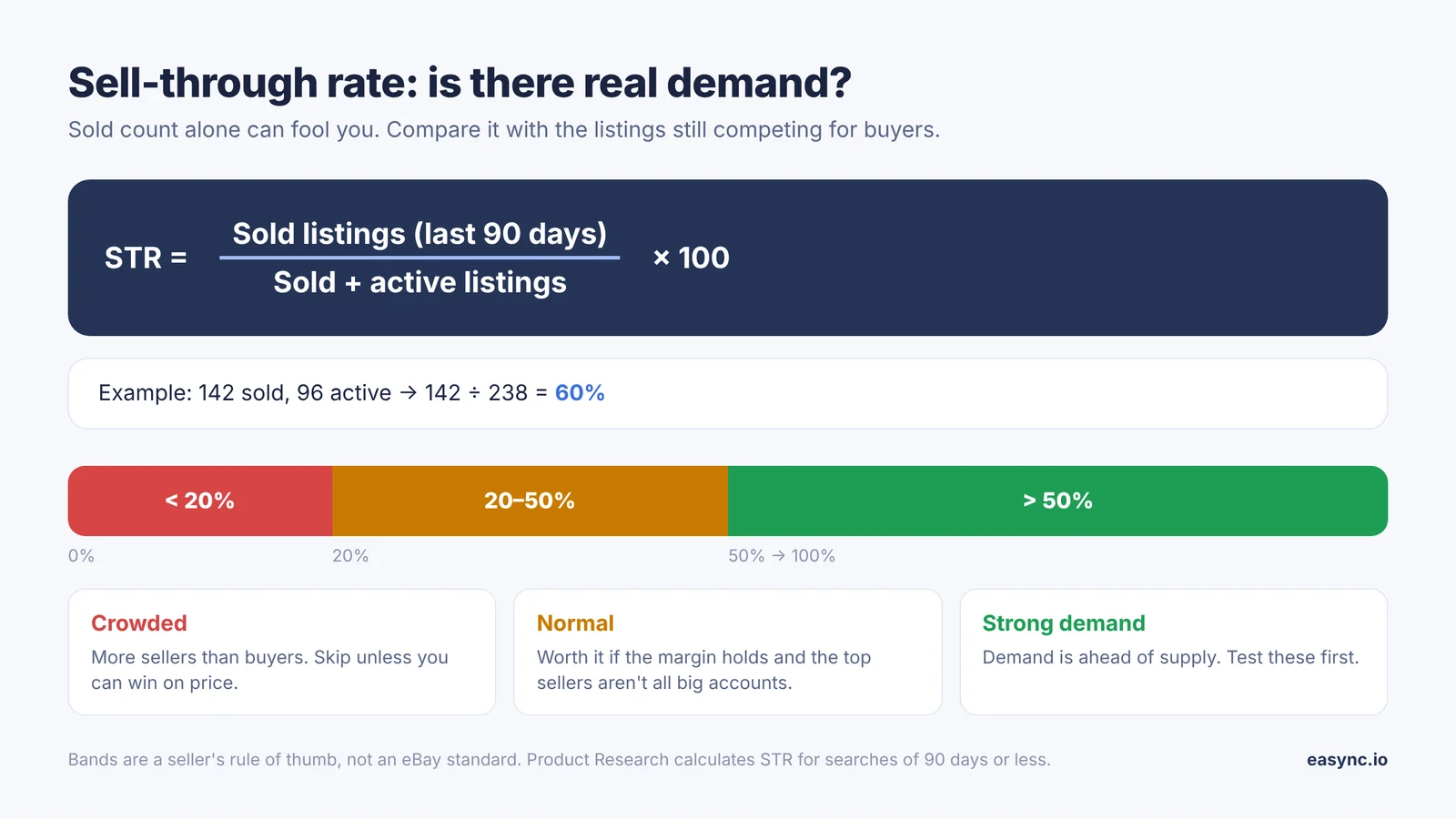
These bands are my own rules of thumb from listing tests, not an eBay standard. Product Research calculates STR for you on searches of the last 90 days or less.
How to see eBay sold items older than 90 days
Public sold search stops at roughly 90 days. To go further back, use Product Research (the tool eBay used to sell as Terapeak). It lives in Seller Hub, every seller with Seller Hub access can use it, and it costs nothing extra.
- Go to Seller Hub > Research.
- Type the keyword, or paste an item number.
- Set the date range. You can go back up to 3 years.
- Filter by condition, format (auction or fixed price) and marketplace, then search.
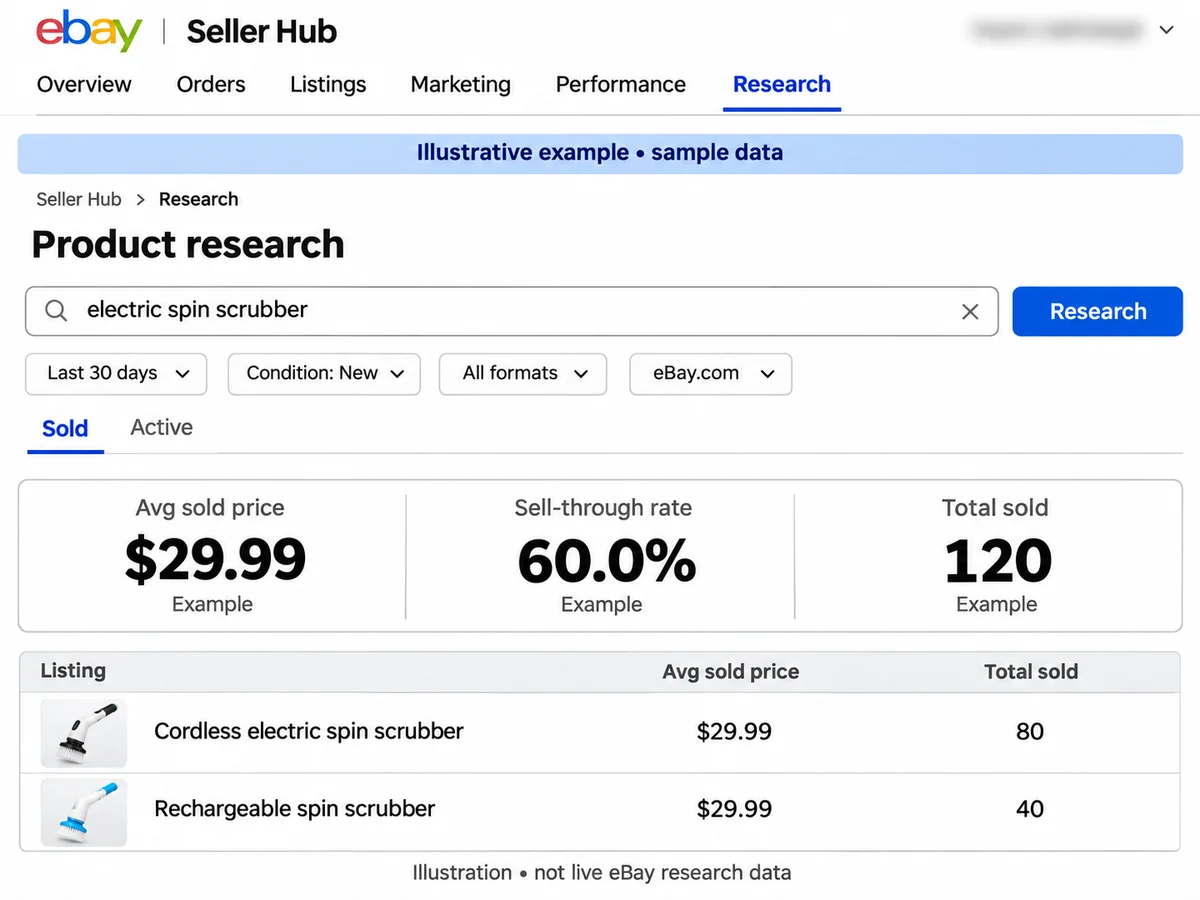
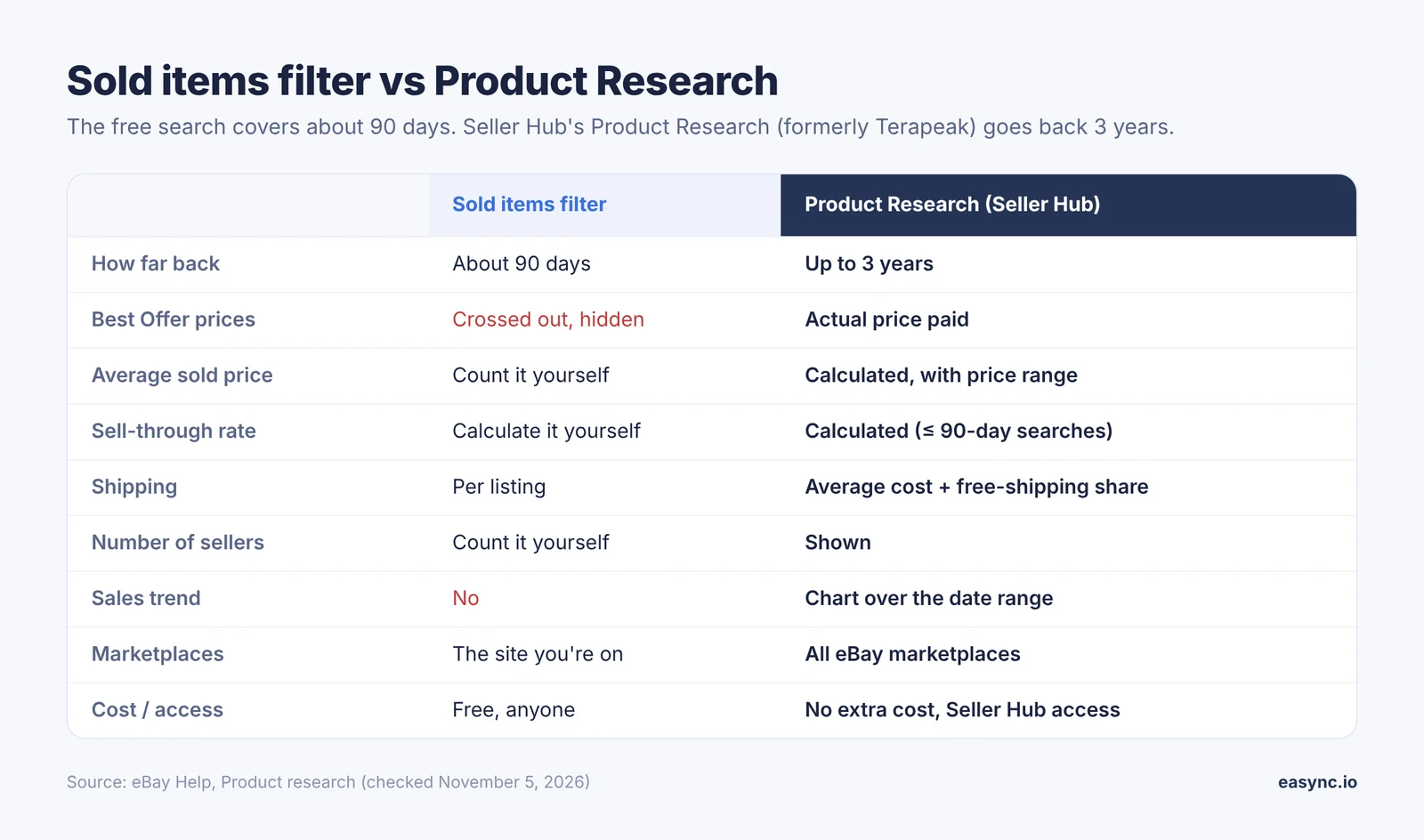
What Product Research shows that the free search doesn’t
| Sold items filter | Product Research (Seller Hub) | |
|---|---|---|
| How far back | About 90 days | Up to 3 years |
| Best Offer prices | Crossed out, real amount hidden | Actual price paid |
| Average sold price and range | You add it up yourself | Calculated |
| Sell-through rate | You calculate it | Calculated (searches of 90 days or less) |
| Shipping | Per listing | Average shipping cost and how many listings offer free shipping |
| Number of sellers | You count | Total sellers who sold the item |
| Sales trend | No | Chart over the date range |
| Marketplaces | The site you’re on | All eBay marketplaces |
Business sellers with a Basic Store or higher also get Sourcing insights, which points to categories where buyer demand is high and supply is short.
The 3-year range matters for seasonal products. Last year’s November and December sales tell you far more about this year’s Q4 than the last 90 days do.
How I use sold listings to decide what to sell
Here is the routine I run before I list a product I’ll dropship. It takes about ten minutes per item.
- Search sold items, new condition, US only, last 90 days. I count the sales and write down the median sold price, not the average. One $90 bundle can pull the average way off.
- Run the same search on active listings. Count them and work out the STR.
- Check who is selling. If the top 10 sold listings are all one or two big sellers with free returns and same-day handling, I’m competing with their account history, not just their price.
- Look at the photos and titles that sold. The words in the titles that sold go into my title. Our eBay title builder speeds this up.
- Find the supplier price and do the math. Sold price minus supplier cost, eBay fees and ad spend. If the margin is thin at the median price, I walk away.
- Check last year in Product Research if the item is seasonal.
Worked example (illustrative numbers)
Say a sold search for a new electric spin scrubber shows this:
| Number | Value |
|---|---|
| Sold in the last 90 days (new, US) | 142 |
| Active listings right now | 96 |
| Sell-through rate | 142 ÷ 238 = 60% |
| Median sold price, free shipping | $34.80 |
| Supplier price, shipping included | $19.99 |
| eBay final value fee (13.6% + $0.40 on the total incl. 8% sales tax) | $5.51 |
| Promoted Listings at 4% of the total | $1.50 |
| Profit per sale | $7.80 |
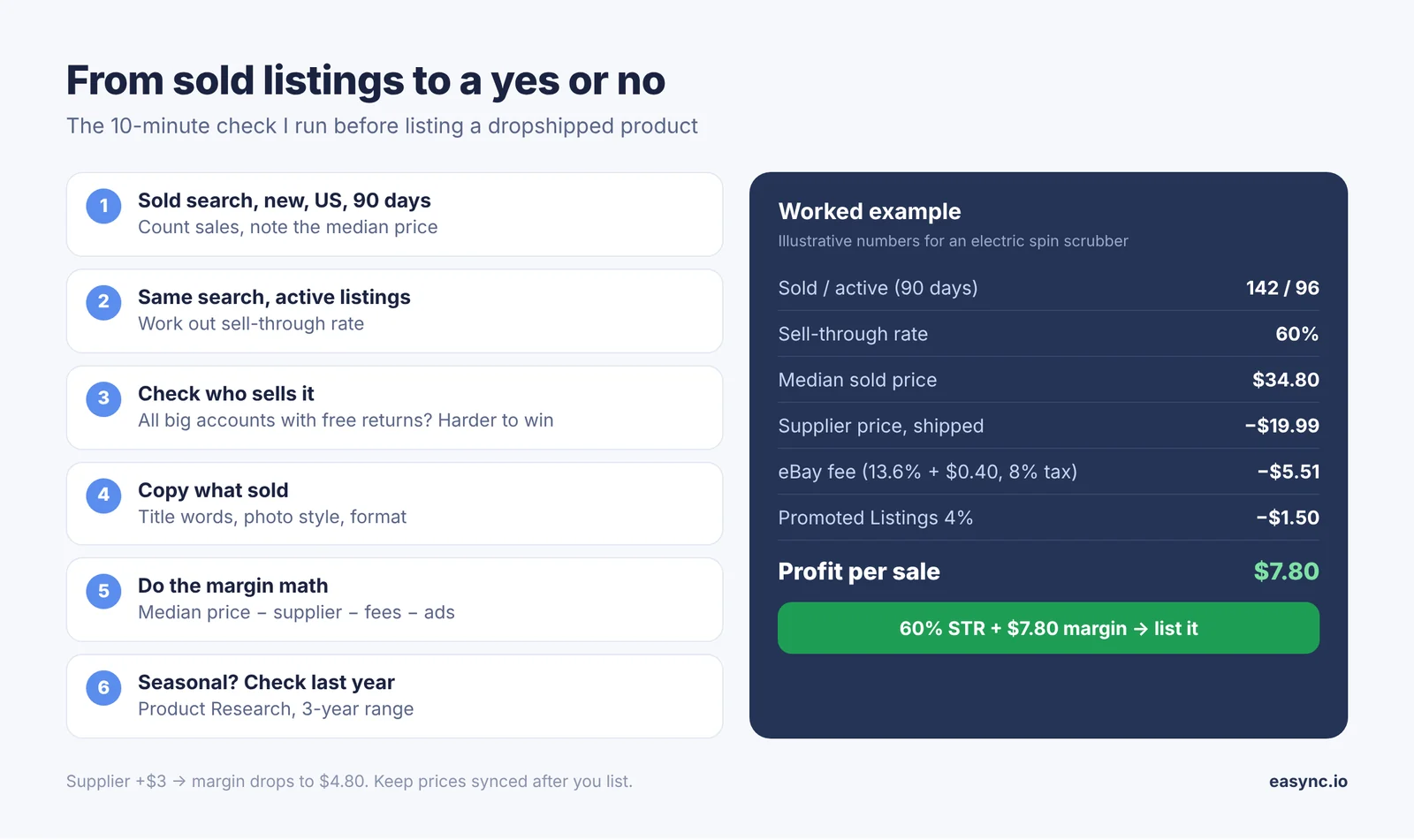
A 60% STR and $7.80 a sale clears my bar. I’d list it at or just under the median and watch the first two weeks. If the supplier raises the price by $3, the margin drops to $4.80, so the price has to move with it. You can check your own numbers with our eBay fees calculator.
That last part is where most dropshipping stores lose money. Sold listings tell you what to sell on the day you research. They don’t tell you that your supplier ran out on Tuesday or raised the price on Friday.
One policy point before you source: eBay allows dropshipping only from a wholesale supplier. Buying from another retailer or marketplace and having it ship straight to your buyer breaks eBay’s rules and can get the account restricted.
More ways to find products: what to sell on eBay and how to find top-selling items on eBay.
After the research: keeping prices and stock right
Sold listings give you the starting price and the go-ahead. After that, the numbers move every day: the supplier’s price, the supplier’s stock, and the competition. When I ran listings by hand, the losses came from three things: an item went out of stock at the supplier and I had to cancel (that’s a defect on your account), the supplier raised the price and I sold at a loss, or I simply didn’t get to the order fast enough.
Easync handles that part for eBay sellers:
| After you list | By hand | With Easync |
|---|---|---|
| Supplier stock | You check when you remember | Monitored around the clock; the eBay listing goes out of stock when the supplier does |
| Supplier price | You find out after a losing sale | Your eBay price follows the supplier cost at the margin you set |
| New order | Copy the address, buy, save the receipt | Order placed with the supplier automatically |
| Tracking | Paste it in by hand | Uploaded to eBay automatically |
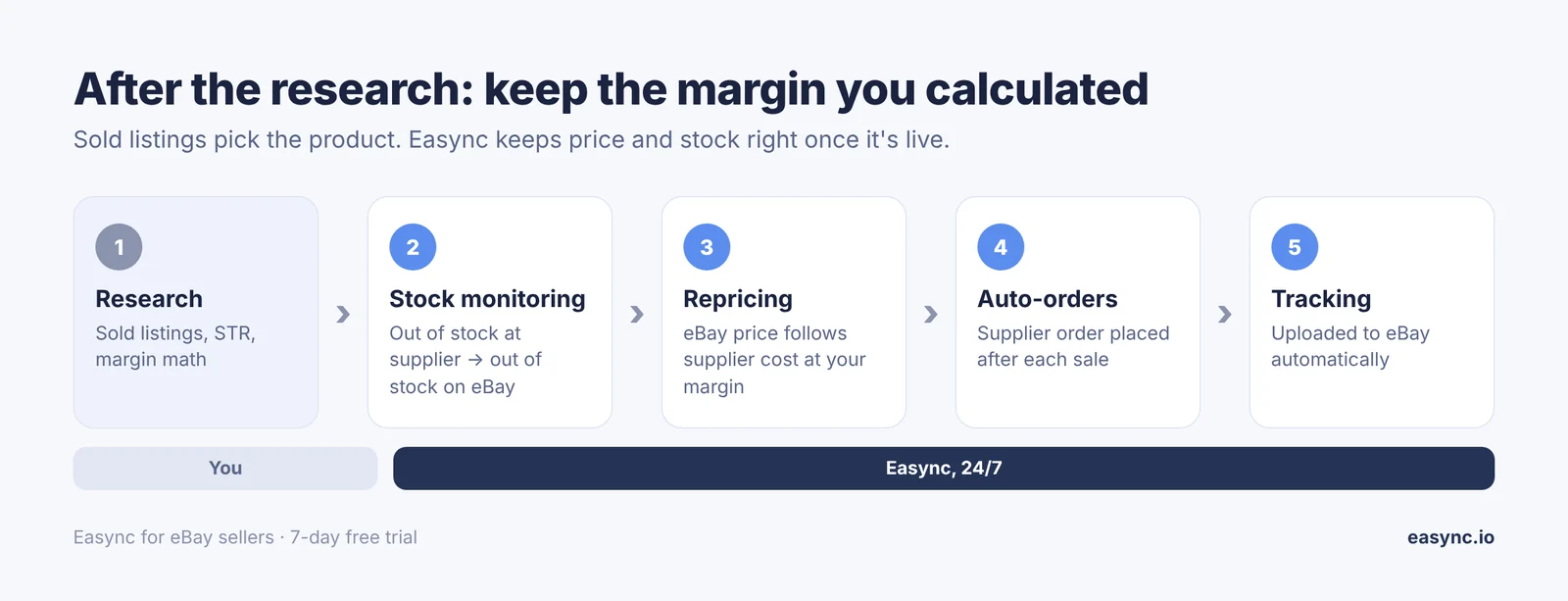
The research workflow above stays the same. You still pick products from sold data. Easync keeps the margin you calculated in step 5 from drifting once the listing is live.
Ready to automate your dropshipping?
Join 41,000+ dropshippers using Easync.
★★★★★ G2 4.6/5
|
★★★★★ Capterra 4.8/5
|
★★★★★ SourceForge 4.8/5
FAQ
How do I see sold items on eBay?
Search for the item, then tick Sold items under Show only in the left filters (desktop) or turn on Sold items under Filter (app). Sold prices show in green with the date of sale.
How far back do eBay sold listings go?
About 90 days in regular search. Product Research in Seller Hub goes back 3 years.
How do I see sold items older than 90 days?
Use Product Research (formerly Terapeak): Seller Hub > Research, enter the keyword and set the date range up to 3 years.
What’s the difference between sold and completed listings on eBay?
Sold items shows only listings that ended in a sale. Completed items shows every ended listing, including the ones that didn’t sell.
Why is the sold price crossed out?
The seller accepted a Best Offer below the listed price. Search doesn’t show the real amount. Product Research does.
How do I see what an item sold for with Best Offer?
Open Seller Hub > Research and search the item or its item number. Product Research shows the actual price paid, including accepted Best Offers.
Can I see sold items in the eBay app?
Yes. Search, tap Filter, switch on Sold items, then Show results.
How do I sort eBay sold listings by most recent?
After you turn on Sold items, change the sort to Ended recently.
What is a good sell-through rate on eBay?
Sold listings ÷ (sold + active listings) × 100. As a seller, I treat over 50% as strong demand, 20–50% as normal, and under 20% as crowded.