
- Express guides
- Getting started
How to Add a Virtual Assistant to Your Easync Account
Short answer: To give an eBay virtual assistant access to Easync, open Settings → Preferences, enter the VA’s email under Virtual Assistants and click Save. The VA gets an invite email, sets a password and logs in with their own account. A VA can create listings, change repricing and store settings and work with orders, but can’t see billing or payment details and can’t message buyers yet. Remove them from the same list to revoke access.
What a virtual assistant can do in Easync
An eBay virtual assistant (VA) is a person you hire to handle routine store work: adding listings, adjusting prices, checking orders. Easync lets you give a VA their own login to your account, so you never share your password and can cut access in one click.
Easync doesn’t find or hire VAs for you. You hire your own, for example on a freelance marketplace, and invite them.
Here’s what a VA can do once they’re in:
| Access | |
|---|---|
| Create and edit listings | Yes |
| Change repricing and other store settings | Yes |
| Work with orders | Yes |
| See the billing section, card or payment details | No |
| Message buyers through Messages | Not yet. Easync plans to add it |
Until VA messaging is available, buyer messages go through you.
How to add a VA
- In the Easync dashboard, open Settings (my.easync.io/account/settings) and go to the Preferences tab.
- Scroll to the Virtual Assistants block.
- Enter the VA’s email address and click Save. The VA appears in the Virtual Assistants List.
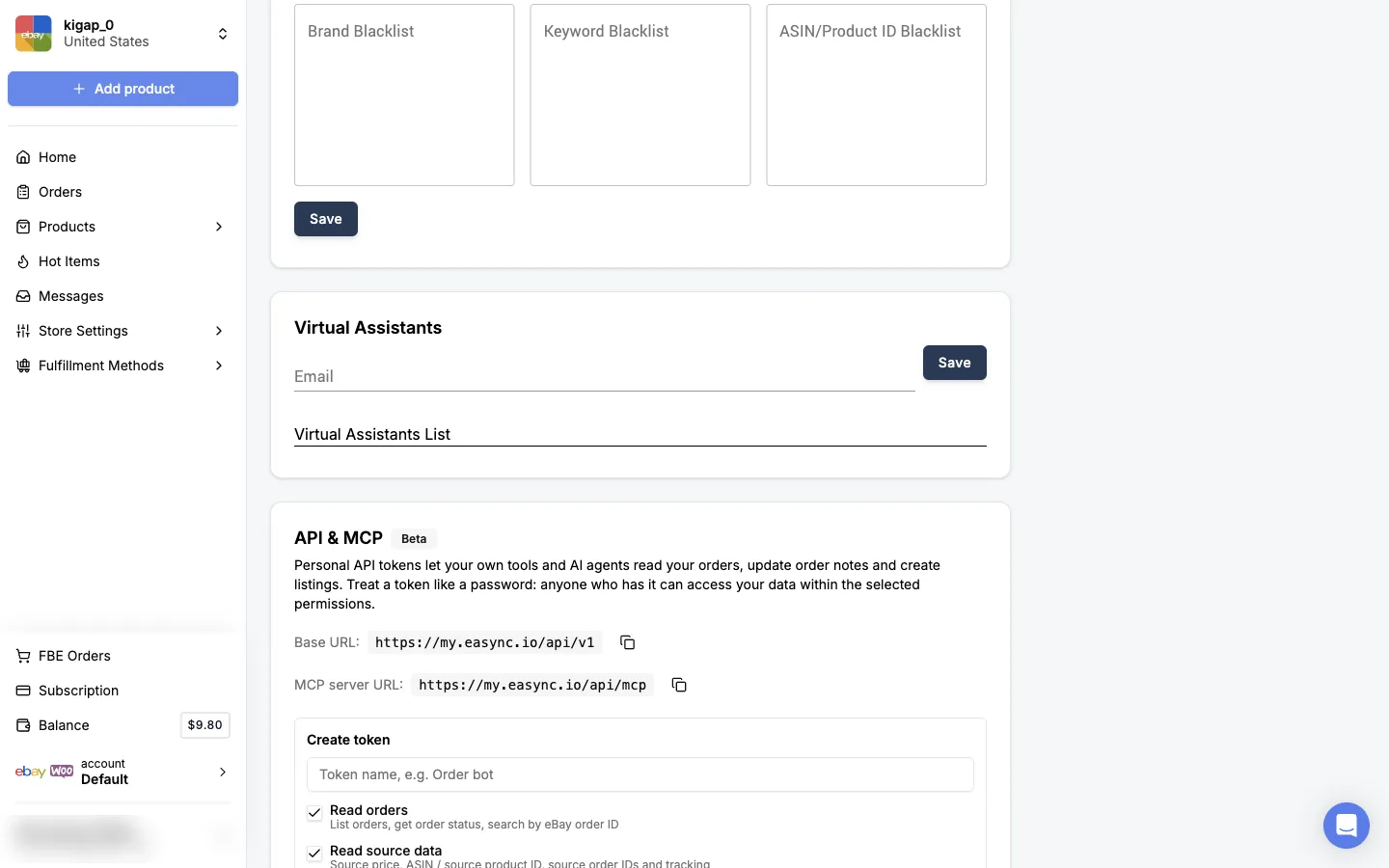
Easync sends a registration invite to that email automatically.
Older help articles link to my.easync.io/account/preferences/virtual_assistants. That page no longer exists: Virtual Assistants is now a block on the Preferences page.
What the VA does next
- The VA opens the invite email and follows the link to finish registration and set a password.
- After that, they log in at my.easync.io with their own email and password, like any other user.
The VA has to finish registration first. Logging in before setting a password won’t work.
How to remove a VA
Open Settings → Preferences → Virtual Assistants and remove the VA from the list. They can’t log in from that moment.
If you’re not sure whether the VA changed something, check Store Settings yourself. It shows the current value of every setting, including repricing.
If the VA can’t get access
Go through these steps in order:
- Check spam. The invite email often lands there.
- Make sure the VA finished registration. They need to open the link in the invite and set a password.
- Resend the invite. Remove the VA from the list, add their email again and click Save. This is the most reliable way to resend.
- Contact support. If nothing helped, send the VA’s email to support in the dashboard chat, and the team will check it.
FAQ
Does my virtual assistant need my Easync password?
No. A VA gets their own login. You invite them by email, they set their own password, and you can remove their access at any time without changing yours.
Can a VA see my billing or card details?
No. A VA has access to the whole store account except the billing section and the profile page with payment details.
Can a VA answer eBay buyer messages in Easync?
Not yet. Messaging buyers through the Messages section isn’t available to VAs. Easync plans to add it; until then, buyer messages go through you.
Does Easync provide virtual assistants?
No. Easync doesn’t hire or assign VAs. You find your own, for example on a freelance marketplace, and invite them to your account.
The VA never got the invite email. What should I do?
Ask them to check spam first. If it isn’t there, remove the VA from the Virtual Assistants list and add their email again to resend the invite. If that doesn’t help, send the VA’s email to support in the dashboard chat.
Next steps
- Set up your eBay store and first listings, so your VA has a clear process to follow.
- Set prices and lock prices on single listings.