
- Express guides
- Getting started
How to Connect a Fulfillment Account in Easync: Amazon 2FA, Proxy and Payment
Short answer: A fulfillment account is the supplier account (Amazon or AliExpress) that Easync uses to place orders for you. Turn on Auto Ordering in Fulfillment Methods, then click Add Auto Ordering Account. For Amazon, first switch two-step verification to an authenticator app only, with no phone or email method, and copy the long setup key. Paste that key into Easync with your login, billing address and payment method. AliExpress connects with one-click authorization instead.
What a fulfillment account does
A fulfillment account, also called an auto ordering (AO) account, is your own buyer account on a supplier site. When an order comes in on eBay or another store, Easync logs in to this account, buys the item with the customer’s shipping address and sends the tracking number back to your store. This is what makes eBay dropshipping automation work without manual steps.
Easync has three fulfillment methods. You pick one per store in Fulfillment Methods:
| Method | Who places the supplier order | Do you connect a buyer account? |
|---|---|---|
| Manual Fulfillment | You, by hand | No |
| Auto Ordering | Easync, through your buyer account | Yes, this guide |
| Fulfillment by Easync | The Easync team, through its own supply accounts | No |
If you source from Amazon US and don’t want to manage a buyer account, Fulfillment by Easync (FBE) is the simpler option. The rest of this guide covers Auto Ordering.
What you need before you start
- A buyer account on the supplier site. Amazon (US, UK, Canada, Germany, France, Italy, Spain or Australia, personal or Amazon Business) or AliExpress (US, UK or Australia).
- Access to the Amazon account’s security settings to set up an authenticator app.
- The billing address on file with the supplier. The address you enter in Easync has to match it exactly, or orders fail.
- A way to pay for orders: a card, or gift card balance on the supplier account.
Step 1. Turn on Auto Ordering
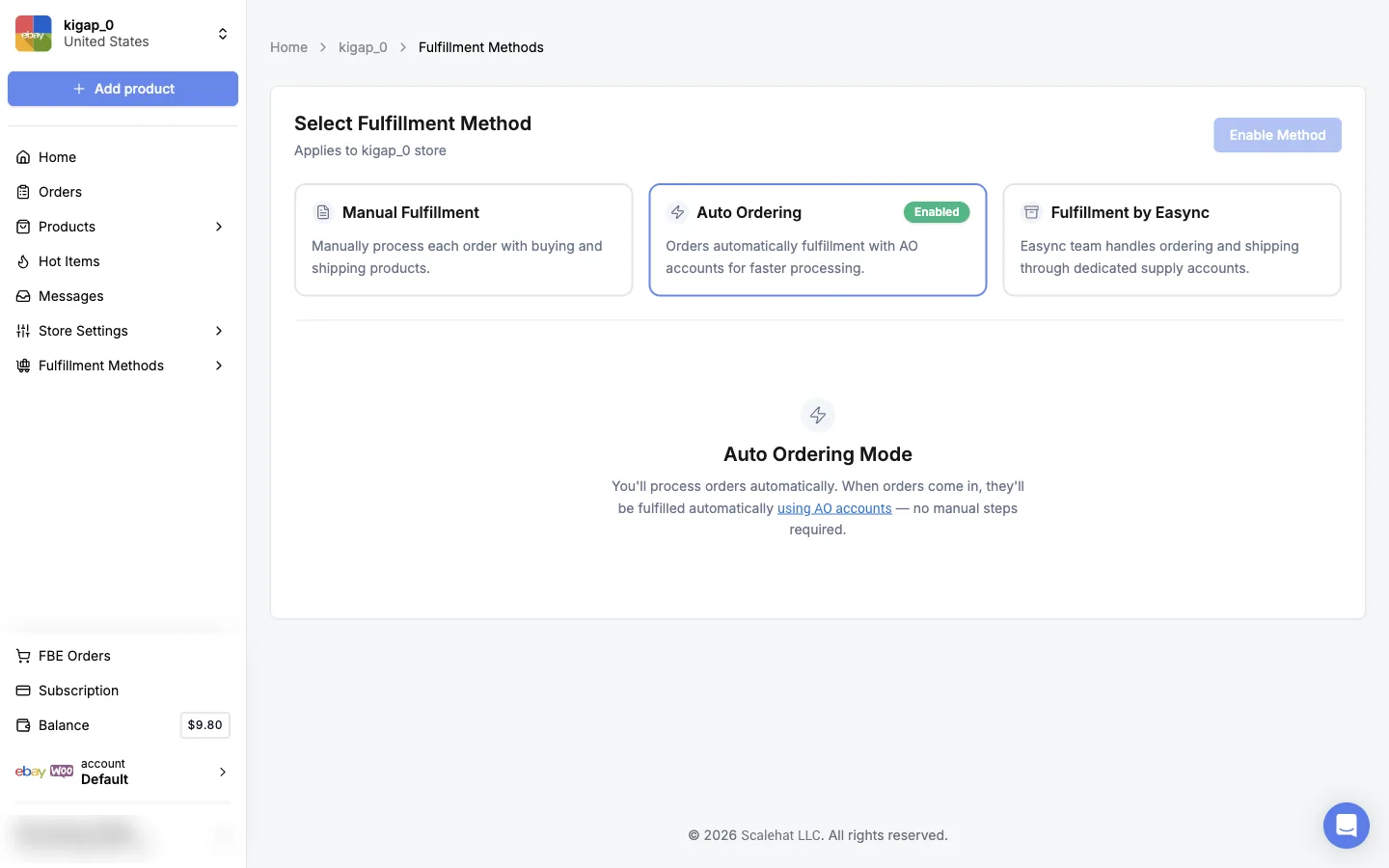
- In the Easync dashboard at my.easync.io, open Fulfillment Methods.
- Check that the page says the method applies to the right store.
- Select Auto Ordering and click Enable Method. The card shows Enabled.
- Click the using AO accounts link, or open Fulfillment Methods → Fulfillment Accounts, to get to the list of auto ordering accounts.
Step 2. Set up Amazon two-step verification with an authenticator app
Easync logs in to Amazon without you, so it has to generate the one-time codes itself. It does that from the authenticator app’s setup key. Do this before you add the account to Easync:
- On Amazon, open Your Account → Login & security → 2-Step Verification and start the setup.
- Choose Authenticator App as the method.
- When Amazon shows the QR code, don’t scan it. Click the link to see the key as text instead. It’s a long code of 52–53 characters, split into groups of four.
- Copy the key and save it somewhere safe. Add it to an authenticator app (Google Authenticator, Microsoft Authenticator, Authy and similar apps all work) and enter the code from the app to finish the setup on Amazon.
- Back in 2-Step Verification settings, remove any phone number or email method so the authenticator app is the only one.
Keep the authenticator app as the only Amazon verification method. If a phone number or email stays on the account, Amazon can send the code there. Easync never receives it, the login fails and orders stop updating automatically.
Save the setup key on your side as well. Easync stores it encrypted, but you’ll need it again if you reinstall your authenticator app or reconnect the account.
Step 3. Add your Amazon account in Easync
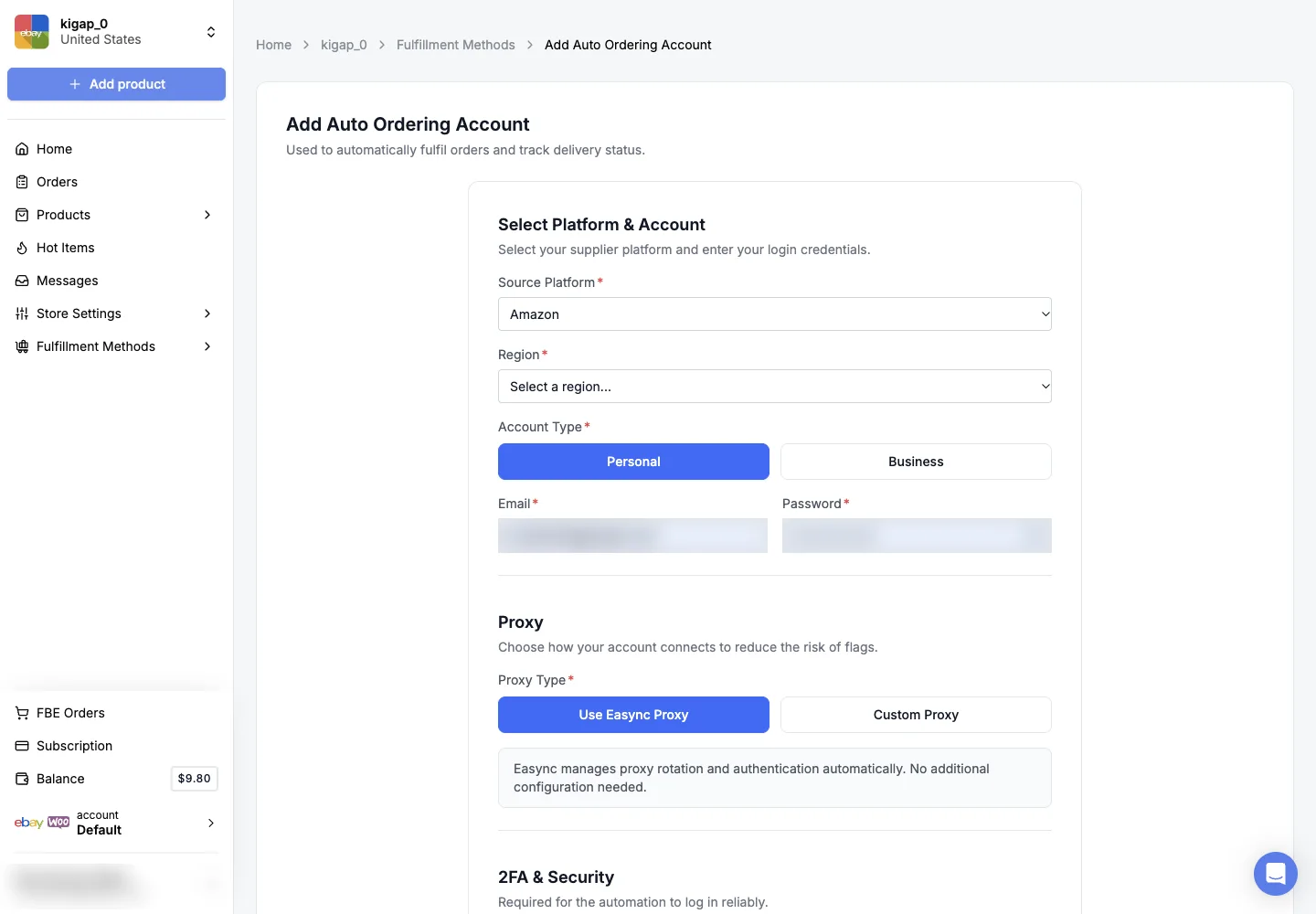
On the Auto Ordering Accounts page, click Add Auto Ordering Account and choose Amazon as the Source Platform. Then fill in the form:
| Section | What to enter |
|---|---|
| Region | The Amazon site you buy from: United States, United Kingdom, Canada, Germany, France, Italy, Spain or Australia |
| Account Type | Personal or Business (Amazon Business) |
| Email and Password | The Amazon login |
| Proxy | Use Easync Proxy (recommended: Easync rotates and authenticates it for you) or Custom Proxy with connection type (http, https or socks5), host, port, username and password |
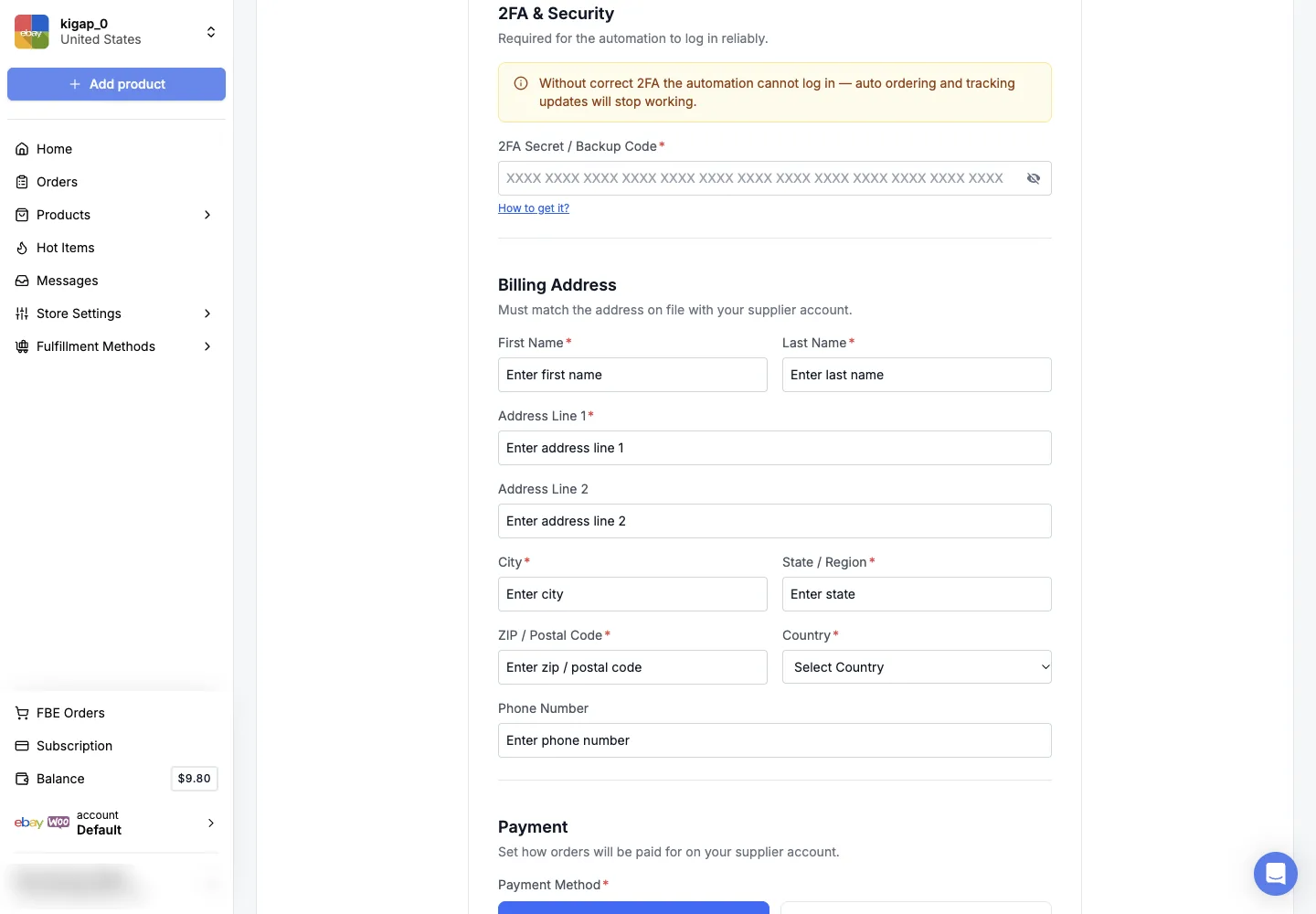
| 2FA Secret / Backup Code | The setup key from Step 2 |
| Billing Address | Name, address, city, state, ZIP and country exactly as on the Amazon account. Phone number is optional |
| Payment | Pay with Card or Gift Balance, plus Use Reward Points if you want to spend Amazon points |
How the two payment options behave:
- Pay with Card. Easync charges the card you enter here first, then the card saved on Amazon. If both fail, the order isn’t placed. Card details are stored encrypted.
- Gift Balance. Easync pays with the gift card balance on the Amazon account. If the balance can’t cover an order, auto ordering skips that order, so keep the balance topped up.
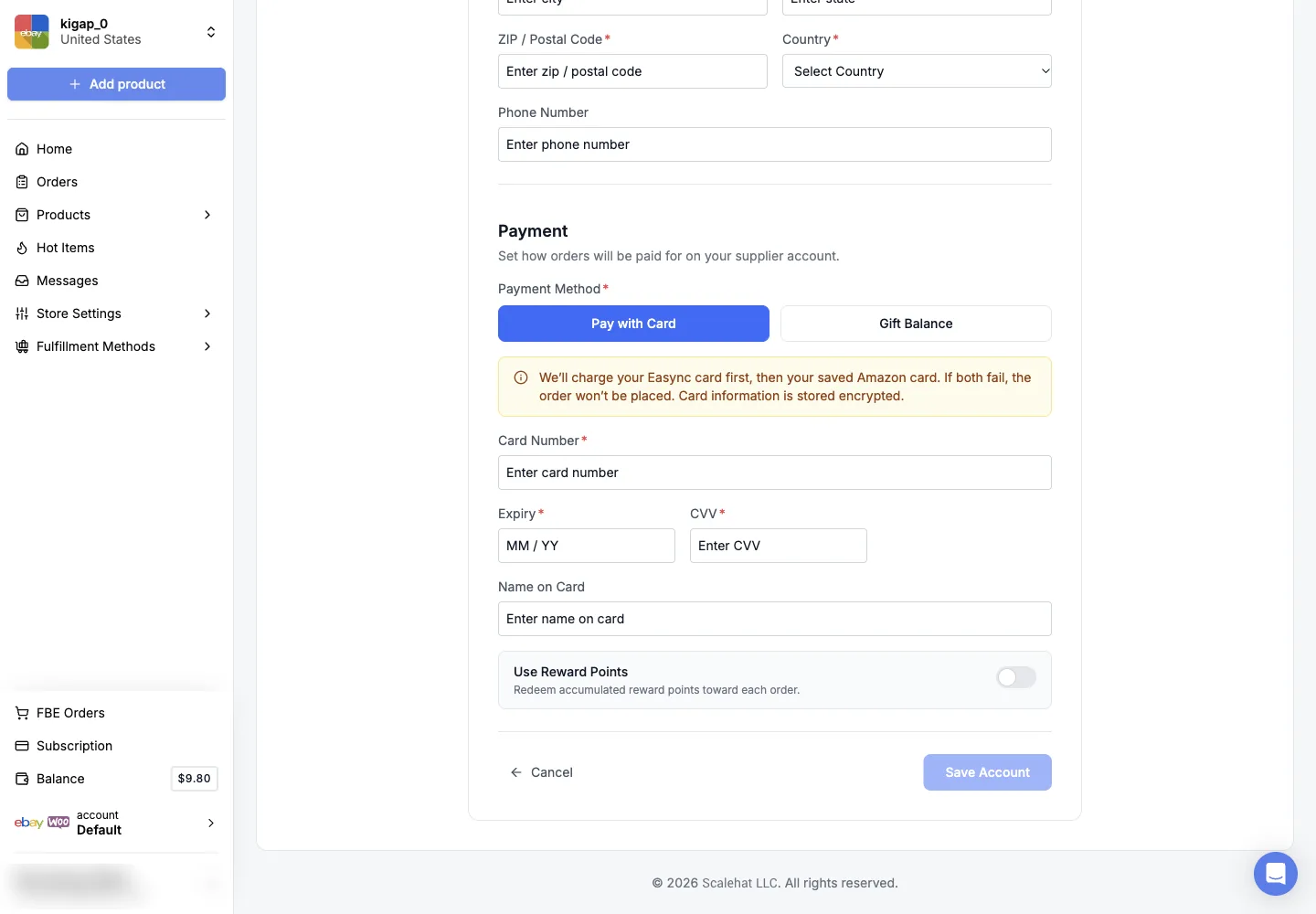
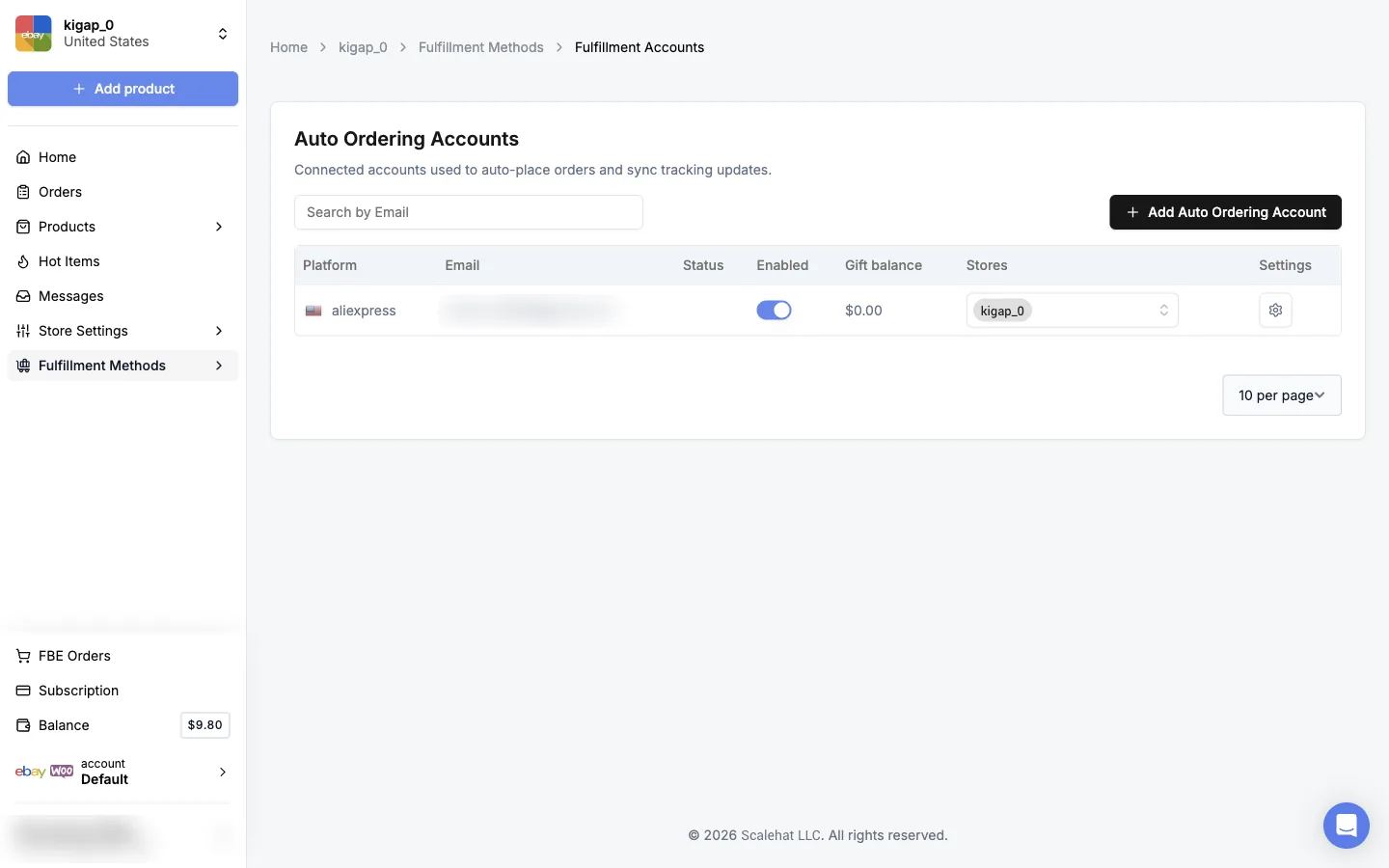
Click Save Account. The account appears in the list with its status, the Enabled switch, gift balance and the stores that use it.
Connect AliExpress instead
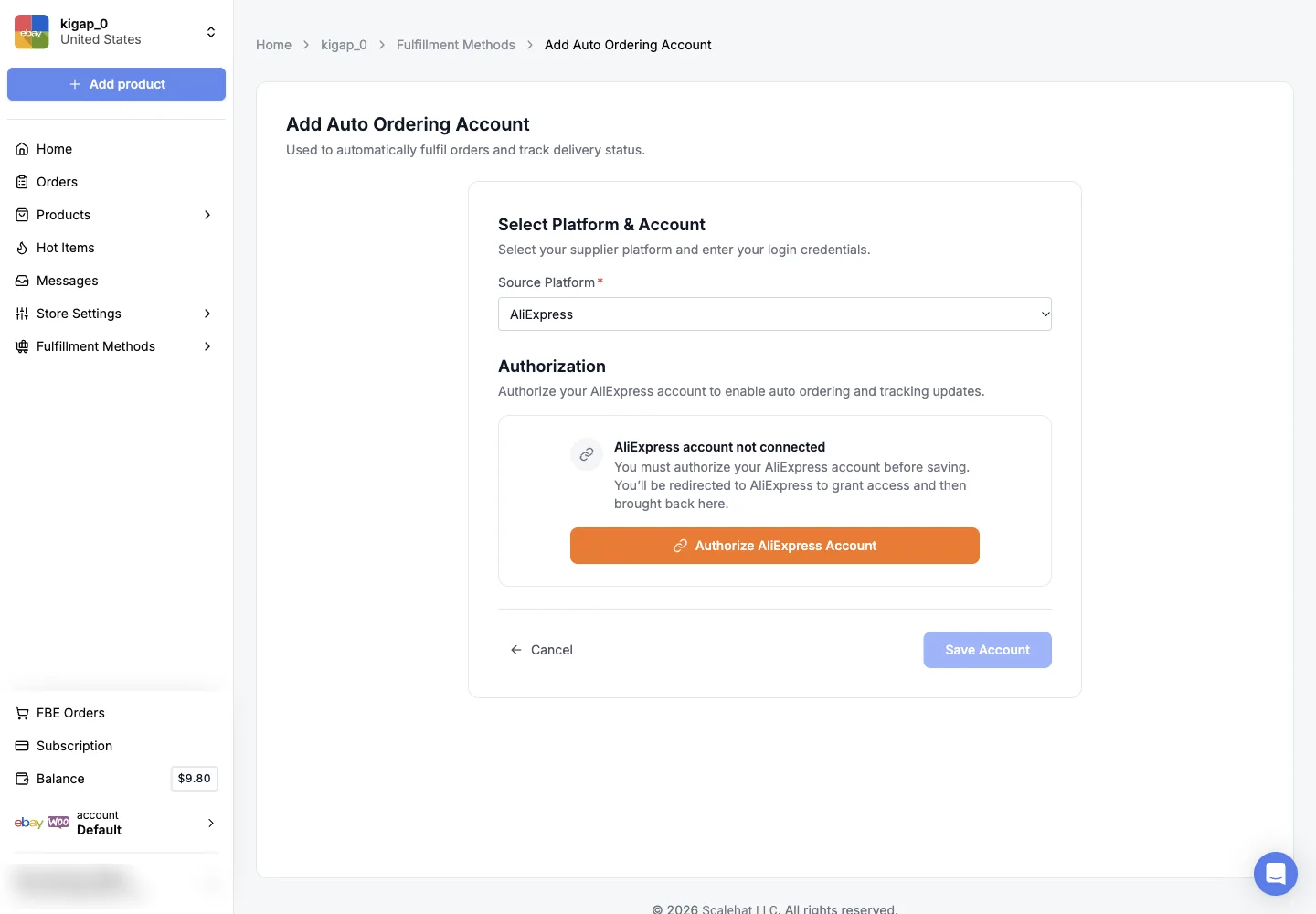
AliExpress. Choose AliExpress as the Source Platform and click Authorize AliExpress Account. You’re sent to AliExpress to grant access, then back to Easync, where you click Save Account. There’s no password or 2FA key to enter.
Step 4. Choose which stores use the account
One fulfillment account can serve several stores. On the Auto Ordering Accounts page, open the Stores drop-down next to the account and select every store that should order through it. Use the Enabled switch to pause an account without deleting it, and the gear icon under Settings to edit its details.
If you can’t add a store to the account yourself, for example because it’s on another region, send support a message in the dashboard chat with:
- the fulfillment account email;
- the store where it’s already added and the store where you want it, with each store’s region or marketplace.
Support links the account and confirms in the chat.
Troubleshooting
“Error” or “2FA error” when you add an Amazon account, but you can log in to Amazon yourself. The 2FA setup is almost always the cause. Check that the authenticator app is the only verification method on Amazon, with no phone or email, and that you pasted the long setup key, not a 6-digit code from the app. Fix it, then save the account again.
The account was connected, but orders stopped updating. Someone probably changed the Amazon security settings: added a phone number, reset 2-Step Verification or changed the password. Update the password or the 2FA key in the account settings in Easync.
Orders are skipped with Gift Balance. The gift card balance on the supplier account is lower than the order total. Top it up, or switch the account to Pay with Card.
Orders fail at checkout. Check that the billing address in Easync matches the one on the supplier account exactly, and that the card hasn’t expired.
Proxy or connection errors that don’t go away after you fix 2FA. Message support in the dashboard chat. They pass proxy problems to the tech team.
FAQ
What is a fulfillment account in Easync?
It’s your own buyer account on a supplier site, such as Amazon or AliExpress. When a customer buys from your store, Easync logs in to this account and places the order with the customer’s address, then copies the tracking number back to your store. Easync calls it an auto ordering (AO) account.
Why does Easync need my Amazon 2FA key?
Amazon asks for a one-time code every time someone logs in. Easync logs in without you, so it needs the authenticator setup key to generate those codes itself. Without the key, auto ordering and tracking updates stop.
Can I use SMS or email for Amazon two-step verification?
No. Easync can only read codes from the authenticator app key. If a phone number or email is still a verification method on the Amazon account, Amazon may send the code there, Easync never receives it, and the account shows a 2FA error.
Can one fulfillment account work for several stores?
Yes. In Fulfillment Methods → Auto Ordering Accounts, pick every store that should use the account in the Stores column. If a store isn’t available there, send the account email, both store names and their regions to support in the dashboard chat, and the team links it for you.
Do I need a fulfillment account if I sell Amazon US products?
Not necessarily. With Fulfillment by Easync (FBE), the Easync team orders and ships through its own supply accounts, so you don’t connect a buyer account at all. FBE is a separate fulfillment method you can switch to on the same page.
How do I delete my Easync account?
Support can add, share or disconnect fulfillment accounts and remove stores, but only you can delete the Easync account itself. Do it in Account Settings at my.easync.io/account/settings.
Next steps
- Set up your eBay store, business policies and first listings.
- Learn how orders are fulfilled and tracked.
- Fix common order problems.
- See every supplier and marketplace Easync supports.