
- articles
- eBay Dropshipping
eBay Inventory Management Software: What Actually Keeps Stock in Sync
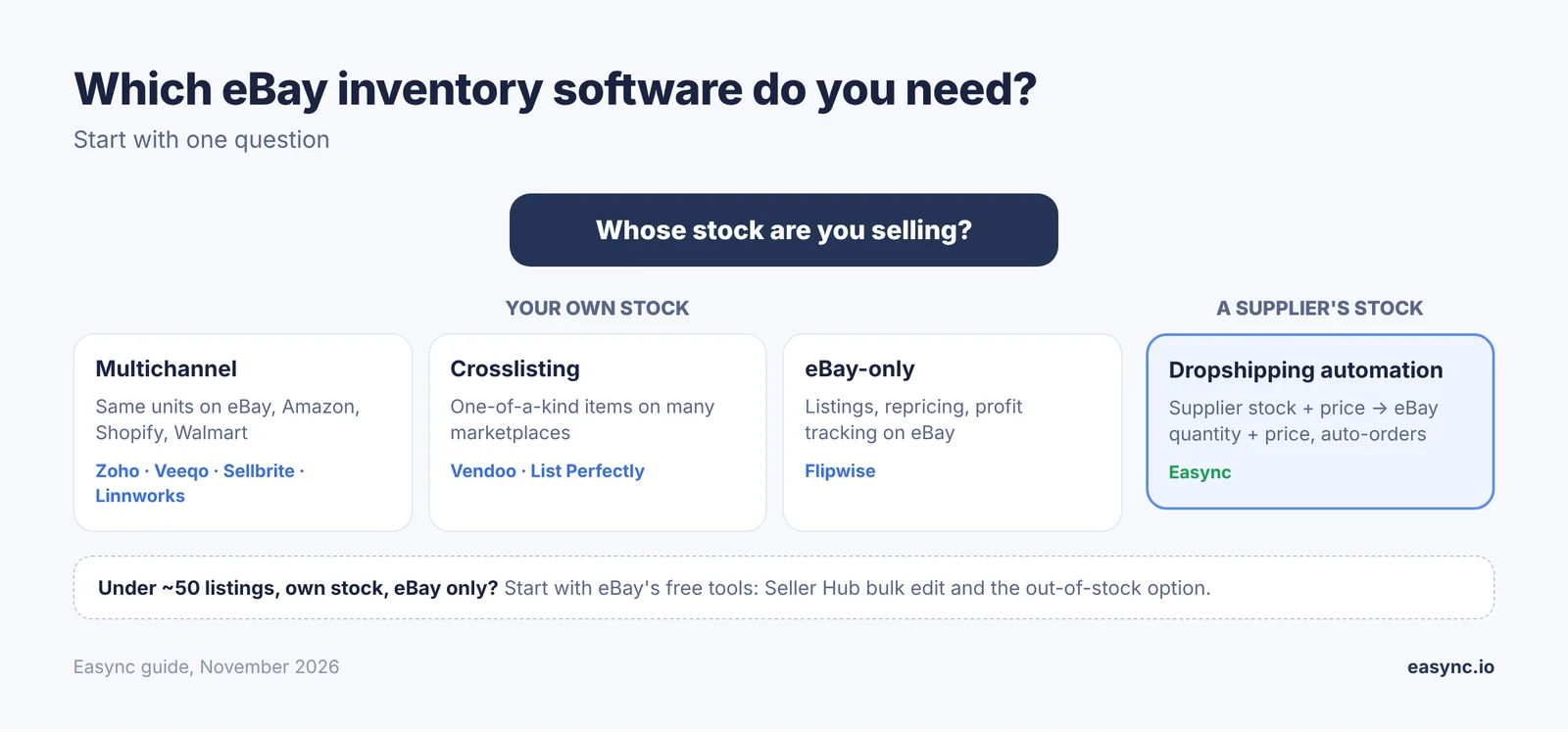
eBay inventory management software keeps the quantity on your eBay listings equal to what you can actually ship. If you hold stock and sell on several channels, that means a multichannel inventory tool (Zoho Inventory, Veeqo, Sellbrite, Linnworks). If you resell one-off items, a crosslisting tool that delists sold items (Vendoo, List Perfectly) is enough. If you dropship, the stock isn’t yours at all, so you need supplier monitoring that changes your eBay quantity and price when the supplier’s do. That’s what Easync does.
I learned the difference the expensive way. My first store ran on a spreadsheet and the eBay quantity field. It worked until a busy week when two items sold out at the supplier and I had to cancel the orders. Each cancellation counted as a defect. Since then I’ve used tools of all three types, and they solve different problems. This guide sorts them by business model, lists what each costs according to the vendor’s own pricing page, and covers what eBay gives you for free before you pay for anything.
Quick answer
| Your business | What you need | Examples |
|---|---|---|
| Your own stock, eBay plus other channels | Multichannel inventory and order management | Zoho Inventory, Veeqo, Sellbrite, Linnworks |
| One-of-a-kind resale items on several marketplaces | Crosslisting with auto-delist | Vendoo, List Perfectly |
| eBay only, focus on profit tracking and relisting | eBay-only management | Flipwise |
| Dropshipping from Amazon, Walmart, AliExpress and other suppliers | Supplier stock and price monitoring, auto-orders | Easync |
| Under ~50 listings, own stock, eBay only | eBay’s free tools: Seller Hub and the out-of-stock option | eBay |
What eBay gives you for free
Before paying for software, set up the tools eBay already includes. For a small store with its own stock, they can be enough.
| Tool | What it does | Where |
|---|---|---|
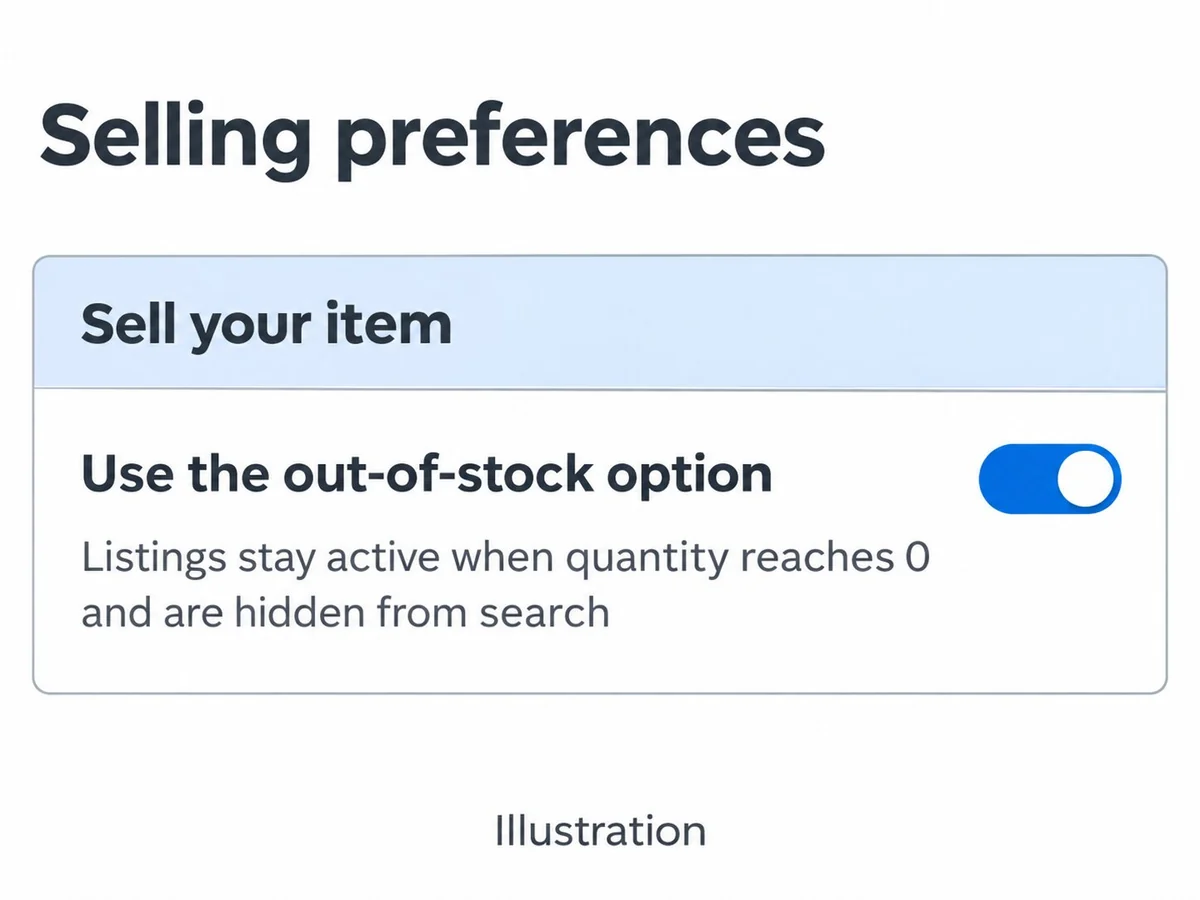
| Out-of-stock option | Keeps Good ‘Til Cancelled listings alive at quantity 0, hidden from search, with their sales history | My eBay > Selling preferences |
| Seller Hub > Listings | Edit quantity and price on one listing or many with bulk edit | Seller Hub |
| Seller Hub Reports | Upload and download listings as CSV to change quantities in bulk | Seller Hub > Reports |
| Inventory and Trading APIs | Let software update quantities automatically | eBay Developers Program |
The out-of-stock option is the one to turn on today
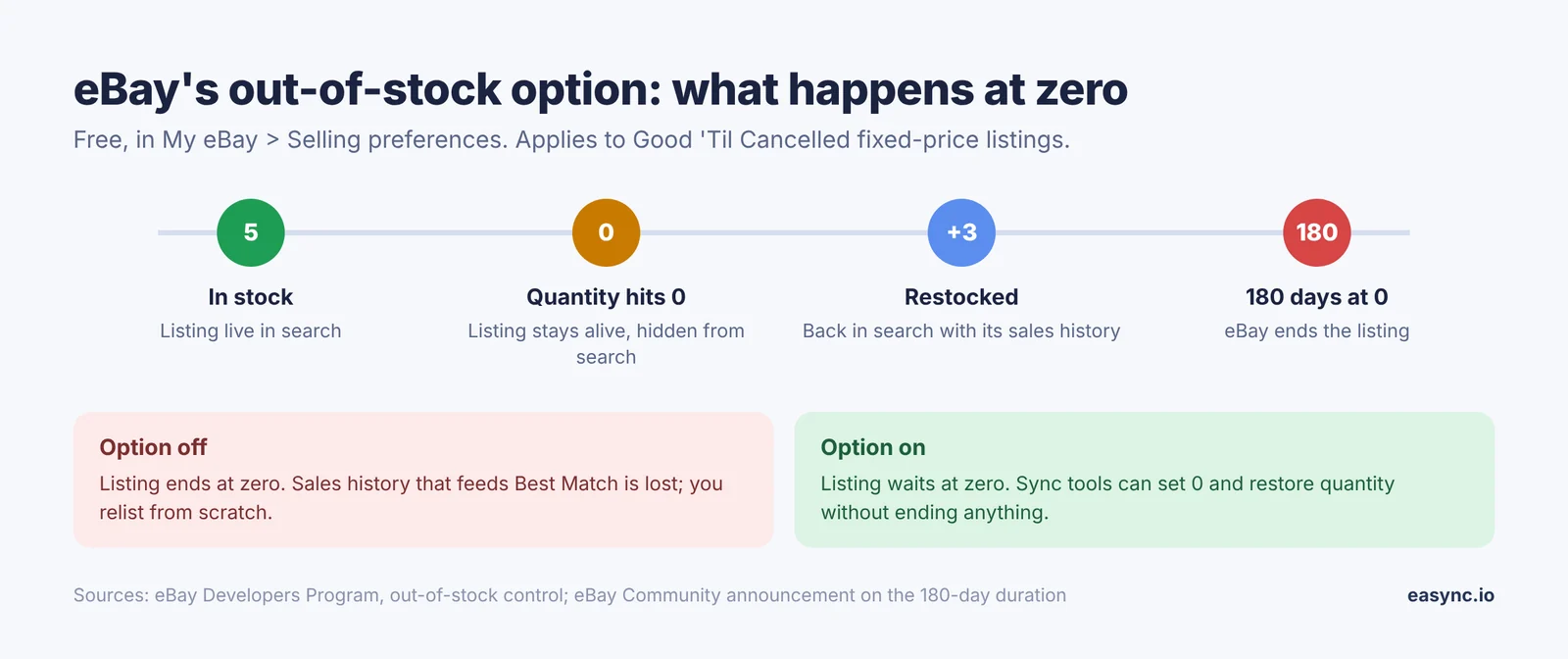
Without it, a fixed-price listing that hits zero ends, and you lose the sales history that feeds Best Match. With it on, the listing stays alive at zero, drops out of search, and comes back the moment you add quantity. eBay applies the setting to all existing and new listings once you switch it on.
There’s a time limit: eBay ends listings that stay out of stock too long. The limit used to be 90 consecutive days; eBay later extended it to 180 consecutive days.
Where the free tools stop
eBay only knows what you tell it. It doesn’t see your Shopify sales, your warehouse count or your supplier’s stock. The moment you sell the same unit in two places, or the unit sits at someone else’s warehouse, you need software that updates eBay for you.
Four types of eBay inventory software
“Inventory management” means different things depending on where your stock sits. Most comparison lists put all of these tools in one ranking, which is how sellers end up paying for a warehouse system to run a dropshipping store.
| Type | Where the stock is | What it syncs | Good for | Not built for |
|---|---|---|---|---|
| Multichannel inventory / order management | Your shelf or warehouse | One stock count across eBay, Amazon, Shopify, Walmart, Etsy | Brands and resellers with their own stock on several channels | Supplier stock you don’t hold |
| Crosslisting with auto-delist | Your shelf, mostly one-of-a-kind items | When an item sells on one marketplace, it’s removed from the others | Clothing, collectibles, thrift and resale | Hundreds of identical units, supplier sync |
| eBay-only management | Your shelf | Listings, repricing, relisting and profit tracking on eBay | eBay-only resellers | Other channels, supplier sync |
| Dropshipping automation | At the supplier (Amazon, Walmart, AliExpress and others) | Supplier stock and price to your eBay quantity and price, plus auto-orders and tracking | eBay dropshippers | Your own warehouse stock |
So start with one question: whose stock are you selling? If it’s yours, pick from the first three rows. If it’s a supplier’s, only the last row watches the thing that actually changes.
eBay inventory management software compared
Prices below are taken from each vendor’s pricing page in November 2026. They change often, so check before you buy.
| Tool | Type | Free plan | Paid from (per month) | eBay sync | Other channels |
|---|---|---|---|---|---|
| Zoho Inventory | Multichannel inventory | Yes, 50 orders/month | $29 (Standard, billed annually, 500 orders) | Yes | Amazon, Walmart, Etsy, Shopify, WooCommerce |
| Veeqo | Shipping + multichannel inventory | Shipping plan free | $19 (Inventory plan, by order volume) | Yes | Amazon, Shopify and others; owned by Amazon |
| Sellbrite | Multichannel listing + inventory | Yes, 30 orders/month, sync every 2 hours | $29 (Pro 100, billed annually) | Yes | Amazon, Walmart, Etsy, Shopify and others |
| Linnworks | Order and warehouse management | No | Quote only, by order volume | Yes | Amazon and many more |
| Flipwise | eBay-only management | Up to 24 listings (new members) | $19.99 (100–499 listings) | Yes | Other sales logged by hand |
| Vendoo | Crosslisting | No (14-day trial) | $14.99 | Yes, with sale detection and auto-delist | Poshmark, Mercari, Depop, Whatnot, Etsy |
| List Perfectly | Crosslisting | No | $29 (auto-delist on Pro Plus, $99+) | Yes | Many resale marketplaces |
| Easync | Dropshipping automation | No (7-day trial) | $49.99 (Basic) | Yes: eBay US, CA, UK | Shopify; suppliers Amazon, Walmart, AliExpress, Costco, Best Buy and others |
What the table doesn’t show
- Sync speed. “Real-time” on a landing page can mean webhooks or a check every few hours. Sellbrite’s free plan, for example, syncs every 2 hours. Ask how often stock is updated on the plan you’d actually buy.
- Order-based pricing. Zoho, Veeqo, Sellbrite and Linnworks price by orders per month. Q4 volume can push you into the next tier.
- Where the count comes from. Every multichannel, crosslisting and eBay-only tool here syncs a stock count you maintain. None of them checks whether Amazon or Walmart still has the item.
How to choose eBay inventory software
Answer these five questions and most of the list drops away.
- Whose stock is it? Yours: multichannel, crosslisting or eBay-only tools. A supplier’s: dropshipping automation.
- How many channels? eBay only: eBay’s free tools or an eBay-only tool. eBay plus Shopify, Amazon or Walmart: multichannel.
- Identical units or one-offs? Many units of the same SKU need a shared stock count. One-of-a-kind items need auto-delist the moment one sells.
- How many orders a month, and in Q4? Order-based plans get expensive at peak. Check the tier you’d be on in December, not in March.
- How fast is the sync? If two buyers can grab the last unit on different channels within the sync window, you’ll oversell.
Checklist before you pay
- ☐ Supports eBay US (and UK/CA/AU if you sell there)
- ☐ Updates eBay quantity automatically, and says how often
- ☐ Works with eBay’s out-of-stock option instead of ending listings
- ☐ Handles variations (size, color) at the variation level
- ☐ Free plan or trial long enough to see a full week of orders
- ☐ Price at your Q4 order volume, not today’s
- ☐ For dropshipping: monitors supplier price too, not only stock
Spreadsheet or software?
A spreadsheet works while you’re the only one changing quantities and you sell on one channel. Once a second channel or a supplier is involved, the sheet is always one update behind. That gap is where oversells come from, and on eBay every oversell you cancel is a defect against your seller standards.
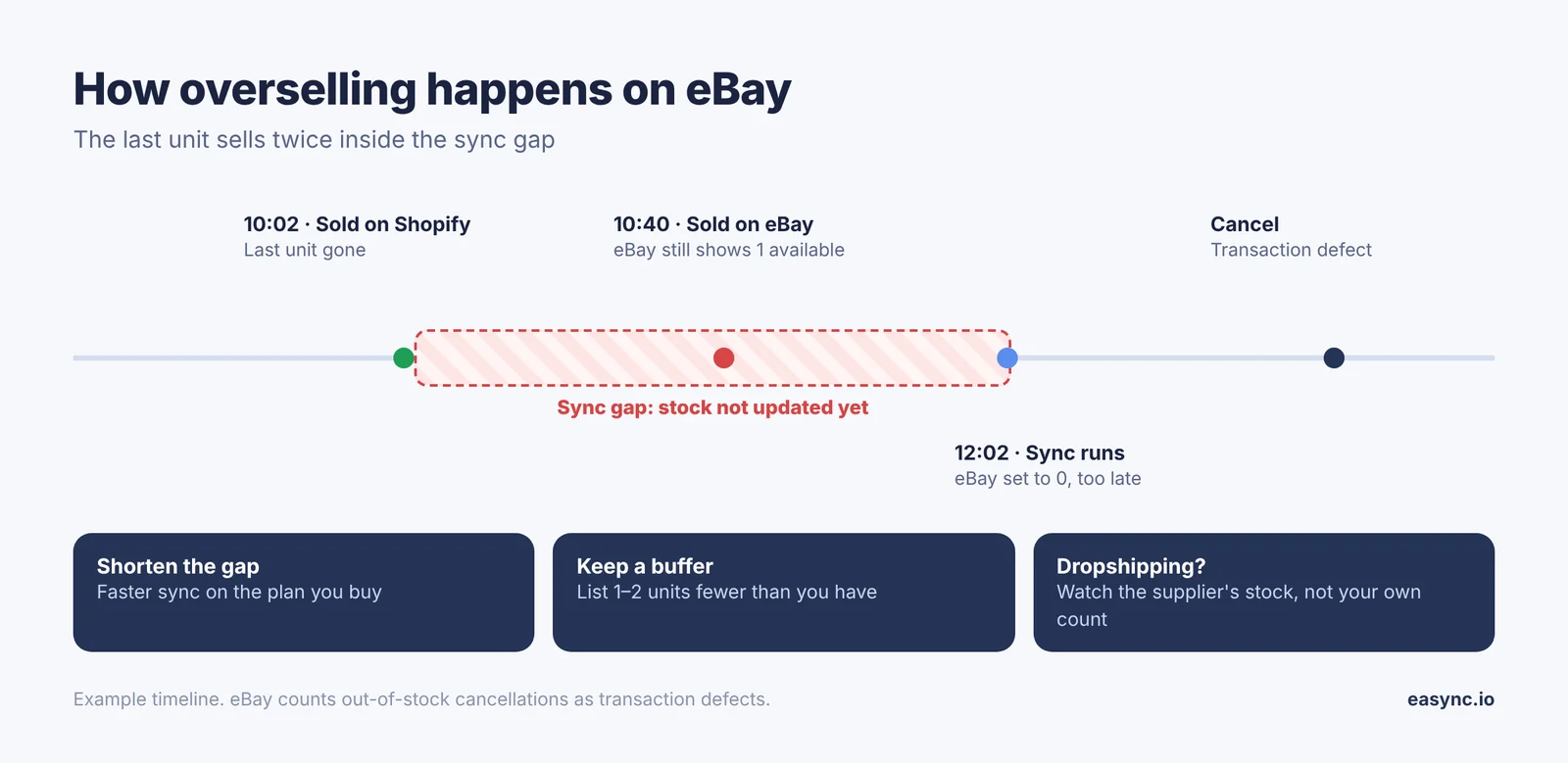
Inventory management for eBay dropshipping
When you dropship, you never touch the stock. The number that matters is the supplier’s, and it changes without telling you: a best-seller sells out on Amazon, Walmart drops a variation, an AliExpress seller pauses a listing. Your eBay listing still says “10 available” and keeps selling.
That’s why warehouse tools don’t fix dropshipping. They sync a number you type in. A dropshipper needs a tool that reads the supplier’s page and acts on it.
| What changes at the supplier | Without monitoring | With supplier monitoring |
|---|---|---|
| Item goes out of stock | You sell it, then cancel: a transaction defect | Your eBay listing goes to quantity 0 (with the out-of-stock option, it stays alive and hidden) |
| Item comes back in stock | Listing stays at 0 until you notice | Quantity restored, listing back in search |
| Supplier raises the price | You sell at a loss | Your eBay price moves up to keep your margin |
| Supplier drops the price | Your listing looks overpriced | Your eBay price moves down |
| A variation (size, color) sells out | Wrong variation sold | That variation goes to 0 |
eBay’s seller standards list “the seller cancels the order unexpectedly (e.g. because it was out of stock…)” as a transaction defect. Above Standard allows a defect rate of no more than 2%, Top Rated 0.5%. For a small store, a few oversold orders in a busy week can be enough to move you down a level.
How Easync handles it
Easync is built for this case: listings on eBay (US, CA, UK) supplied from Amazon, Walmart, AliExpress, Costco, Best Buy and other stores.
- Item monitoring. Supplier stock and price are checked automatically, around the clock.
- Stock sync. When the supplier runs out, the eBay listing is set out of stock; when it’s back, the quantity comes back.
- Repricing. Your eBay price follows supplier cost at the margin you set.
- Auto-ordering and tracking. After a sale, the supplier order is placed with the buyer’s address and tracking goes to eBay.
- Multiple stores from one dashboard.
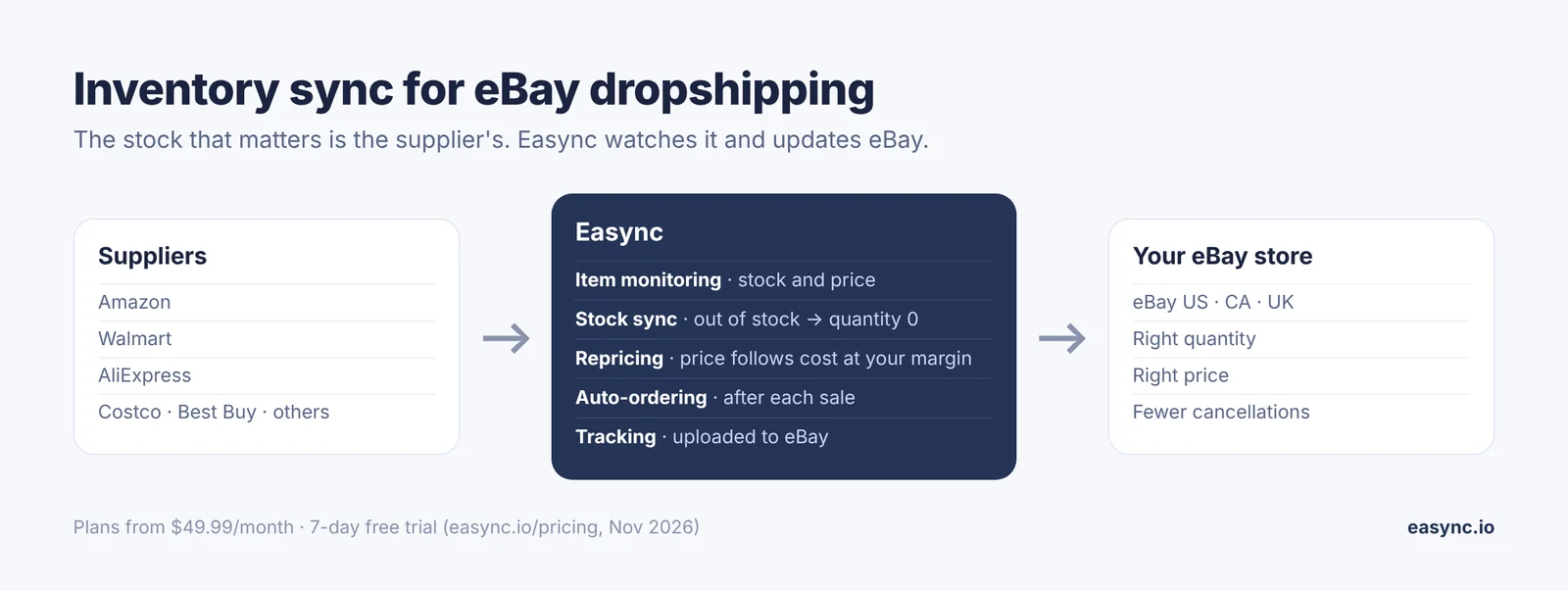
Plans start at $49.99/month with a 7-day free trial, according to the Easync pricing page.
One rule check: eBay’s dropshipping policy allows sourcing from wholesale suppliers. Buying from another retailer or marketplace and shipping straight to your buyer isn’t allowed, so check how your supplier setup fits the policy.
Ready to automate your dropshipping?
Join 41,000+ dropshippers using Easync.
★★★★★ G2 4.6/5
★★★★★ Capterra 4.8/5
★★★★★ SourceForge 4.8/5
How to set up eBay inventory sync without overselling
Whichever tool you pick, the setup looks the same. Here is the order I do it in.
- Turn on eBay’s out-of-stock option (My eBay > Selling preferences). Your sync tool can then set listings to zero without ending them.
- Give every listing and variation a SKU. Sync tools match on SKU. A missing or duplicated SKU is the most common reason a sync quietly skips a listing.
- Connect eBay to the tool and import your active listings. Check that the quantities it shows match eBay before you switch syncing on.
- Set a stock buffer. List one or two units fewer than you have (or than the supplier shows). It covers the gap between a sale and the next sync.
- Set price rules if the tool reprices: your minimum margin after eBay fees, and a maximum price. Our eBay fees calculator gives you the fee side.
- Run a small test. Sync 10–20 listings for a week before turning it on for the whole store.
- Watch the first oversell or cancellation closely. Find out which step missed it (SKU, buffer, sync interval) and fix that step.
Signs your sync isn’t working
- Orders arrive for items you know are gone
- Listings ended instead of going out of stock
- Variation quantities on eBay don’t match the source
- Prices on eBay haven’t moved while the supplier’s have
- Cancellations show up in Seller Hub > Performance
For Q4 specifically, our Black Friday checklist for eBay dropshippers covers stock buffers, handling time and supplier price changes in more detail.
FAQ
What is the best eBay inventory management software?
It depends on where your stock is. For your own stock across several channels: a multichannel tool such as Zoho Inventory, Veeqo, Sellbrite or Linnworks. For one-of-a-kind resale items: a crosslister with auto-delist such as Vendoo or List Perfectly. For dropshipping: a tool that monitors supplier stock and price, such as Easync.
Is there free eBay inventory management software?
Yes. eBay’s own Seller Hub, bulk edit and out-of-stock option cost nothing. Zoho Inventory has a free plan for 50 orders a month, Sellbrite for 30 orders a month, and Veeqo’s shipping plan is free.
How do I keep eBay and Amazon inventory in sync?
Use a multichannel tool that holds one stock count and updates both marketplaces when an order comes in. Give every product the same SKU on both channels and keep a small stock buffer.
How do I sync inventory between Shopify and eBay?
Connect both stores to a multichannel inventory tool, or use a Shopify app that lists to eBay and syncs quantities. Match listings by SKU and test on a few products first.
What happens when an eBay listing hits zero quantity?
Without the out-of-stock option, a fixed-price listing ends. With it switched on, the Good ‘Til Cancelled listing stays alive, hidden from search, and keeps its sales history until you add quantity. eBay ends listings that stay out of stock for 180 consecutive days.
Does overselling hurt my eBay account?
Yes. Cancelling an order because the item is out of stock counts as a transaction defect under eBay’s seller standards.
What inventory software do eBay dropshippers use?
Dropshippers need supplier monitoring, because the stock sits with the supplier. Tools like Easync watch supplier stock and price, update the eBay listing, place supplier orders and upload tracking.