
- articles
- eBay Dropshipping
eBay Vacation Mode (Time Away): How to Turn It On in 2026
eBay vacation mode is now called Time Away. It lets any seller pause fixed-price sales for up to 30 days, or keep selling for up to 15 days with longer delivery estimates. You set it in My eBay > Account > Time Away, and it takes a few clicks.
This guide covers what eBay’s help page skips: which option to choose, what buyers actually see, which orders don’t get new delivery dates, the mistakes that cost sellers defects, and how dropshippers can handle supplier holidays like Chinese New Year.
Key takeaways
- Time Away replaced the old “Vacation Settings” in September 2020. Before that, only eBay Store subscribers could use it; now every seller can.
- Pause item sales hides fixed-price listings from search for up to 30 days. Auctions stay live.
- Allow item sales keeps listings buyable for up to 15 days, shows a banner and moves delivery dates automatically.
- eBay fees, including Store subscriptions, keep running while you’re away.
- Start Time Away a day before you leave and end it a day after you’re back. Most seller problems happen on those two edge days.
Pause sales or allow sales: which Time Away option to choose
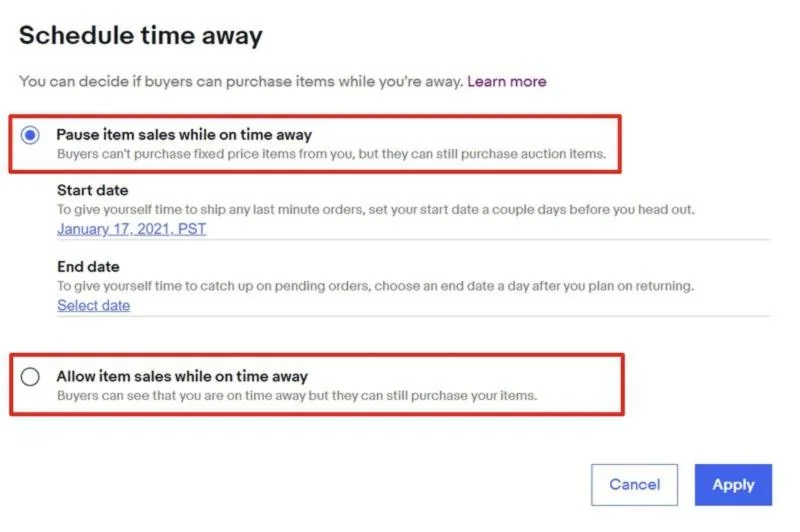
Choose Pause if no one can ship orders while you’re gone; choose Allow only if someone can still ship, just more slowly. The two options differ in length, visibility and risk.
| Pause item sales | Allow item sales | |
|---|---|---|
| Maximum length | 30 days | 15 days |
| Fixed-price listings in search | Hidden (takes a few hours) | Visible |
| Can buyers buy fixed-price items? | No. Buyers with the item in their cart or Watchlist see that you’re not processing orders until your return date | Yes |
| Auctions | Stay live and can be won | Stay live and can be won |
| Banner on listings | On auctions | On all listings |
| Delivery dates | Updated on auctions | Updated automatically on most listings |
| Listings after you return | Reappear in search automatically within a couple of hours | No change |
| Best for | Vacations without help, illness, moving, supplier shutdowns | Short trips when a helper or 3PL still ships orders |
Two things are the same for both options. You still have to ship every order placed before your start date and answer open buyer requests. And eBay keeps charging listing fees and Store subscription fees.
Store vs. no Store: Time Away works the same way for all sellers. Only Store subscribers had the old Vacation Settings before September 2020; that restriction is gone.
How to put eBay on vacation mode, step by step
You need 4 steps on desktop. The direct link to the settings is ebay.com/vac/timeaway; you’ll need to be signed in.
Step 1. Open Time Away settings
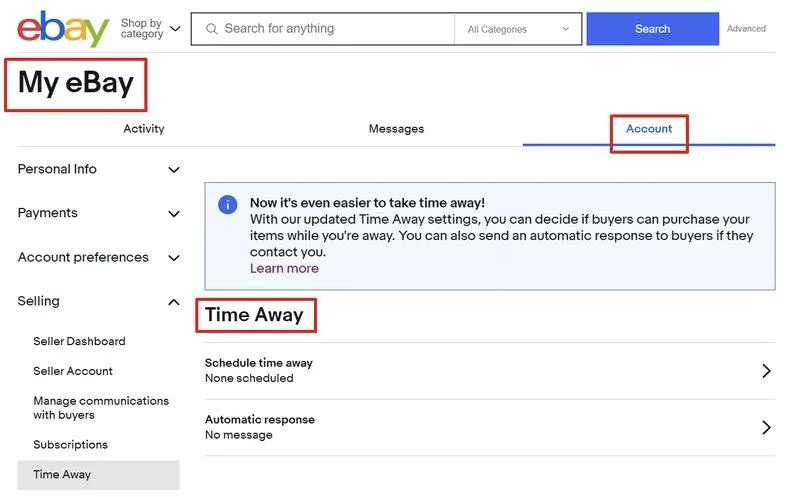
Go to My eBay > Account > Time Away (under Selling in the left menu). You’ll see two settings: Schedule time away and Automatic response.
Step 2. Choose Pause or Allow item sales
Select Schedule time away, then pick one option. Use the table above if you’re not sure which one fits.
Step 3. Set the start and end dates
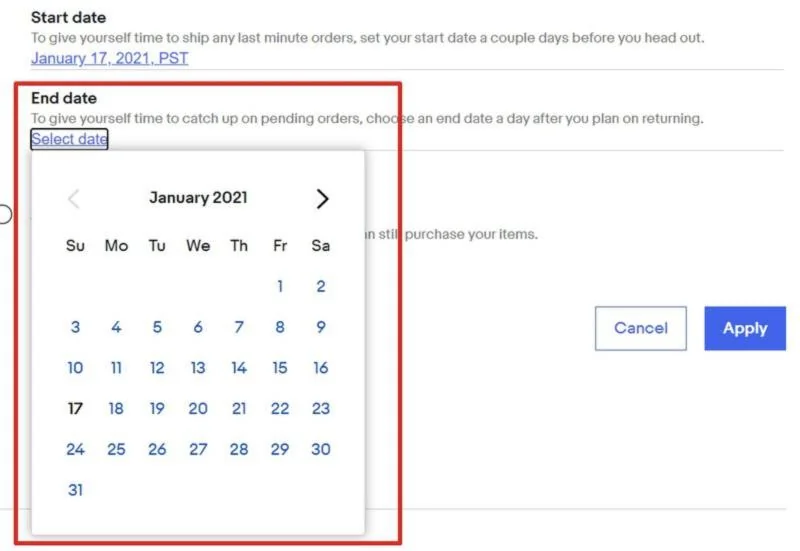
Pick a start date and an end date, then select Apply. Time Away starts at 12:01 a.m. on the start date and ends at 11:59 p.m. on the end date; the dates in the settings show Pacific Time (PST).
If you start Time Away today, the banner appears on your listings within minutes, but hiding listings and updating delivery dates can take a few hours. So set it up the evening before you leave, not at the airport.
Step 4. Turn on the automatic response
Go back to Time Away settings, select Automatic response, then Message when on time away. Set the same dates, write your message (up to 5,000 characters) and select Apply. Buyers who message you through eBay will get it.
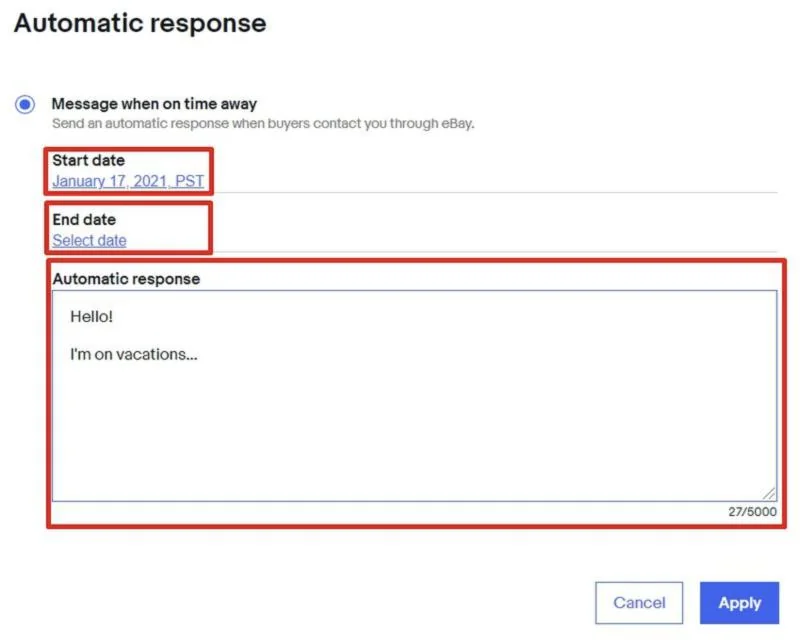
A message that works: “Thanks for your message! I’m away until [date]. Orders placed before [start date] have shipped. I’ll reply to every message within 24 hours of my return.”
Can you turn on vacation mode in the eBay app?
eBay’s help page and its 2020 launch announcement describe Time Away on desktop: My eBay, Account settings and Seller Hub. The menu in the mobile app changes between versions, so the safest way on a phone is to open ebay.com/vac/timeaway in your mobile browser.
How to turn off Time Away early
Open Time Away settings, select Cancel time away or move the end date to an earlier day, then select Apply. Hidden listings can take a couple of hours to return to search.
What happens to your listings and orders during Time Away
Time Away changes how listings look and when buyers expect delivery, but it doesn’t end listings, refund fees or pause your obligations.
- Fixed-price listings (Pause): hidden from search; they come back on their own after the end date, with no edits needed.
- Auctions (both options): stay live and can sell. If you can’t ship an auction, end it before you leave.
- Watchlist and cart: with Pause, buyers can’t check out and see your return date.
- Buyer messages: answered by your automatic response, if you set one.
- Fees: listing fees and Store subscription fees keep running.
- Orders placed before the start date: you must ship them and answer any returns or questions about them.
Orders that don’t get new delivery dates
With either option, eBay does not update the delivery date for these orders. If one comes in while you’re away, it can arrive late on your record:
- Second Chance Offers
- Auto-accepted offers and pending counteroffers
- Offers you send to buyers that they accept while you’re away
- Local pickup and in-store pickup items
- Digital items
- Sneakers eligible for Authenticity Guarantee
Before you leave, turn off auto-accept on Best Offer, don’t send offers to watchers, and raise the handling time on pickup listings.
Does Time Away hurt your seller performance or search ranking?
eBay doesn’t publish data on how Time Away affects Best Match ranking. Two things are known:
- Sales history counts in search. eBay says a listing’s sales history helps decide its Best Match position. A month with no sales means a month without new history.
- Defects come from the edges, not from the pause itself. In one eBay Community thread from 2026, a seller with 11 years on eBay and over 8,000 sales reopened without checking the date and couldn’t ship 14 orders. Cancelling them as out of stock gave 14 defects (2.94%) and a Below Standard rating.
So plan your dates carefully and give yourself a buffer of a day on each side.
eBay vacation mode for dropshippers
Dropshippers rarely need Time Away for their own vacation; they need it when the supplier goes on vacation. Your listings stay live, but the supplier can’t ship, and every late order counts against you.
The dates to plan for in the next few months:
- Late December 2026: US carriers and retail warehouses slow down around Christmas and New Year. Amazon and Walmart orders can take longer than the handling time on your listings.
- January 2027: suppliers in China start slowing down 2–3 weeks before Chinese New Year, according to Maersk guidance cited by Drip Capital.
- February 6, 2027: Chinese New Year. AliExpress and other China-based suppliers ship slowly for several weeks around this date, and the exact window differs by supplier.
What to do, depending on your supplier:
| Situation | Best move |
|---|---|
| Supplier stops shipping for 1–4 weeks (China, factory holiday) | Time Away with Pause item sales if most of your listings use that supplier; otherwise set those items to 0 quantity |
| Supplier ships, but slower | Raise handling time on affected listings; no Time Away needed |
| Only some suppliers are affected | Set those listings to 0 quantity with the out-of-stock option; keep the rest selling |
| You’re away, but suppliers ship as usual | Keep selling and let automation place orders; use Time Away only if no one can handle returns and messages |
Time Away is account-wide: it pauses all your fixed-price listings, not just the ones from one supplier. For a partial pause, use quantity instead.
Keep selling while you’re away with automation
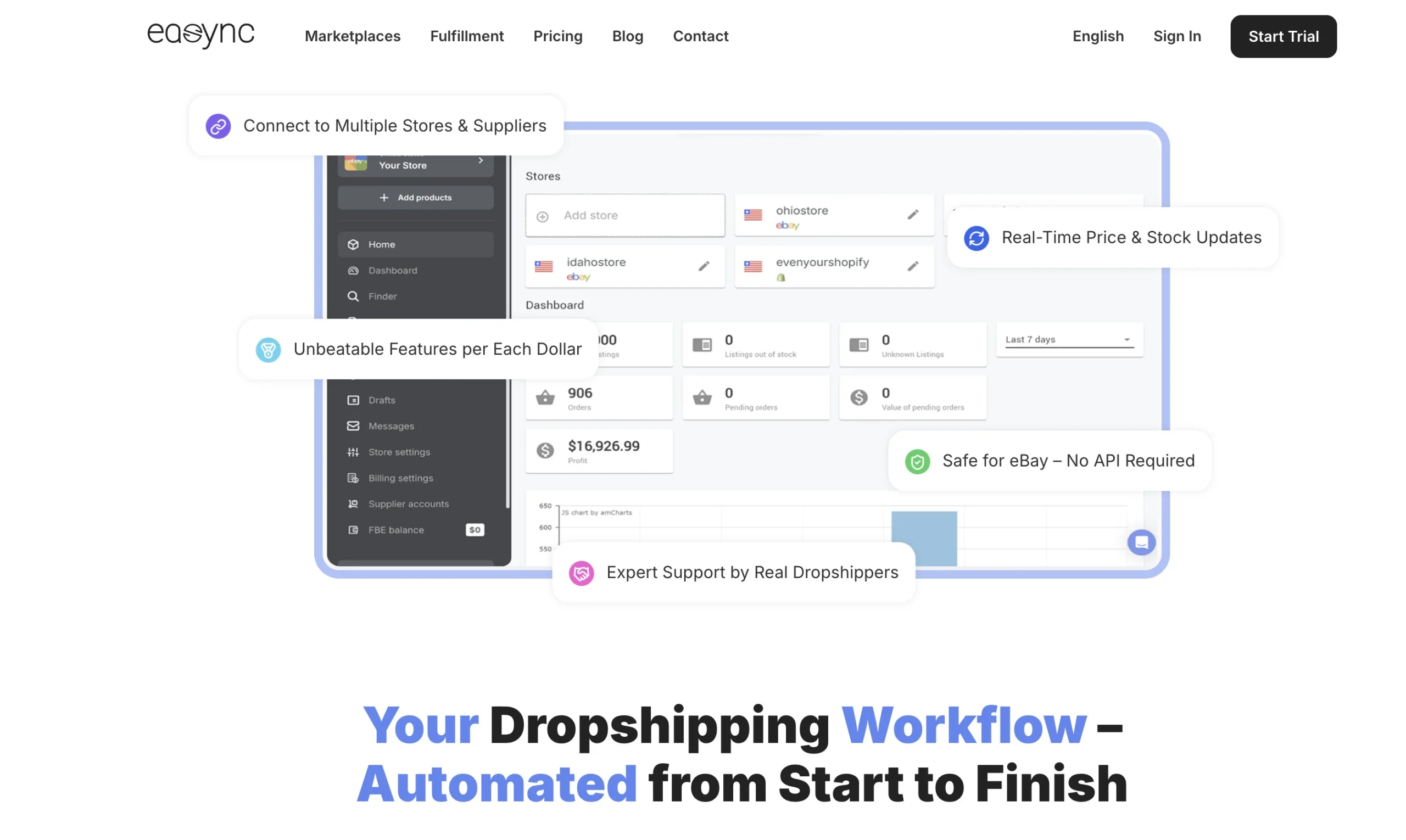
If your suppliers keep shipping, you may not need vacation mode at all. The hard part of a break isn’t shipping: it’s the supplier price that jumps by $5 overnight, or the item that sells out while your eBay listing still shows 10 in stock. That’s the work Easync takes off your hands:
- Stock sync. Easync checks your suppliers on Amazon, Walmart and AliExpress and updates eBay quantity when an item sells out. No sale of an item you can’t ship, no out-of-stock cancellation.
- Repricing. When the supplier price changes, your eBay price follows it, so a sale never turns into a loss while you’re offline.
- Automatic orders. When an eBay order comes in, Easync places the order with the supplier, so orders go out on time even when you’re away.
- Tracking updates. Tracking numbers are added to your eBay orders, so buyers aren’t left asking where their package is.
You come back to processed orders instead of a pile of overdue ones, and you only need to answer messages and returns.
Ready to automate your dropshipping?
Join 41,000+ dropshippers using Easync.
★★★★★ G2 4.6/5
|
★★★★★ Capterra 4.8/5
|
★★★★★ SourceForge 4.8/5
Alternatives to eBay vacation mode
Time Away is the right tool for a full break. For anything shorter or partial, these work better:
| Option | What it does | Use it when |
|---|---|---|
| Raise handling time | Moves the delivery estimate on the listings you edit | You can ship, just later; a 3–5 day trip |
| Out-of-stock option + 0 quantity | Keeps the listing active but hidden from search; it reappears when you add quantity | Only some items or one supplier are affected |
| End listings | Removes the listing | You stop selling an item for good |
| Time Away, Allow item sales | Keeps listings buyable with a banner and later delivery dates | A helper or 3PL ships, but slower; up to 15 days |
| Time Away, Pause item sales | Hides all fixed-price listings | Nobody can ship; up to 30 days |
To turn on the out-of-stock option, go to Selling preferences > Multi-quantity listings and switch on Listings stay active when you’re out of stock. eBay says sales history helps decide a listing’s Best Match position, so it’s better to keep a listing at 0 quantity than to end it and relist later. A listing at 0 quantity for 180 days in a row is ended automatically. If you dropship, Easync’s stock sync sets quantity to 0 when a supplier sells out and restores it when stock is back, so you don’t have to do this by hand for every listing.
When not to use Time Away
- Breaks longer than 30 days. Pause stops at 30 days. For a longer break, end listings or set them to 0 quantity.
- Peak season, if you can still ship. In December, raise handling time instead of hiding your whole store.
- When you run auctions. Auctions keep running with either option. End them first or make sure someone can ship them.
Troubleshooting eBay Time Away
| Problem | Why it happens | Fix |
|---|---|---|
| Listings still show in search after you turned on Pause | Hiding takes a few hours | Wait 2–3 hours; start Time Away the evening before you leave |
| Listings didn’t come back after you returned | Reappearing takes a couple of hours | Wait 2 hours; if they’re still hidden, check that the end date is in the past |
| You got an order while on Time Away | It’s an auction, an accepted offer or a pickup item, or it was placed before the start date | Ship it or contact the buyer; turn off auto-accept and end auctions before your next break |
| An order shows as overdue during Time Away | Some order types keep their original delivery date | Check the list of orders that don’t get new delivery dates above |
| You can’t set more than 15 days | You chose Allow item sales | Switch to Pause item sales for up to 30 days |
| You need more than 30 days | That’s the maximum for Pause | End listings or set them to 0 quantity with the out-of-stock option |
FAQ
Does eBay still have vacation mode?
Yes. It’s called Time Away now. It replaced Vacation Settings in September 2020 and is available to all sellers, not only eBay Store subscribers.
How long can I put my eBay store on vacation?
Up to 30 days if you pause sales, and up to 15 days if you allow sales.
Do I still pay eBay fees on vacation mode?
Yes. Listing fees and Store subscription fees keep running during Time Away.
Can buyers still buy from me during Time Away?
With Allow item sales, yes. With Pause item sales, they can’t buy fixed-price items, but auctions stay live and can still sell.
Does Time Away affect my seller rating?
The break itself doesn’t create defects. Late shipments and cancellations do, so ship every order placed before the start date, and don’t reopen before you can ship.
Can I put only some listings on vacation?
No, Time Away applies to your whole account. To pause only some items, set their quantity to 0 with the out-of-stock option turned on.
What time does eBay Time Away start?
At 12:01 a.m. on the start date, and it ends at 11:59 p.m. on the end date. eBay’s settings show the dates in Pacific Time.
Before you go: a 5-minute checklist
- Ship every order placed before your start date
- End auctions you can’t ship
- Turn off auto-accept on Best Offer and don’t send offers to watchers
- Choose Pause or Allow, and set the start date one day early and the end date one day late
- Turn on the automatic response with the same dates
- Dropshippers: check your suppliers’ holiday dates and set affected items to 0 quantity
eBay vacation mode is simple to turn on, but the details decide whether you come back to a clean account or to defects. Plan the dates, cover the orders that don’t get new delivery dates, and if your suppliers keep shipping, let automation run the store for you. Try Easync free for 7 days.