
- articles
- eBay Dropshipping
eBay Promoted Listings for Black Friday & Cyber Monday 2026: Ad Rates and a Q4 Plan
Black Friday falls on November 27, 2026 and Cyber Monday on November 30. Adobe expects US shoppers to spend $47.5 billion online over Cyber Week, up 7.4% from 2025. On eBay, the sellers who win that traffic usually pay for it with Promoted Listings, and in 2026 the rules for that changed.
This guide shows how Promoted Listings charges in Q4 2026, how to calculate the highest ad rate your margin can take, and what to do with your ad rates week by week from now to Christmas.
Key takeaways
- Since January 13, 2026, a General campaign fee applies when any buyer buys a promoted item within 30 days of any click on its ad, not only the buyer who clicked.
- The minimum General ad rate is still 2% on eBay’s help page. In early October 2026 some sellers saw a 5% minimum; eBay called it a limited test.
- The ad fee is a percentage of the total sale: item price, shipping and sales tax.
- Your break-even ad rate is your profit before ads divided by the total sale. For a dropshipped item with a $6 profit on a $54 total, that’s 11.5%.
- Raise ad rates for Cyber Week only on items that can afford it, and bring them back down on December 1.
How eBay Promoted Listings works in 2026
eBay has two main strategies: General, where you pay a percentage when a promoted item sells, and Priority, where you pay for each click. Most dropshippers use General, because it costs nothing unless an item sells.
| General strategy | Priority strategy | |
|---|---|---|
| You pay | A % of the total sale when the item sells within 30 days of a click | A price per click, whether or not the item sells |
| Rate | 2%–100% of the total sale, fixed or dynamic | Set by a second-price auction, based on your bid, listing quality, keyword relevance and competition |
| Budget | No budget; you pay only on sales | Daily budget required |
| Fee base | Item price + shipping + sales tax + other fees | Each valid click |
| Placements | General access to ad placements | Priority placements, advanced targeting, optional video |
| Campaigns per listing | 1 General campaign at a time | Several Priority campaigns |
| Best for | Most listings, thin-margin items, dropshipping | Hero products with strong margins and proven demand |
Promoted Offsite shows eligible listings on external channels such as Google. It’s a separate tool; this guide focuses on the two strategies above.
What changed in 2026
- January 13, 2026: item-based attribution. eBay now charges a General fee when anyone buys the promoted item within 30 days of a click on its ad, even if the buyer never clicked. Each new click restarts the 30 days. “Halo” and “direct” attribution no longer apply to General campaigns. The UK, Germany, Australia, France, Italy and Spain already worked this way.
- Clicks count broadly. A “click” includes adding to the Watchlist, adding to the cart and Quick View, not just opening the listing.
- October 1–2, 2026: a 5% minimum test. Some sellers couldn’t set General rates below 5%. eBay said it was a limited test and that it hasn’t announced any increase to minimum ad rates. eBay’s help page still lists 2%.
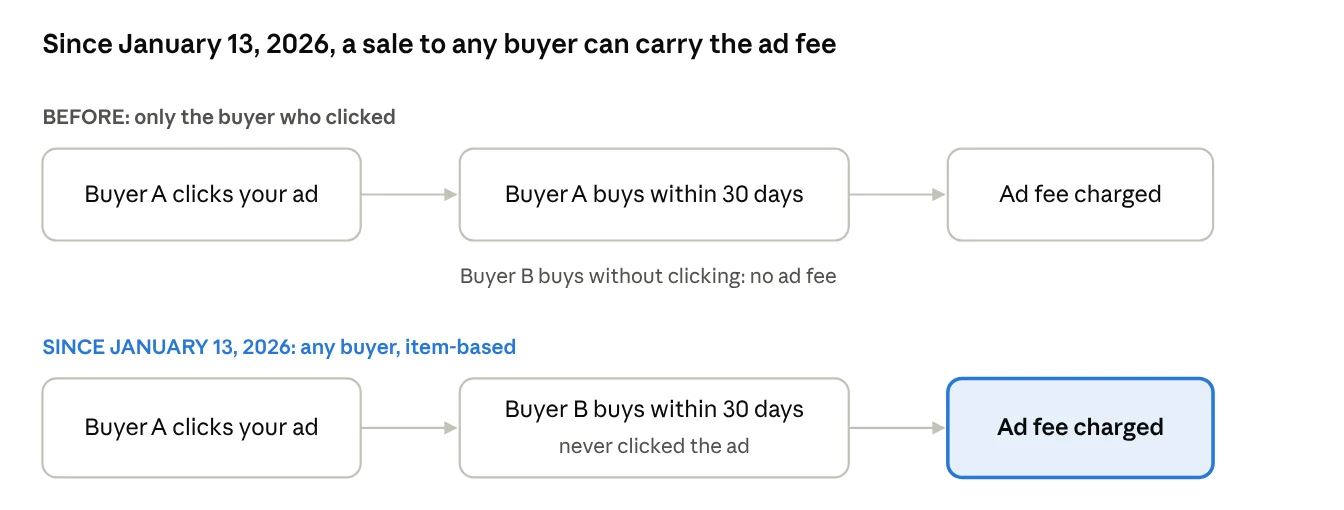
In practice, for an item with steady sales, almost every sale now carries an ad fee once it’s promoted. Treat the General ad rate as a fixed cost on that item, not as a bonus fee on extra sales.
Q4 2026 calendar: what to do with ad rates each week
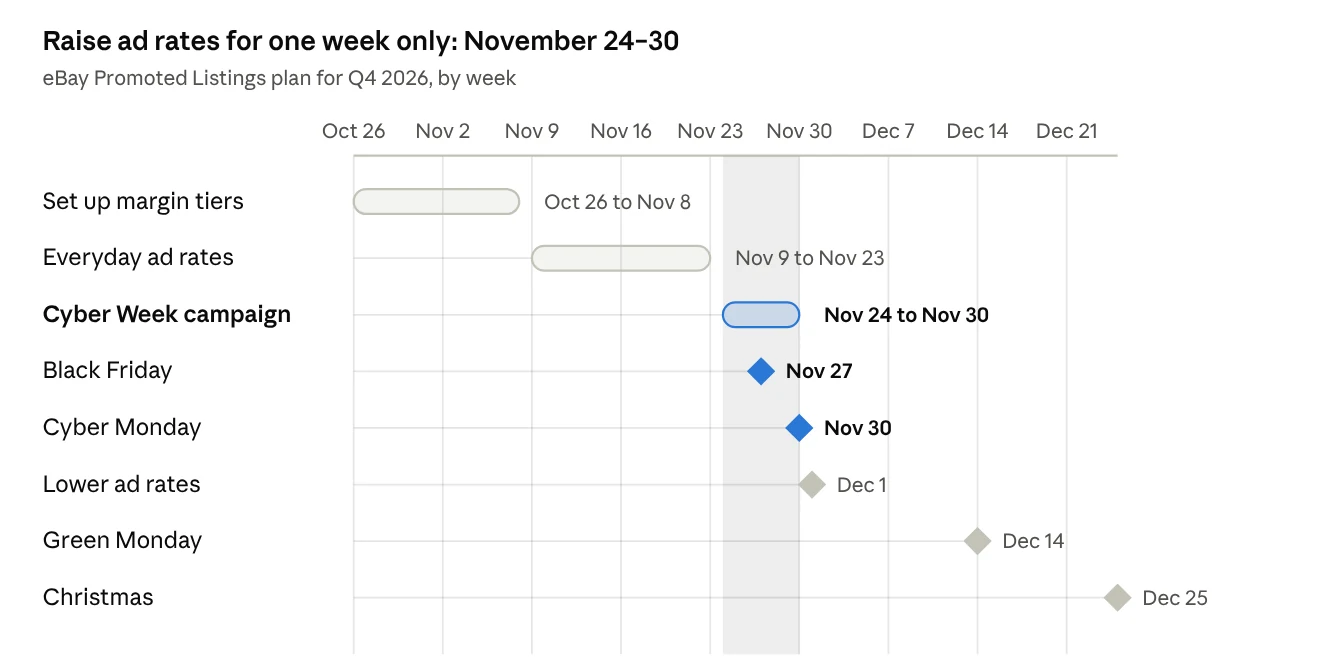
Keep everyday rates through most of November, raise them for one separate campaign from November 24 to 30, and lower them on December 1.
- Oct 26 – Nov 8: set up. Calculate break-even rates, sort listings into margin tiers and build the Cyber Week campaign as a draft.
- Nov 9 – Nov 23: everyday rates. Early deals start; Adobe expects discounts of up to 14% in early November and 21% just before Thanksgiving. Keep rates at your normal tier levels.
- Nov 24 – Nov 30: Cyber Week. Run the Cyber Week campaign with higher fixed rates on top-tier items. Black Friday is November 27, Cyber Monday is November 30.
- Dec 1: lower rates. End the Cyber Week campaign and move proven winners into a December campaign.
- Dec 14 – Dec 25: last orders. A smaller push around Green Monday (December 14), then cut ads on items that can’t arrive before Christmas.
How to set ad rates for Black Friday and Cyber Monday
Start from what an item can afford, not from eBay’s suggested rate. eBay’s suggestion weighs seasonality and competition, so in Cyber Week it tends to rise exactly when everyone else is raising their rates too.
Step 1. Find your break-even ad rate
Break-even ad rate = (Price − Cost − eBay fees) ÷ Total sale (price + shipping + tax)
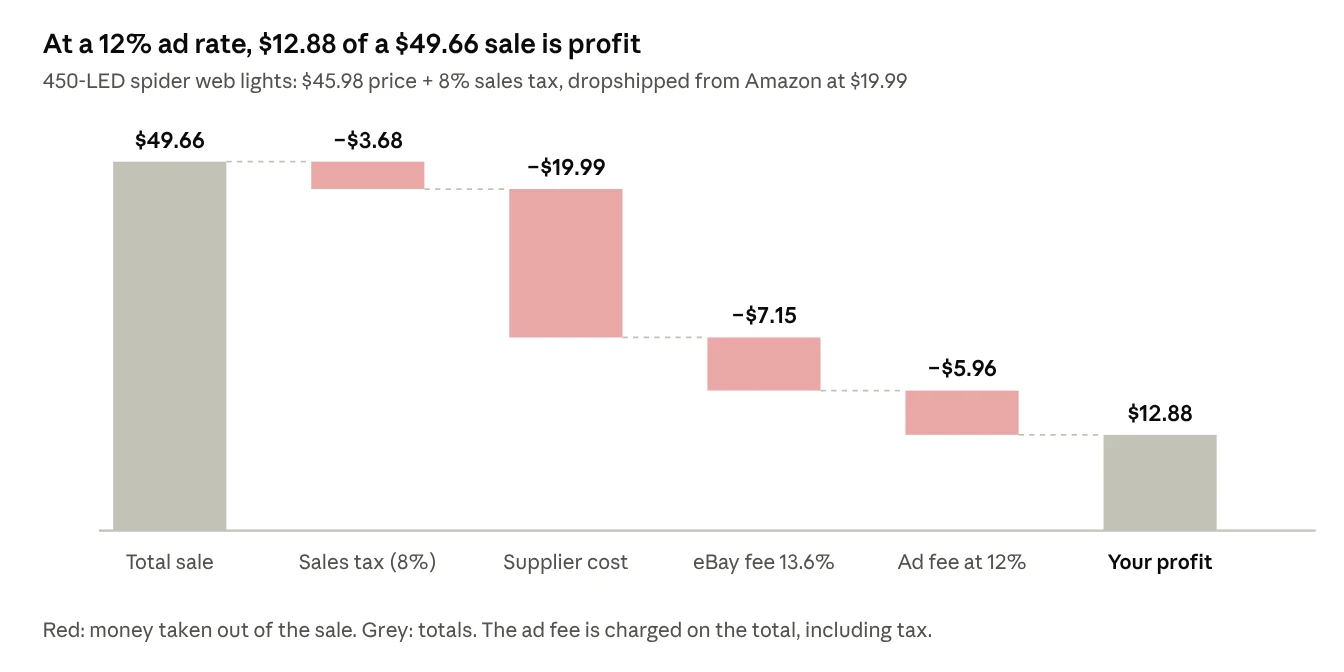
The denominator matters: the ad fee is charged on the whole sale, including sales tax. eBay’s final value fee is 13.6% of the total sale plus $0.40 per order in most categories.
Step 2. Check what each rate leaves you
Two dropshipping examples from our Halloween margin check, with 8% sales tax:
| Ad rate | Spider web lights: $45.98 price, $19.99 cost | Fog machine: $49.95 price, $35.99 cost |
|---|---|---|
| No ads | $18.84 profit | $6.22 profit |
| 2% | $17.84 | $5.14 |
| 5% | $16.35 | $3.53 |
| 8% | $14.86 | $1.91 |
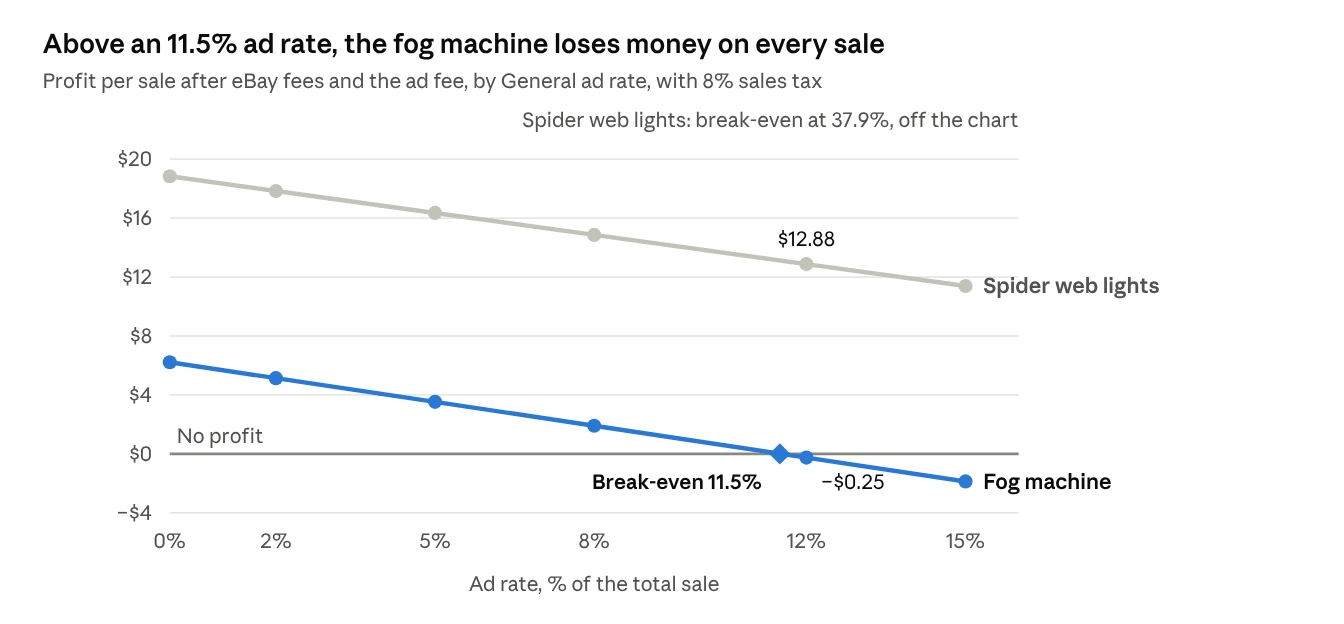
| 12% | $12.88 | −$0.25 |
| 15% | $11.39 | −$1.87 |
| Break-even rate | 37.9% | 11.5% |
The spider web lights can take a Cyber Week rate of 12–15% and still make more than $11. The fog machine loses money above 11.5%, so it should stay at 2–5% or out of the campaign.
Step 3. Set rates by margin tier
| Profit before ads, as % of total sale | Normal weeks | Cyber Week (Nov 24–30) |
|---|---|---|
| Over 30% | Suggested rate, capped at 10% | Up to 12–15% on best sellers |
| 15–30% | 3–6% | 6–9% |
| 10–15% | 2–3% | 3–5% |
| Under 10% | Don’t promote | Don’t promote |
These tiers are a starting point, not an eBay rule. Check your Advertising dashboard after Black Friday and move rates for items that sold well with low spend.
Fixed or dynamic ad rate?
Use fixed rates in Q4. A dynamic rate follows eBay’s suggested rate daily, so it can climb past your break-even during Cyber Week without warning. A fixed rate stays where you set it until you change it.
How to set up a Black Friday campaign in Seller Hub
Build a separate campaign for Cyber Week instead of raising rates in your everyday campaign. Then you can end it on December 1 in one click.
- Group listings by margin tier. Export your active listings and sort them into the tiers above. Leave out anything under 10% profit before ads.
- Open the Advertising dashboard. In Seller Hub, go to Marketing > Advertising dashboard, select Promote your listings, then choose the General strategy.
- Add listings. Pick them manually, by Item ID, by CSV upload or with rules (category, price range, brand, condition, days on site, quantity). For a Cyber Week push, manual or CSV selection gives you the most control.
- Set a fixed ad rate per tier. You can set one rate for the campaign or a different rate per listing.
- Name and date the campaign. For example, “BFCM 2026 – tier 1”, from November 24 to November 30.
- Remove those listings from the everyday campaign. A listing can be in only one General campaign at a time.
- Check results on December 1. Download the sales report, compare ad fees to profit per item, and move the winners into your December campaign.
To raise or lower one listing’s rate, use Seller Hub > Listings > Active > Actions > Edit promoted listing. In the eBay app, Easy boost changes one rate for all eligible listings with a slider, which is too blunt for Cyber Week.
When Priority (cost per click) makes sense in Q4
Use Priority only for a few hero products with high margin and proven sales, and only with a daily budget you’re ready to lose. You pay for every click, and Cyber Week clicks are expensive. Priority sales are reported as direct (the clicked item) or halo (another item from your store bought by the same buyer).
Promoted Listings for dropshippers: protect the margin first
For a dropshipper, an ad rate is safe only as long as the supplier price stays the same. In Cyber Week it rarely does: Amazon and Walmart prices change daily, and popular items sell out. Three things go wrong most often:
- The supplier raises the price. You set a 10% ad rate on a $46 item with $19 profit. The Amazon price jumps $8 on Black Friday, and every promoted sale now makes less than half as much.
- The supplier sells out. Your promoted listing keeps getting clicks and orders you can’t fill. Each cancellation is a defect, and the 2026 attribution rules mean you may still pay ad fees on the item’s other sales.
- Ad rates and prices drift apart. You raised rates for Cyber Week but forgot to lower them on December 1, or you repriced the item and the old rate no longer fits.
How Easync keeps promoted listings profitable
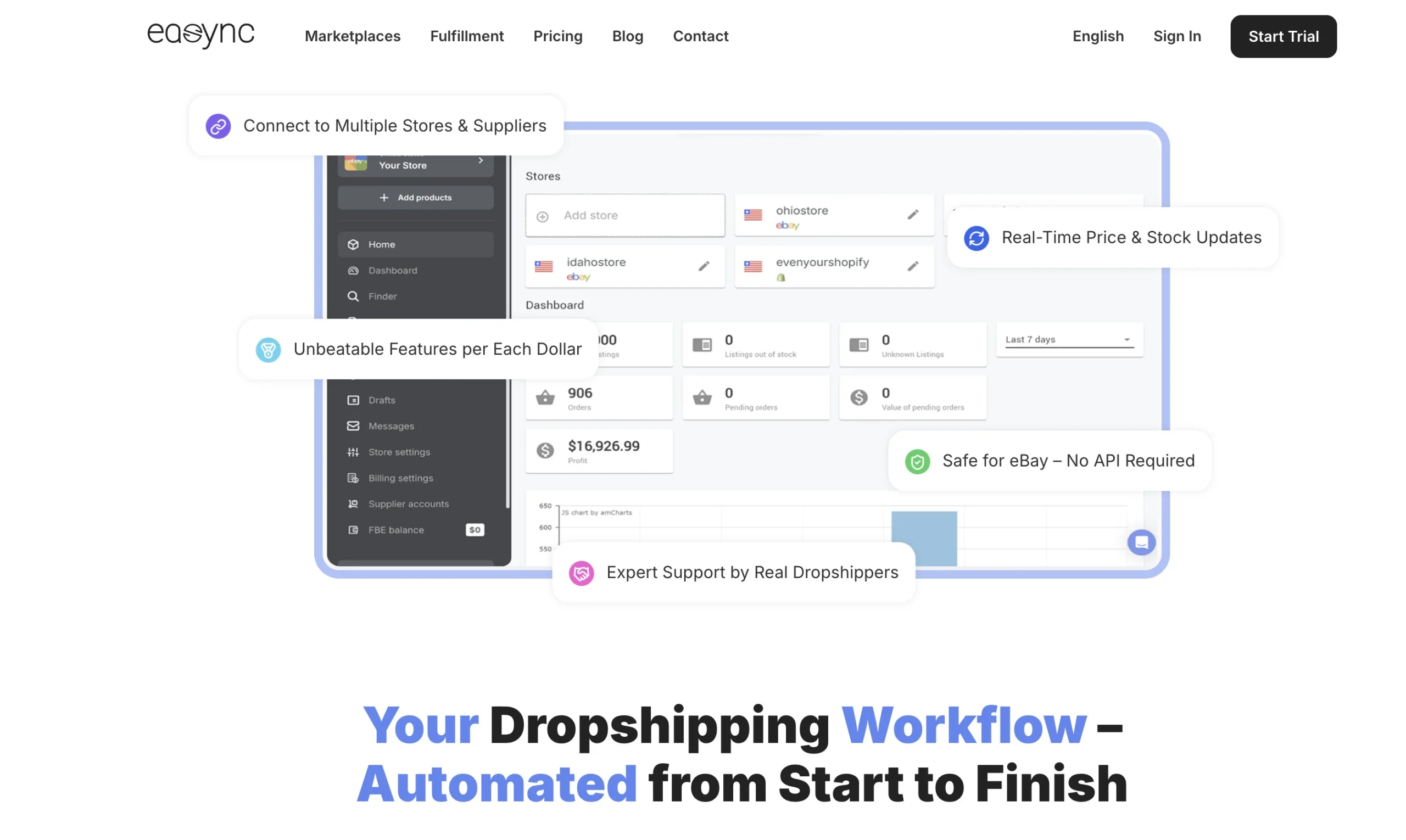
Easync handles the supplier side, so your ad rate is the only number you have to plan:
- Repricing with your margin rules. Easync tracks Amazon, Walmart and AliExpress prices 24/7 and updates your eBay price by the profit margin you set. Add your Cyber Week ad rate to that margin, and a supplier price jump can’t turn a promoted sale into a loss.
- Stock monitoring. When a supplier sells out, Easync updates the eBay listing, so you don’t keep paying for clicks and orders you can’t ship.
- Automatic orders and tracking. After a sale, Easync orders from the supplier with the buyer’s details and uploads tracking to eBay. Cyber Week volume doesn’t turn into late shipments.
- Product import. Paste a supplier link to import products with your titles, descriptions and price rules, so you can add Q4 products to campaigns quickly.
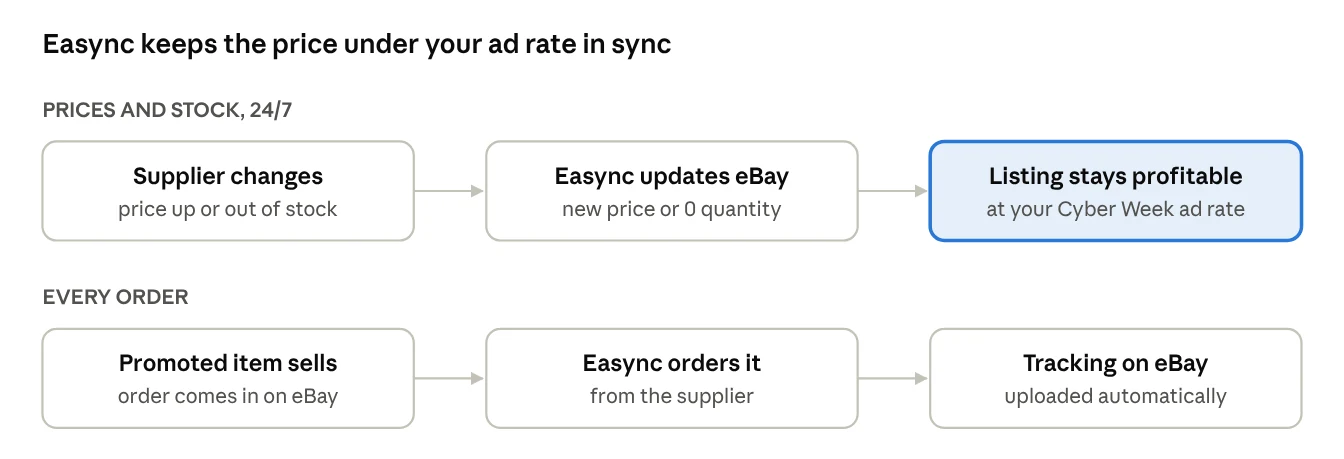
The result: you set the ad rate once per tier, and the price underneath it stays profitable through Cyber Week.
Ready to automate your dropshipping?
Join 41,000+ dropshippers using Easync.
★★★★★ G2 4.6/5
|
★★★★★ Capterra 4.8/5
|
★★★★★ SourceForge 4.8/5
Q4 Promoted Listings mistakes to avoid
- Promoting everything at one rate. A 10% rate is cheap on a 40%-margin item and a loss on a 10%-margin item. Set rates by margin tier.
- Using dynamic rates in Cyber Week. They follow eBay’s suggested rate, which rises with competition.
- Forgetting the tax in the fee base. At 8% sales tax, a 10% ad rate costs 10.8% of your item price.
- Leaving Cyber Week rates on in December. Discounts in December are 10–15% according to Adobe, below the Cyber Week peak; your ad rates should come down too.
- Promoting items you can’t restock. With item-based attribution, one click keeps the fee active on every sale of that item for 30 days.
- Judging results by attributed sales alone. Compare ad fees with profit per item, not with revenue.
FAQ
Are eBay Promoted Listings worth it in Q4?
For items with a margin that covers the ad rate, usually yes: Cyber Week is the busiest online week of the year, and promoted listings get more ad placements. For thin-margin items, no. Check the break-even rate before you promote.
What is a good ad rate for Black Friday on eBay?
There is no single number. Use your break-even rate as a ceiling and stay well below it. For items with over 30% profit before ads, 12–15% in Cyber Week can work; for items with 10–15% profit, keep it at 3–5%.
What is the minimum ad rate for eBay Promoted Listings in 2026?
2% for General campaigns, according to eBay’s help page. Some sellers saw a 5% minimum on October 1–2, 2026; eBay said it was a limited test and hasn’t announced an increase.
Is the ad fee charged on shipping and tax?
Yes. The General ad fee is a percentage of the total sale, which includes item price, shipping, taxes and other applicable fees.
What changed in eBay Promoted Listings in 2026?
From January 13, 2026, General fees in the US and Canada apply when any buyer buys a promoted item within 30 days of any click on its ad. Before, the sale had to come from the buyer who clicked.
When should I lower my ad rates after Cyber Monday?
On December 1. Keep higher rates only on items that sold well with a healthy profit, and plan a smaller push around Green Monday (December 14) and the last shipping days before Christmas.
Your Cyber Week ad plan in one line
Calculate the break-even rate for every item, promote only what clears 10%, run a separate fixed-rate campaign from November 24 to 30, and cut rates back on December 1. If you dropship, keep supplier prices and stock in sync with Easync so the margin under your ad rate holds all week. Try Easync free for 7 days.