
- Easync Updates
Easync Platform Update: AI Agents via MCP, Setup Wizard 2.0 and More
Easync can now connect to AI assistants like ChatGPT and Claude, and to your own tools, through a new API and MCP server. It’s in beta and available to all users. Also in this release: an easier start for new sellers, updates to Auto Ordering alerts and several fixes.
Easync now works with AI assistants and your own tools (Beta)
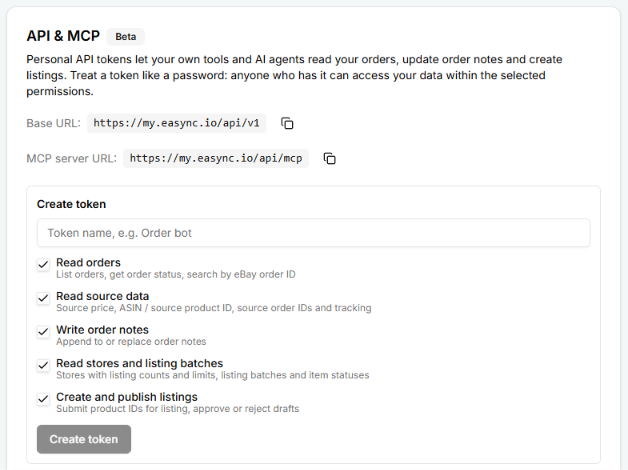
Your AI assistant, scripts and internal tools can now read your orders, update order notes and create listings in Easync, so routine checks don’t require opening the dashboard. You choose what each tool is allowed to do. You’ll find it in the new API & MCP section.
You decide what each token can do
A personal API token is a key for one specific tool. Name it (for example, “Order bot”) and tick only the permissions it needs:
- Read orders: list orders, check order status and search by eBay order ID.
- Read source data: source price, ASIN or source product ID, source order IDs and tracking.
- Write order notes: append to or replace notes on an order.
- Read stores and listing batches: listing counts and limits for each store, plus batch and item statuses.
- Create and publish listings: submit product IDs for listing and approve or reject drafts.
Anyone who has the token can access your data within those permissions, so use one token per tool and grant nothing extra. If you’re building an integration, download the OpenAPI specification with extended endpoint documentation.
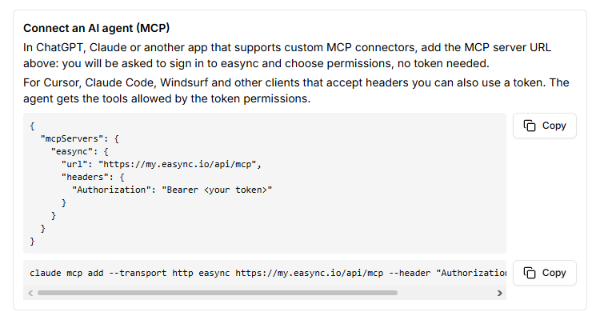
Connecting ChatGPT, Claude and other AI agents
How you connect depends on the app:
- ChatGPT, Claude and other apps with custom MCP connectors: add the MCP server URL, sign in to Easync and choose permissions. No token needed.
- Cursor, Claude Code, Windsurf and other clients that accept headers: connect with a personal token. The agent gets exactly the tools that token allows.
Then just ask: “Which of today’s orders still have no tracking?”, “Add a note to this order: the buyer asked for gift wrap” or “Submit these ASINs for listing and show me the drafts.” The assistant does the work, and you make the final call.
Setup Wizard 2.0 for new sellers
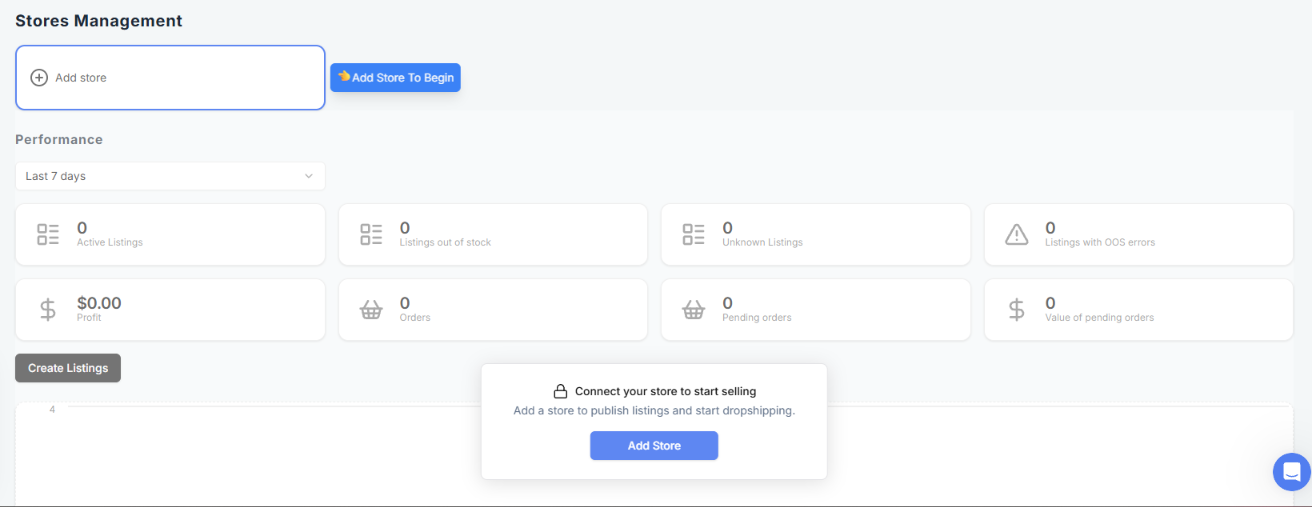
If you haven’t connected a store yet, Setup Wizard 2.0 walks you through connecting Shopify and configuring Easync step by step. You can also skip it. If your store is already connected, nothing changes for you.
The screen shown before a store is connected now has a clearer title and description. And if you’ve already added an Auto Ordering account but no store, it no longer blocks you.
Auto Ordering: clearer account alerts
None of these changes require new settings:
- Deleted accounts excluded. Alerts no longer count accounts you’ve deleted.
- A clear first step. With no buyer account connected, you’ll see an alert with a quick way to add one, and the accounts table has a new empty state.
- Misclick protection. Deleting an account with 2FA turned on now requires confirmation.
- Marketplace flags. The fulfillment account dropdown now shows them, so it’s easier to pick the right account.
Other improvements
- Order history, always: the order page shows the history timeline even when source order data isn’t available.
- Full eBay titles: long product titles could get cut off in eBay descriptions. A new original_title variable keeps the full title.
- Tidier Preferences: the Preferences page now matches the Account tab layout.
- Virtual assistants: we fixed store access for VA users.